RSSI Measurement for each single Datachannel

Dear Sir or Madam,

I would like to establish Bluetooth communication. When the Central is connected to the Peripheral, I want to measure the RSSI value of each data channel (0-36).

Is it possible with your ICs (nRF51/ nRF52) to either bypass the hopping algorithm and select a frequency directly (e.g. channel 10 for central and peripheral for the next 10 messages) or to read out the associated data channel for the measured RSSI value?

I have never programmed a Nordic uC:
Can you tell me which uC with which SDK and SoftDevice is best for this case?

Operating system: Windows 10
IDE: SES
Nordic Device: not selected yet

Many thanks for your help
Kind regards
Rebekah Walter

Parents Reply Children
  • Hi Priyanka, thank you very much for your help!!

    I have some more questions:

    1) When i run the RSSI Test Sample, which is not a real BLE communication (as I understood it) Is it possible to get a BLE communication running after the RSSI measurements? 

    2) I downloaded the nRF connect SDK and i was able to open the Radio Test Sample on VS. I open the main and i saw that the main only initilaize the Clock. Can you shortly explain how the programm is workin and where i can find the rest for the source code. (I want to get the correct order of the commands)

    I am a beginner and i need some more support from your side.

    Tank you very much!

    Regards

    Rebecca 

  • Hi Rebecca,

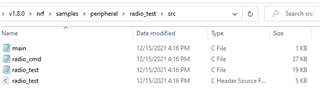
    No, you cannot incorporate any BLE communication into this sample as it does not follow the BLE specifications. This is a simple sample which is used to test the radio especially for regulatory certifications etc. The nRF Connect SDK is based on Zephyr RTOS and here instead of dumping everything into the main.c, we have custom files which implement the required functions, for eg, if you take the src folder inside the radio_test sample, you can see the following:

    There are two more c files- radio_cmd (for all the commands and various modes) and radio_test(for the enabling and disabling radio_test, for timers etc) which are used along with the main.c.

    In order to understand line by line, you could use a debugger but as a beginner, I would suggest you to take a look at the BLE_service_tutorial. Yes, this link is for a BLE, but the way this tutorial is written will help you understand about the custom folders, etc.

    Regards,

    Priyanka

Related