This discussion has been locked.
You can no longer post new replies to this discussion. If you have a question you can start a new discussion

nRF52805 BLE not fully display data on Android

Hi,

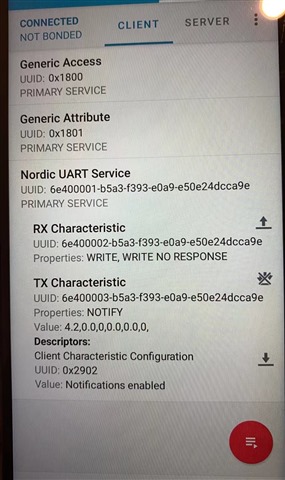
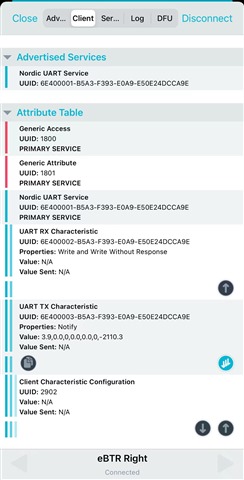
I followed the structure of ble_app_uart__saadc_timer_driven__scan_mode project and customize a program on the nRF52805. I transmit data through BLE to Nordic uart service. I used saadc_callback to send data. However, when receiving data from smart phone, I found that iOS can display the full content(7 values) but Android can only display part of them(6 values). I am not sure why this is happening. Could you help me with this?

I have attached part of my code in ssadc_callback and the output data on two phones. Thanks in advance!

        bytes_to_send = sprintf(nus_string,"%.1f,%.1f,%d,%.1f,%.1f,%d,%.1f", BatteryLvl_Volts, Q_TSI, Duration_E_ms, TV_User, MV_User, BPM_1min_User, Pressure_Pa);

// Send BLE NUS string
        ret_code_t   err_code_ble_nus;
        err_code_ble_nus = ble_nus_data_send(&m_nus, nus_string, &bytes_to_send, m_conn_handle);
        
        if (err_code_ble_nus == BLE_ERROR_GATTS_SYS_ATTR_MISSING){
            uint32_t err_code = sd_ble_gatts_sys_attr_set(m_conn_handle, NULL, 0, 0);
            APP_ERROR_CHECK(err_code);
            NRF_LOG_INFO("Notification Disabled ===================================");
            
        }else if( (err_code_ble_nus != NRF_ERROR_INVALID_STATE) && (err_code_ble_nus != NRF_ERROR_NOT_FOUND) ){
            APP_ERROR_CHECK(err_code_ble_nus);
            
        }else{
            NRF_LOG_INFO("BLE Data Sent");
        }
          

Parents Reply
  • Hi Torbjørn,

    Thank you for your reply.

    I am using the Redmi 9A from Xiaomi. It has the Android version: 10 QP1A. 190711.020.

    The logging line in gatt_evt_handler is not called in Android or iOS. The log only shows these two lines. The first line is from my ssadc_callback.

    <info> app: BLE Data Sent
    <info> app: BLE_GAP_EVT_CONNECTED

    Best regards

    Jeremy

Children
  • Hi Jeremy

    Do you think it would be possible to capture a Bluetooth sniffer trace when you connect to the phone and try to send data to it?

    If you don't have a professional Bluetooth sniffer available it is possible to use a Nordic devkit or dongle as a Bluetooth sniffer using the nRF Sniffer

    Best regards
    Torbjørn

  • Hi Torbjørn,

    I solve the problem by editing the code in nrf_ble_gatt.c  as below:

    #if NRF_BLE_GATT_MTU_EXCHANGE_INITIATION_ENABLED
        // Begin an ATT MTU exchange if necessary.
        if (p_link->att_mtu_desired > p_link->att_mtu_effective)
        {
            ret_code_t err_code;
    
            NRF_LOG_DEBUG("Requesting to update ATT MTU to %u bytes on connection 0x%x.",
                          p_link->att_mtu_desired, conn_handle);
    
            err_code = sd_ble_gattc_exchange_mtu_request(conn_handle, p_link->att_mtu_desired);
    
            if (err_code == NRF_SUCCESS)
            {
                p_link->att_mtu_exchange_requested = true;
            }
            else if (err_code == NRF_ERROR_BUSY)
            {
                p_link->att_mtu_exchange_pending = true;
                NRF_LOG_DEBUG("sd_ble_gattc_exchange_mtu_request()"
                              " on connection 0x%x returned busy, will retry.", conn_handle);
            }
            else
            {
                NRF_LOG_ERROR("sd_ble_gattc_exchange_mtu_request() returned %s.",
                              nrf_strerror_get(err_code));
            }
        }
    #endif // NRF_BLE_GATT_MTU_EXCHANGE_INITIATION_ENABLED

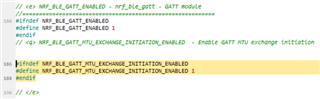
    The NRF_BLE_GATT_MTU_EXCHANGE_INITIATION_ENABLED is not defined in sdk_config, so when connecting Android the debug output is as below:

    <info> app: BLE Data Sent
    <info> app: BLE_GAP_EVT_CONNECTED
    
    <info> app: BLE Data Sent
    <info> app: BLE_DEFAULT
    
    <info> app: BLE Data Sent
    <info> app: BLE_DEFAULT

    So when I set NRF_BLE_GATT_MTU_EXCHANGE_INITIATION_ENABLED as 1, it solves the problem. The debug displayed output connecting Android is as below:

    <info> app: BLE Data Sent
    <info> app: BLE_GAP_EVT_CONNECTED
    
    <info> app: BLE Data Sent
    <info> app: Data len is set to 0xF4(244)
    <info> app: BLE_DEFAULT
    
    <info> app: BLE Data Sent
    <info> app: BLE_DEFAULT
    
    <info> app: BLE Data Sent
    <info> app: BLE_DEFAULT

    However, I still want to know what this MTU exchange Initiation is actually for and why it only works for Andriod. Is this related to a specific Android type? When connecting iOS system, the debug output is always:

    <info> app: BLE Data Sent
    <info> app: BLE_GAP_EVT_CONNECTED
    
    <info> app: BLE Data Sent
    <info> app: BLE_GAP_EVT_PHY_UPDATE_REQUEST
    
    <info> app: BLE Data Sent
    <info> app: BLE_DEFAULT
    
    <info> app: BLE Data Sent
    <info> app: Data len is set to 0xF4(244)
    <info> app: BLE_DEFAULT

    Could you please explain a little about it?

    Thank you in advance

    Best regards

    Jeremy

  • Hi Jeremy

    Thanks for the updated report. 

    I should have realized that the issue might be related to the NRF_BLE_GATT_MTU_EXCHANGE_INITIATION_ENABLED define. 

    This is a change that was introduced in a recent update to the GATT module where it is up to the application to decide whether or not the peripheral device should initiate the GATT MTU exchange procedure. In older versions the GATT module would always try to do this. 

    On iOS this is not necessary since the phone will start the procedure for you, but on some Android devices the phone will not do it and it is up to the peripheral device to do it instead. 

    Jeremy Wu said:
    I solve the problem by editing the code in nrf_ble_gatt.c  as below:

    It should not be necessary to change the nrf_ble_gatt.c implementation. All you have to do is set NRF_BLE_GATT_MTU_EXCHANGE_INITIATION_ENABLED to 1 in sdk_config.h:

    Best regards
    Torbjørn

Related