NRF9160 NCS v1.7.0 CAT M1 Data Issue

Hello,

We are currently certifying our module for Verizon in the US.  As such, we are updating our software to work with MFW v1.3.0 and the corresponding NCS version v1.7.0.  The upgrade went relatively smoothing and things are generally working as we'd expect.  Our device will connect either over the CATM1 or NBIOT network (configurable) and then connect to an MQTT broker and send data up.  However, we have encountered an issue and require some assistance in troubleshooting it.

When we connect specifically over Vodafone (AT&T in my area) using CATM1 (using SYSTEMMODE set to both CATM1/NBIOT supported w/ LTE Preference = M1 Preferred), we will see our device successfully register to roaming.  It will then successfully open the TCP connection to the MQTT broker and send an MQTT Connect message.  However we never hear back from the server with the CONNACK.  Our device currently waits ~20 seconds before it gives up after not receiving a CONNACK.  Now running the EXACT same code and just swapping out the LTEPreference to "NB Preferred", we can successfully get a CONNACK and send/receive MQTT data.  When using the SAME MFW version (v1.3.0) and the older NCS version (v1.4.2) we can successfully connect over MQTT using CATM1.  This tells me its specifically something with the NCS version, likely something in the nrfxlib Modem Library.  I'm not sure if its necessarily a bug, but it could be some subtle way in which the modem library interacts with the Vodafone network while on CAT M1.

I've got some modem trace pcap files below that may help diagnose this issue.  In both tests, my device (IP 10.49.0.225) is connecting to server w/ IP 192.168.4.13.   You will need to filter the MQTT broker server pcap w/ "ip.src_host == 10.49.0.225 or ip.dst_host == 10.49.0.225". 

I've run two tests:

  1. Connect over NBIOT and successfully use MQTT
    1. Modem Trace = /cfs-file/__key/communityserver-discussions-components-files/4/VZW_5F00_AT130_5F00_NB_5F00_Success_5F00_AT130.pcapng
    2. PCAP from MQTT Broker Server = /cfs-file/__key/communityserver-discussions-components-files/4/VZW_5F00_AT130_5F00_NB_5F00_Success_5F00_DemoServer.pcap
  2. Connect over M1 and FAIL to use MQTT
    1. Modem Trace = /cfs-file/__key/communityserver-discussions-components-files/4/VZW_5F00_AT130_5F00_M1_5F00_Failure_5F00_AT130.pcapng
    2. PCAP from MQTT Broker Server = /cfs-file/__key/communityserver-discussions-components-files/4/VZW_5F00_AT130_5F00_M1_5F00_Failure_5F00_DemoServer.pcap

You can see in the NBIOT pcap files they connection and CONNACK happen as expected.  However with the M1 logs, you can see a couple things:

  1. The TCP SYN Handshake occur successfully. 
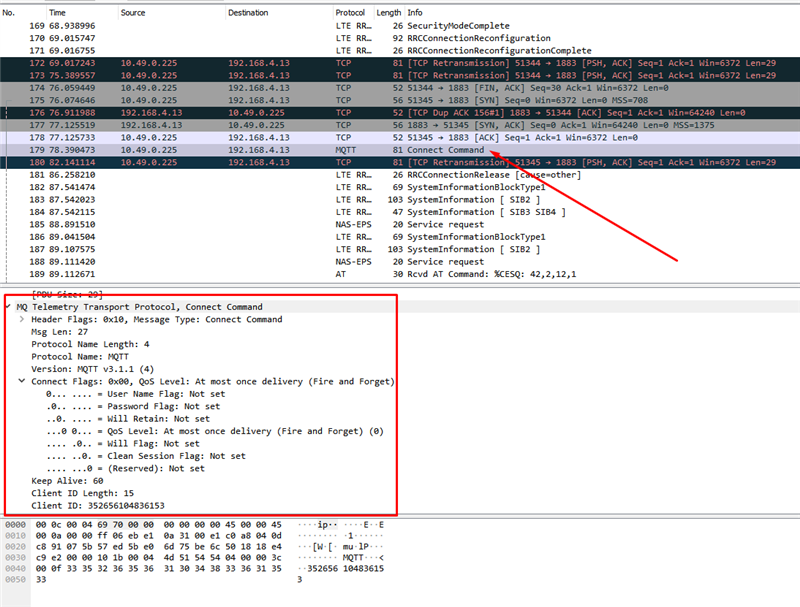
  2. The NRF9160 will send the MQTT Connect packet and it looks like i'd expect (screenshot 1). 
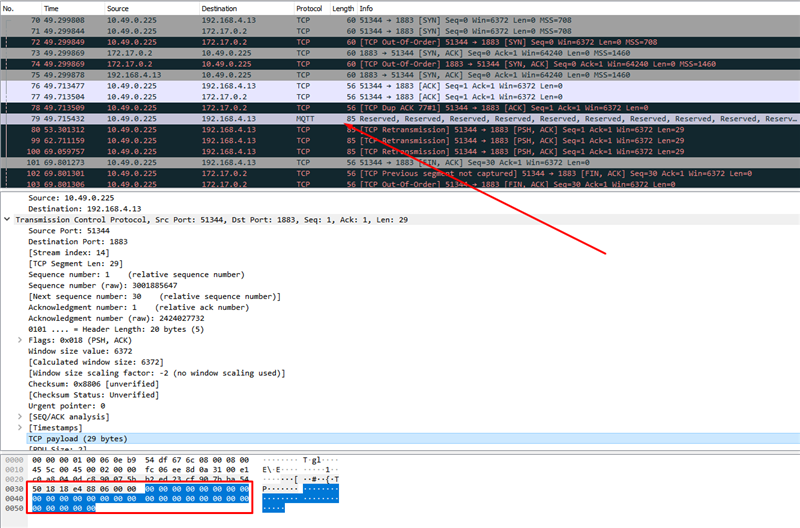
  3. Server logs (screenshot 2) looks like the TCP Payload is all zeros.  The other difference I could note is that when its received the "Differentiated Services Field" is set differently on the server side and looks invalid (or unknown).  

It ultimately seems like the NRF Modem Library version in conjunction with the Vodafone CATM1 network is causing us problems.  However I'm not sure how or why this could be happening.  I was hoping your team might have some insight on the issue?  Any insight or recommendations would be much appreciated!

SCREENSHOT 1
SCREENSHOT 2
Parents
  • Hi,

    I'll need the modem team to take a look at this, but I have a few questions first:

    Do you also have the raw modem traces? They contain more information than what is available in the .pcaps, and I wouldn't be surprised if the modem team requests raw traces.

    You say that you are working on Verizon certification, but from what I could see, you are using a Vodafone SIM card?

    Are you using the carrier library?

    You are also using modem fw v1.3.0 with rev1 HW, while the modem fw only has been certified with rev2 HW.

    If you also have traces where you change the NCS version, that would also be great, so that we can compare what happens in them.

    Best regards,

    Didrik

  • Hello Didrik,


    I've attached a raw modem trace of both the issue on NCS v1.7.0 and of a successfully connection on NCS v1.4.2.  Hopefully that gets you the info you need to do a comparison.

    You are correct, I am currently testing using a Vodafone SIM card.  I'm currently waiting on my VZW device, so I'm currently just testing out on the Vodafone network.  We'll have a common software between both our Verizon and Vodafone variants, so ultimately it needs to work for both network types, hence why I'm testing on Vodafone.

    Correct, we are building using the carrier lib.

    Correct, we are using rev1 HW in combination with the mfw v1.3.0.  We were given a waiver by Nordic to use Rev1 HW with this certified version of firmware, so we should be covered.

    Let me know if there's any other info you require.  This is a high priority issue, as it affects our Verizon certification deadline so any information you can provide would be much appreciated!  Thanks!

  • Hello Didrik,

    I've been able to isolate where the problem is occurring.  I built the MQTT example for the NRF9160 DK, pointed to our production servers, and used one of our production SIMs.  I did NOT see the issue occur using this method. 

    I was next able to build the MQTT example for the NRF9160 DK but switch out the UART lines in the DK device tree.  That allowed for me to run that build on our production device and at least validate the MQTT communcation to our production servers.  Interestingly, I did NOT experience the issue on this test either.  This tells me its something in the way our application is being built that is interacting with the MQTT library/modem library that is causing the problem.

    After various tests to compare the devkit vs our build, I was able to isolate the issue to be one of the following:

    • Something specific with our board
    • Something in our bootloader (we use SM, but do some additional validation on top of SPM)

    One thing I did identify is that our bootloader is currently giving us the error "Could not initialize secure services (err -28)".  I've so far been unsuccessful at determining the issue, but had a couple questions based on testing.

    • Do you think this issue might be caused by this secure services error?
    • Any thoughts to the -28 error and how we might resolve that?
    • Based on what I've narrowed it down to, any other thoughts as to what might be causing the issue?
  • Jameson said:
    Do you think this issue might be caused by this secure services error?

    One of the possible causes we have speculated on is that there is some timing difference triggering a race condition somewhere. I guess an error/early return might cause this timing difference.

    This is just speculation though. Normally, I would probably say that "no, as long as the data makes it to the modem, it should work", but that clearly isn't the case here. 

    Jameson said:
    Any thoughts to the -28 error and how we might resolve that?

    Assuming the error comes from spm_secure_services_init, the error code originally comes from nrf_cc3xx_platform_ctr_drbg_init. However, from what I can see from the ctr_drbg_init function, it should not return that error code.

    If it is a "normal" errno.h error code, it is ENOSPC "No space left on device". 

    I'll try to dig more into the ctr_drbg_init function on Monday.

    What "bootloader" are you using? What changes did you do to it?

  • Have you modified spm_secure_services_init somehow?

    Assuming that the -28 error is ENOSPC, and doesn't come from a library that uses different error codes, these are the most likely sources of the error:

    fprotect_area or fprotect_are_no_access

    sms_register_listener

    i2c_transfer

    jwt_init_builder

    fs_register

    nvs_write

    Are you using any of those?

  • Hello again. Have you made any progress?

    There is also a possibility that the -28 error comes from nrf_cc3xx_platform_ctr_drbg_init. To verify if that is the case, we need to see your project configuration.

    Could you share your .config or autoconf.h file?

  • Hi, how are the testing going?

    Would it be easier for you to share details if I make this ticket private?

    Best regards,

    Didrik

Reply Children
No Data
Related