How to DECLARE - ATT_MTU, PHY, LE Data Length, LE Connection interval for nRF5340 DK?

The board is nRF5340 DK.

nRF Connect SDK1.8.0 / Windows

Example Peripheral UART.


I want to DECLARE them, not change them with different types of functions. There are examples for the second. I want to compile the project directly with these values. I know that then the individual devices will be understood each other, for the specific values. Everywhere in the examples are used functions that change in the process of work, I do not want that. I don't care how this happens in the different SoftDevices.


I want to change the default ones.

BT_LE_CONN_PARAM_DEFAULT

Default LE connection parameters: Connection Interval: 30-50 ms Latency: 0 Timeout: 4 s

Enable LE Data Packet Length Extension.


How and where to declare them?

Parents
  • Hi Stefan,

    Could you let me know if you have control over both sides of the connection or not ? (central and peripheral) 
    I assume you want to just use the configuration and don't want to change the configuration in run time ? 

    Note that most of the parameter of a connection is dictated by the central device. For example the connection parameter need to be configured (for example: connection parameters) and feed to the stack via bt_conn_le_create() function. 

    Have you looked at the configuration in prj.conf of the throughput example ? 

  • I have been studying this example for 3 days, this is not my case. That's why I wrote that I don't want that. I have two kits, nRF5340 DK, the communication for the test will be between them. I want to see what speed I can get. I changed the software inside the central and peripheral (UART) to be completely binary. It exchanges commands up to 40 bytes long.

    The situation is as follows. / If I call them briefly like this:/

    1/ Central is s wireless port on a machine. Send/Receives commands through uart.

    CU(central uart), CP(central processor/ nRF5340), CB(central Bluetooth)

    2/ The peripheral is a remote control, there is a version with a display. In this case, a second processor (Big) is connected to the serial port, which controls the display. It turns on about twice a second and paints the screen. nRF5340 (it is actually the remote) reads all inputs (buttons, switches, joystick, etc.) and controls some LEDs/outputs.

    PU(peripheral uart), PP(peripheral processor/ nRF5340), PB(peripheral Bluetooth)


    Several cases.

    1. The machine sends status to the remote.

    CU>CB>>PB>PU or PP. The indication is on the display or on something on the remote control (LED)

    1. The machine reads the status of all inputs on the remote control.

    CU>CB>>PB>PP>PB>>CB>CU - Returns an answer.

    1. The machine exchanges data directly with the second processor with the display.

    CU>CB>>PB>PU> Display>PU>PB>>CB>CU - Returns an answer.

    ….

    And so many options.


    I need to achieve about 5-6 commands (* 40 bytes) with return response !! , 5-10 times per second.

    At the moment I have tried all this and it works, but the times are very big.


    I even did such a test:

    CU>CB>>PB>PP>PB>>CB>CP>CB>>PB>PP>PU for one command.

    At the moment, all this works on cable (RS-485), the idea is not to get worse. If it gets better, even better. :)

  • I'm not sure I understood what needed to be done.

    1. About INTERVAL_MIN and INTERVAL_MAX.

    In central main.c ONLY:

     // ADDED *****

    #define INTERVAL_MIN   0x28     

    #define INTERVAL_MAX  0x28     

    static struct bt_le_conn_param *conn_param =

                    BT_LE_CONN_PARAM(INTERVAL_MIN, INTERVAL_MAX, 0, 400);

    // ADDED *****


    In

    static int scan_init(void)

    {

                    int err;

                    struct bt_scan_init_param scan_init = {

                                   .connect_if_match = 1,

                                   .conn_param = conn_param // ADDED ****

                    };

    ….


    Something else somewhere ??


    No difference. Sending and returning a command between the two boards is about 100ms.

    CU>CB>>PB>PP>PB>>CB>CU

    I tried to change the values (MIN/MAX), nothing different. Something else needs to be set somewhere.


    1. CONFIG..

     This need to add ONLY in central or and in peripheral?(I tried both options. no difference.)

    As far as I understand this only changes the buffers, without affecting the times.

    In prj.conf file.

    CONFIG_BT_BUF_ACL_RX_SIZE=251

    ….

    CONFIG_BT_CTLR_DATA_LENGTH_MAX=251


    In central ONLY child_image\hci_rpmsg.conf is missing.

    The only file inside is this rpc_host.conf. (\SDK\ncs\v1.8.0\nrf\samples\bluetooth\central_uart\child_image)

    In it I added:

    CONFIG_BT_BUF_ACL_TX_SIZE=251

    CONFIG_BT_CTLR_DATA_LENGTH_MAX=251

    CONFIG_BT_BUF_ACL_RX_SIZE=251

    From VSC:

    CONFIG_BT_CONN_TX_MAX=10
    CONFIG_BT_L2CAP_TX_BUF_COUNT=10

    meaningless, these are the default values

    CONFIG_BT_CTLR_RX_BUFFERS=2

    CONFIG_BT_CTLR_RX_BUFFERS couldn't be set. Missing dependencies:BT_CTLR

    CONFIG_BT_CTLR_DATA_LENGTH_MAX=251

    CONFIG_BT_CTLR_DATA_LENGTH_MAX couldn't be set. Missing dependencies:

    BT_CTLR_DATA_LENGTH && BT_CTLR

    From my first post:

    BT_LE_CONN_PARAM_DEFAULT -> Connection Interval: 30-50 ms

    That is, setting 50 ms should not affect. But obviously the set does not affect, because when reducing to 10ms, the times are the same.

    Somewhere I'm wrong in principle.:(

  • Hi, 
    To be able to know what wrong, I would suggest to capture a sniffer trace. 
    With that we will be able to see very easily what caused the issue and why it take a long time for the returning command

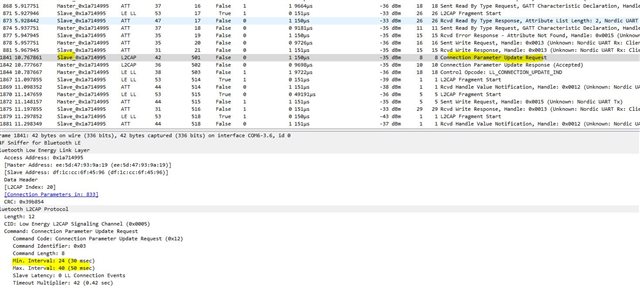
    (Note that if it require a packet back and forth then it may take 2 connection interval meaning 50x2  = 100ms) 

    Please download the sniffer software here and use a DK as the sniffer. Please follow the documentation on how to track a connection.

  • As far as I can see, for some reason the standard times of 30-50 ms are returning.

    q_00.zip

  • Hi Stefan ,

    It was because the peripheral requested the connection parameter. ...


    If you configure this: 

    CONFIG_BT_GAP_AUTO_UPDATE_CONN_PARAMS=n
    on the peripheral side it will not request that again. 
  • Times have improved and they remain stable as I set them!

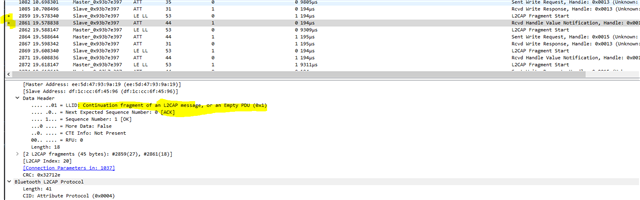
    I just do not understand why in each L2CAP Fragment Start , there is some data, and in the next ( Rcvd Handle Value Notification/ Sent Write Request ) all the data. Is this something that stays on the buffers, and is sent as a random element, just to create the package, or something else?

    At the moment for the test everything works as I set it.

    But the next time, when, for example, with a computer, I connect to a board/peripheral, how will I force the computer to reduce the time/set size of MTU? These times must be preset and limited on the board, and after connecting to force the computer to work with them.

    q_01.zip

Reply
  • Times have improved and they remain stable as I set them!

    I just do not understand why in each L2CAP Fragment Start , there is some data, and in the next ( Rcvd Handle Value Notification/ Sent Write Request ) all the data. Is this something that stays on the buffers, and is sent as a random element, just to create the package, or something else?

    At the moment for the test everything works as I set it.

    But the next time, when, for example, with a computer, I connect to a board/peripheral, how will I force the computer to reduce the time/set size of MTU? These times must be preset and limited on the board, and after connecting to force the computer to work with them.

    q_01.zip

Children
  • Hi Stefan, 

    If you plan to connect to a 3rd party central, I would suggest to keep 

    CONFIG_BT_GAP_AUTO_UPDATE_CONN_PARAMS=y 

    and then configure 
    CONFIG_BT_PERIPHERAL_PREF_MIN_INT

    CONFIG_BT_PERIPHERAL_PREF_MAX_INT

    To the connection interval that you need. This way the peripheral will send a request to the central and if the central accept that it will update the connection interval accordingly. Please choose the number wisely because if you request too short interval the central may reject it. 30ms would be a reasonable number for both current consumption and low latency. 

    Regarding L2CAP Fragment Start, the reason for that is that the DLE (Data length extension) is set to 27 bytes when your data is 41 bytes so it need to be sent in 2 packets. Hence the first L2CAP Fragment Start and then the 2nd which is grouped as the notification. 

    If you want to avoid that you can increase data length extension to >45 to cover the whole packet. 

  • I was definitely confused about what was going on here.

    That was exactly the whole topic, the times and the size of the buffer.

    For the times, it has become clear how this works.

    And you wrote me 9 config lines / commands that were supposed to increase the packet size from 20/27 to more to send 40 bytes in one packet. I copied it and to the peripheral, it doesn't matter. The information is always divided into two.

  • Hi Stefan, 

    I'm sorry that I thought that you were using nRF52.
    If you are using nRF53, you have split  cores: app core and net core. The netcore is running the controller when the app core runs the host. 
    So the config has to be applied for specific core. 


    For the configuration of the netcore you would need to do the following: 
    In the child_image folder you would need to create a file: hci_rpmsg.conf. In this file (which will be the overlay on top of the prj.conf of the hci_rpmsg child image ) you need to add: 

    CONFIG_BT_CTLR_DATA_LENGTH_MAX=251
    CONFIG_BT_BUF_ACL_RX_SIZE=251
    CONFIG_BT_AUTO_DATA_LEN_UPDATE=y

    In the prj.conf for the main project (app core) you can remove

    CONFIG_BT_CTLR_DATA_LENGTH_MAX=251

    but keep the 

    CONFIG_BT_BUF_ACL_RX_SIZE=251

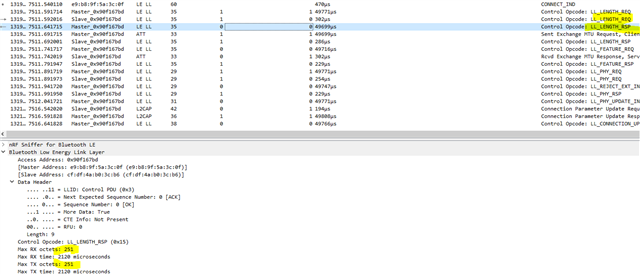
    After that you can reflash the netcore and app core and the data length should be updated automatically, in the sniffer trace you should see: 

  • It works.

    Thank you for your cooperation.

    It can be assumed that you have answered to my topic. Thus, the topic can be considered closed.

Related