OTA DFU for nRF52832 SDK17 not working

Hello Nordic Team!

I'm working with the nRF52832 and following this tutorial from Nordic to do OTA DFU: https://devzone.nordicsemi.com/guides/short-range-guides/b/software-development-kit/posts/getting-started-with-nordics-secure-dfu-bootloader

When generating the .zip file I'm not able to use the correct command because I have softdevice s132_7.2.0, but the support is until s132_7.0.1 https://github.com/NordicSemiconductor/pc-nrfutil/blob/master/nordicsemi/__main__.py#L506

I tested with 7.0.0 but it doesn't work, any idea on where should I check the correct hex number for my softdevice?

Thanks in advance and I appreciate all the help!

  • Hello Edvin, yes I'm using SES

    and indeed that's what's happening! I'm not able to see the DFU LEDs or the advertised name. 

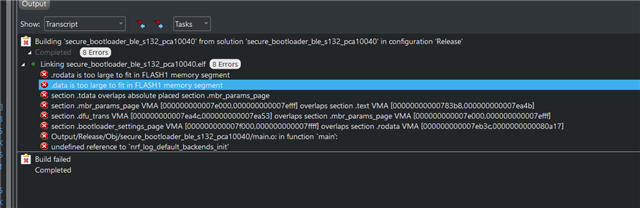
    I tried enabling NRF_LOG_ENABLED to 1, but it result in the error:

    If I understand correctly, the other option would be to create a separate application and add it as you mention. with something simple like nrf_log_info() and check if that works? 

    Thanks again for all your help and hope you have a great weekend :)

  • Hello,

    Yes, when you try to enable logging in the bootloader itself, then it will throw this error. It is because the start address of the bootloader is close to the top of flash, so there is not much space for additional features. It is possible to move the start address for the bootloader down, but it would be easier to start by looking for logs in the application, and see if it starts. Also, try the "attach debugger" button, to see if you can hit a breakpoint near the top of your main.c (and turn off optimization in your application, so that your breakpoint isn't accidentally skipped). 

    Let me know if it doesn't work, and we can look into logs for the bootloader. 

    BR,

    Edvin

Related