This discussion has been locked.
You can no longer post new replies to this discussion. If you have a question you can start a new discussion

Thingy:91 SIM Expired

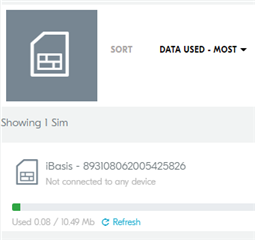
I just received my Nordic Thingy91 and when I tried activating the SIM, the following message came up:

"Unfortunately this SIM has expired. We are sorry for the inconvenience. Please contact iBasis for a free replacement."

I have contacted iBasis both through email and through the iBasis Tech support to get a replacement SIM (I have yet to receive a response).

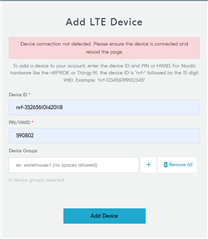
In the meantime, I'm I able to use my own SIM card from my phone? I inserted the card and when I try to "Add LTE Device" in nRF cloud, it says that "There was an error adding your device: No device found for this id. The device has not yet been provisioned." Also, LTE Link Monitor can connect to the UART, but there is no activity and no response from any AT command.

What to do?

Parents
  • I now have another issue with the Thingy. After putting the unit into MCUboot mode by pressing SW4 while switching SW1 to the ON position, I loaded one of the hex files from the img_app_bl folder (doesn't matter which one, I've tried a number of them) and wrote it successfully to the device. However, when I cycle power, none of the apps (Programmer, LTE Link Monitor, Trace Collector) see the device any longer. The device was visible before I wrote the hex file for the first time. The LED comes on first as blinking green and then after a few minutes goes to blinking blue. I am able to program hex files in MCUboot mode, but when it's not in that mode none of the apps see the Thingy.

  • I loaded thingy91_asset_tracker_v2_ltem_2021-12-15_cfedfdfa.hex into the Thingy and am now able to use the LTE Monitor to see activity and give commands.

    I have received the replacement SIM from iBASIS for the expired SIM that was shipped with the Thingy. However, I again am unable to activate the SIM card, this time due to the ICCID on the new SIM is 20 digits, but the "Activate SIM Card" form in nRF Cloud only accepts 18 digits. Again, what to do?

Reply
  • I loaded thingy91_asset_tracker_v2_ltem_2021-12-15_cfedfdfa.hex into the Thingy and am now able to use the LTE Monitor to see activity and give commands.

    I have received the replacement SIM from iBASIS for the expired SIM that was shipped with the Thingy. However, I again am unable to activate the SIM card, this time due to the ICCID on the new SIM is 20 digits, but the "Activate SIM Card" form in nRF Cloud only accepts 18 digits. Again, what to do?

Children
Related