Serial Wire Debug Clock (SWDCLK) stuck at 2V!

Hi,

We have a custom board with the nrf5340 SoC, after erasing it with the erase function included in the nrf extension for VScode, we started getting the following error:

NRF5340_xxAA_ENGDyasir@Em:~$ nrfjprog --deviceversion
ERROR: JLinkARM DLL reported an error. Try again. If error condition
ERROR: persists, run the same command again with argument --log, contact Nordic
ERROR: Semiconductor and provide the generated log.log file to them. 

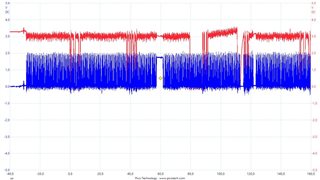
By probing the SWDCLK and SWDIO pins from the JTAG on our custom board (with it connected to the nrf5340 DK), we found that the SWDCLK was stuck at 2V, whereas on a working board the SWDCLK was found to be at 3.3V. Attached is a screen shoot from the oscilloscope where the blue colored wave is the SWDCLK and the red is the SWDIO.

It might be worth noting that we have used the erase function from the nrf VScodes extention on this same device as well as other devices with the exact same hardware many times with no issues.
Parents
  • Hello, 

    Can you please provide more details on how you are connecting the nRF5340DK to your custom board? Are both devices powered and ground at same level?

    It might be worth noting that we have used the erase function from the nrf VScodes extention on this same device as well as other devices with the exact same hardware many times with no issues.

    Does this mean that it worked before, but now it does not? Have you tried running nrfjprog --erase from the command line? 

    Kind regards,
    Øyvind

Reply
  • Hello, 

    Can you please provide more details on how you are connecting the nRF5340DK to your custom board? Are both devices powered and ground at same level?

    It might be worth noting that we have used the erase function from the nrf VScodes extention on this same device as well as other devices with the exact same hardware many times with no issues.
    Does this mean that it worked before, but now it does not? Have you tried running nrfjprog --erase from the command line? 

    Kind regards,
    Øyvind

Children
  • Can you please provide more details on how you are connecting the nRF5340DK to your custom board? Are both devices powered and ground at same level?

    The JTAG cable is connected to the board and it is powered by a battery, while the DK is normally connected to my PC. I have checked all the power supplies on the custom board, including the JTAG connector. All of them were at a normal voltage when compared to a working board, except for the SWDCLK which was at 2V as shown previously, so it is not a power supply issue. Additionally, I changed the SoC on that board and everything is now working properly. So, any idea what could have caused it? Again the last thing we did was that erase function!

    I am probing the SDWCLK and SWDIO from the other side of the board while connecting it to the DK with a JTAG cable, if that is what you were asking for.

    Does this mean that it worked before, but now it does not? Have you tried running nrfjprog --erase from the command line?

    Yes it worked before, and yes I tried nrfjprog --eraseall; --recover from the command line, all with the same error.

    Thanks!

    Yasir

  • Hi Yasir,

    The SWDCLK should be provided by the DK, have you measured directly on the DK? Are there any configurations done to the DK? Solder bridges cut or soldered?

    Yasir_Imran said:
    Additionally, I changed the SoC on that board and everything is now working properly.

    Are you measuring correct voltage on SWDCLK now? 

    Yasir_Imran said:
    So, any idea what could have caused it?

    No, it there is too little information to explain what could have happened I'm afraid. 

    Kind regards,
    Øyvind

  • Hi Øyvind,

    The SWDCLK should be provided by the DK, have you measured directly on the DK? Are there any configurations done to the DK? Solder bridges cut or soldered?

    Basically, the nrf5340 SoC on our custom board had a problem with the SWDCLK pin, by measuring resistance on that pin to GND (on the custom board), it was at around 270 ohms without connecting it to the DK. For a working device the SWDCLK pin is at around 12 mega ohms. So with one of our working custom boards the voltage at that pin with the DK connected is 3.3V but for that board (with the initial problem) before changing the SoC it was 2V as shown before (with it connected to the DK). By disconnecting the JTAG cable from our device the DK works just fine (nrfjprog --deviceversion ...etc.), we also tried with several DKs. Again the problem was solved by changing the SoC on our custom board. Since the board was not responding to any command from the DK, and because the SWDCLK goes directly from the JTAG connector to the SWDCLK pin on the SoC on our board, the only option for us was to change it. The nrf5340 SoCs we have are the D revision ones.

    Our custom board is enclosed in a cover with only the JTAG exposed for programing and debugging. It is power by a rechargeable battery.

    Are you measuring correct voltage on SWDCLK now? 

    Yes with the DK connected its now at 3.3V before it was 2V.

    The problem occurred after using the erase board in the nrf connect extension for Vscode.

    Sincerely,

    Yasir


  • Are you able to provide schematics and pictures of your setup? Have you had a HW review of the custom board? What about ESD? The issue isn't clear to us, and we will need more information to get to the root cause.

    Thanks!

    Kind regards,
    Øyvind

  • Are you able to provide schematics and pictures of your setup? Have you had a HW review of the custom board? What about ESD? The issue isn't clear to us, and we will need more information to get to the root cause.

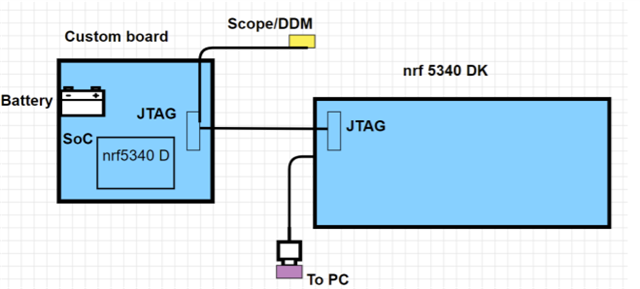
    I am not sure if the diagram bellow is enough but that is all what I can provide at this point.

    I am not worried about ESD, because I am sure I was grounded and we do have ESD mats. If it was ESD related, then it must have been caused by touching the DK, as the board only exposes the JTAG connector; which is very hard to touch unless it was done on purpose. However, all hardware related issues are on the table and have not been ruled out at all. The only reason that places these issues on the very unlikely side, is that we have more than 30 boards with the same hardware 12 of which have been under software development for at least 2 months now. The only board that encountered this issue, has been erased many times using the erase board in VScode. 

    Kindest regards,

    Yasir

Related