This discussion has been locked.
You can no longer post new replies to this discussion. If you have a question you can start a new discussion

NRF Connect impossible installed on macOS Monterey

Impossible instal NRF connect desktop 3.10 for MacOS , my computer is MacBook Pro  16 , 2,3 GHz Intel Core i9 8 core , macOS Monterey v 12.3. 
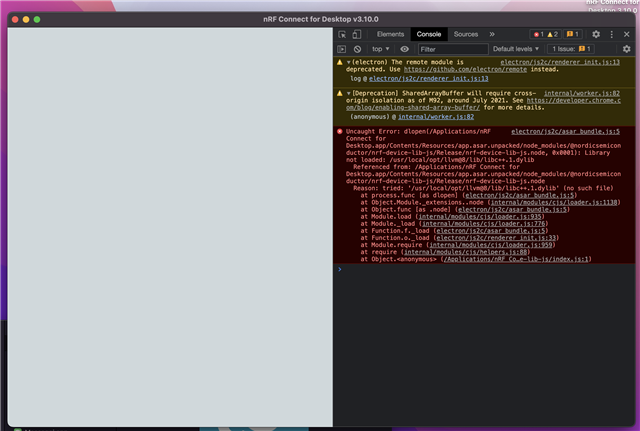
  • Hello, 

    I will need forward this to our SW team. I hope to have an answer by tomorrow.

    Kind regards,
    Øyvind

  • Hello again, 

    Have you installed LLVM? If not, this can be installed via Brew. 

    Kind regards,
    Øyvind

  • Thanks for the reply.
    For the moment I have decided to use the old Mac, I have installed nrf connect version 3.9 and VS Code, the version 3.10 and 3.7 3.8 not work right, I have had problems configuring the nRF Command Line Tools, I have followed a different path from your tutorial, it seems to work well.
    I have not yet tried to see if it recognizes NRF52 / 53 hardware via bluetooth, previously I used a jlink-lite to upload files via Segger.

  • I'm confused, is the issue with nRF Connect for Desktop or the VS Code extension?

  • Hello
    I tried all day yesterday with the old imac, both with Segger embedded studio and with VS Code, it no longer recognizes external hardware even via j-link lite, bluetooth just doesn't exist.


    today i tried again with macbook 16 ", nothing nrf connect does not work, even with all dependencies installed.

    But come on I don't understand how long it takes just to install a software, which needs many other third parties

    Why is there no full IDE?

    I have more than 20 nRf 52840 hardware cards what am I doing ???

    Nrf Connect is a simple WebApp, I think there are other ways to develop a serious software that works well ...

    sorry sorry sorry

Related