Move sample project start point

Hi,

Trying to do a very simple thing.

I want to start a new project from a sample project, but I want my new project to be in a different folder

  1. Load nRF Connect
  2. Install new v1.9.0 SDK/Toolchain
  3. Open Segger Embedded Studio
  4. Open nRF Connect SDK Project
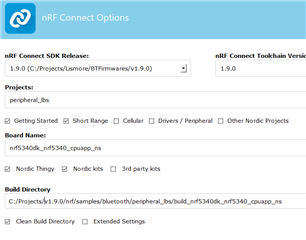
  5. Configure as such:
  6. Press OK
  7. Now before any build, copy the folder from v1.9.0/nrf/samples/bluetooth/peripheral_lbs to a different directory outside of the v1.9.0 SDK dir, say c:\projects\MyPeripheral_lbs
  8. Open this copied project in segger
  9. Build solution

2> In file included from C:/Projects/v1.9.0/zephyr/include/kernel_includes.h:31,
2>                  from C:/Projects/v1.9.0/zephyr/include/kernel.h:17,
2>                  from C:/Projects/v1.9.0/zephyr/arch/arm/core/offsets/offsets_aarch32.c:28,
2>                  from C:/Projects/v1.9.0/zephyr/arch/arm/core/offsets/offsets.c:9:
2> C:/Projects/v1.9.0/zephyr/include/syscall.h:11:10:fatal error: syscall_list.h: No such file or directory
2> compilation terminated.
Build failed

So my question is, in the many many files I now have for this peripheral_lbs project, which one can i find and edit the path to the SDK relative to the new projects folder position?

Many thanks

Parents
  • Hello, 

    First off all, we recommend keeping the project path as short as possible as this may cause issues in the build process. Try to use e.g. C:\NCS\v1.9.0\

    Now before any build, copy the folder from v1.9.0/nrf/samples/bluetooth/peripheral_lbs to a different directory outside of the v1.9.0 SDK dir, say c:\projects\MyPeripheral_lbs

    Please note that when pressing OK, SES will generate a build folder when you press generate. When you copy the folder from nrf\samples\bluetooth\peripheral_lbs, this folder includes the following:

    • boards
    • build_nrf5340dk_nrf5340_cpuapp
    • child_image
    • src
    • CMakeLists.txt
    • Kconfig
    • prj_minimal.conf
    • prj.conf
    • README.rst
    • sample.yaml

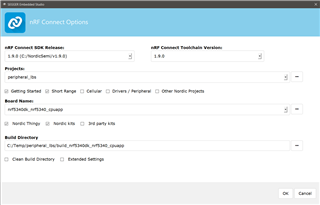
    I replicated the issue here, following your first steps. Now I copy the whole folder to C:\Temp\peripheral_lbs. Now I select the project folder and choose the same board as I initially chose


    When I build this, this will fail if I have not selected "Clean build folder".

    Creating solution peripheral_lbs.emProject
    C:/NordicSemi/v1.9.0/toolchain/opt/bin/cmake.exe -GNinja -DBOARD=nrf5340dk_nrf5340_cpuapp -DBOARD_DIR=C:\NordicSemi\v1.9.0\zephyr\boards\arm\nrf5340dk_nrf5340 -BC:\Temp\peripheral_lbs\build_nrf5340dk_nrf5340_cpuapp -SC:\Temp\peripheral_lbs -DNCS_TOOLCHAIN_VERSION=1.9.0 -DEXTRA_KCONFIG_TARGETS=menuconfig_ses -DEXTRA_KCONFIG_TARGET_COMMAND_FOR_menuconfig_ses=C:\NordicSemi\v1.9.0\toolchain\segger_embedded_studio/html/configure_nordic_project_menuconfig.py
    CMake Error: The current CMakeCache.txt directory C:/Temp/peripheral_lbs/build_nrf5340dk_nrf5340_cpuapp/CMakeCache.txt is different than the directory c:/NordicSemi/v1.9.0/nrf/samples/bluetooth/peripheral_lbs/build_nrf5340dk_nrf5340_cpuapp where CMakeCache.txt was created. This may result in binaries being created in the wrong place. If you are not sure, reedit the CMakeCache.txt
    CMake Error: The source "C:/Temp/peripheral_lbs/CMakeLists.txt" does not match the source "C:/NordicSemi/v1.9.0/nrf/samples/bluetooth/peripheral_lbs/CMakeLists.txt" used to generate cache.  Re-run cmake with a different source directory.
    
    error: cmake failed
    create_nordic_project.py failed (1)

    Please delete the build folder and retry.

    Kind regards,
    Øyvind

Reply
  • Hello, 

    First off all, we recommend keeping the project path as short as possible as this may cause issues in the build process. Try to use e.g. C:\NCS\v1.9.0\

    Now before any build, copy the folder from v1.9.0/nrf/samples/bluetooth/peripheral_lbs to a different directory outside of the v1.9.0 SDK dir, say c:\projects\MyPeripheral_lbs

    Please note that when pressing OK, SES will generate a build folder when you press generate. When you copy the folder from nrf\samples\bluetooth\peripheral_lbs, this folder includes the following:

    • boards
    • build_nrf5340dk_nrf5340_cpuapp
    • child_image
    • src
    • CMakeLists.txt
    • Kconfig
    • prj_minimal.conf
    • prj.conf
    • README.rst
    • sample.yaml

    I replicated the issue here, following your first steps. Now I copy the whole folder to C:\Temp\peripheral_lbs. Now I select the project folder and choose the same board as I initially chose


    When I build this, this will fail if I have not selected "Clean build folder".

    Creating solution peripheral_lbs.emProject
    C:/NordicSemi/v1.9.0/toolchain/opt/bin/cmake.exe -GNinja -DBOARD=nrf5340dk_nrf5340_cpuapp -DBOARD_DIR=C:\NordicSemi\v1.9.0\zephyr\boards\arm\nrf5340dk_nrf5340 -BC:\Temp\peripheral_lbs\build_nrf5340dk_nrf5340_cpuapp -SC:\Temp\peripheral_lbs -DNCS_TOOLCHAIN_VERSION=1.9.0 -DEXTRA_KCONFIG_TARGETS=menuconfig_ses -DEXTRA_KCONFIG_TARGET_COMMAND_FOR_menuconfig_ses=C:\NordicSemi\v1.9.0\toolchain\segger_embedded_studio/html/configure_nordic_project_menuconfig.py
    CMake Error: The current CMakeCache.txt directory C:/Temp/peripheral_lbs/build_nrf5340dk_nrf5340_cpuapp/CMakeCache.txt is different than the directory c:/NordicSemi/v1.9.0/nrf/samples/bluetooth/peripheral_lbs/build_nrf5340dk_nrf5340_cpuapp where CMakeCache.txt was created. This may result in binaries being created in the wrong place. If you are not sure, reedit the CMakeCache.txt
    CMake Error: The source "C:/Temp/peripheral_lbs/CMakeLists.txt" does not match the source "C:/NordicSemi/v1.9.0/nrf/samples/bluetooth/peripheral_lbs/CMakeLists.txt" used to generate cache.  Re-run cmake with a different source directory.
    
    error: cmake failed
    create_nordic_project.py failed (1)

    Please delete the build folder and retry.

    Kind regards,
    Øyvind

Children
Related