Hi,
Trying to do a very simple thing.
I want to start a new project from a sample project, but I want my new project to be in a different folder
- Load nRF Connect
- Install new v1.9.0 SDK/Toolchain
- Open Segger Embedded Studio
- Open nRF Connect SDK Project
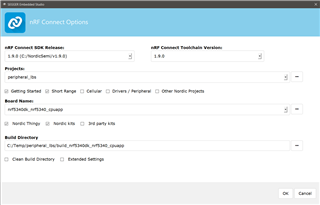
- Configure as such:
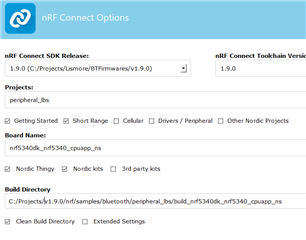
- Press OK
- Now before any build, copy the folder from v1.9.0/nrf/samples/bluetooth/peripheral_lbs to a different directory outside of the v1.9.0 SDK dir, say c:\projects\MyPeripheral_lbs
- Open this copied project in segger
- Build solution
2> In file included from C:/Projects/v1.9.0/zephyr/include/kernel_includes.h:31,
2> from C:/Projects/v1.9.0/zephyr/include/kernel.h:17,
2> from C:/Projects/v1.9.0/zephyr/arch/arm/core/offsets/offsets_aarch32.c:28,
2> from C:/Projects/v1.9.0/zephyr/arch/arm/core/offsets/offsets.c:9:
2> C:/Projects/v1.9.0/zephyr/include/syscall.h:11:10:fatal error: syscall_list.h: No such file or directory
2> compilation terminated.
Build failed
So my question is, in the many many files I now have for this peripheral_lbs project, which one can i find and edit the path to the SDK relative to the new projects folder position?
Many thanks