Did I brick my custom board? "No idcode detected" NRF52840

While trying to debug some issues with my board I accidentally programmed by custom board while powering it with only 3V and now whenever I try programming it I get the following error:

Downloading ‘ble_app_blinky_pca10056_s140.elf’ to J-Link
Programming 22.9 KB of addresses 00027000 — 0002cbe7
Programming 0.1 KB of addresses 0002cbe8 — 0002cc63
J-Link: Flash download: Bank 0 @ 0x00000000: Skipped. Contents already match
Download successful
Connecting ‘J-Link’ using ‘USB’
Connecting to target using SWD
Loaded C:/Program Files/SEGGER/SEGGER Embedded Studio for ARM 4.12/bin/JLink_x64.dll
Firmware Version: J-Link OB-SAM3U128-V2-NordicSemi compiled Dec  3 2021 15:41:28
DLL Version: 6.40`
Hardware Version: V1.00
Target Voltage: 3.300
Device "NRF52840_XXAA" selected.
connect failed
Failed to connect to target.
No idcode detected.
Please check connection and Target Interface Type

and by "it" I mean 3/5 of my boards - I had to repeat the mistake a couple of times to REALLY realize I was being dumb. Is there a way to fix this error? I've tried pulling nrf_reset while the chip is turning on and it doesn't seem to do anything ...

Ryan

Parents
  • Hey Ryan,

    Could you expand a bit on how you are programming your board? It would be great if you could show a picture of the setup as well.

    Regards,

    Elfving

  • Hi Elfving,

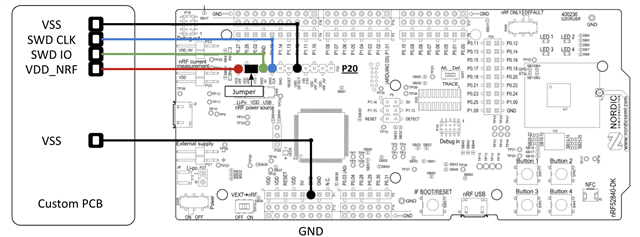
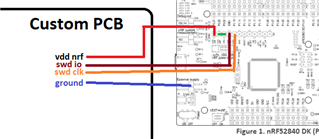
    I've made a diagram! At the time I used the following setup:

    In addition, I powered my external board's VDD with 3V and had the dev kit plugged into my computer's USB. In retrospect, this was really dumb since I probably caused some contention on my VDD_nrf wire... 

    In my current (working) setup, I'm no longer powering my custom PCB externally. I'm simply running everything off of the dev kit's VDD_nrf (that ultimately comes from my computer's USB).

    I've read that I can erase/recover chips using the nrf connect app on my computer. Does that seem like the next step to 'unbricking' my custom pcb's nordic? If so, can I erase/recover my custom pcb's microcontroller by using the above setup (without externally powering the custom board) and running the nrf programmer from the connect app?

    Thank you so much for your help, Elfving!

    Kindest regards,

    Ryan

    Edit: When using nrf_connect's programmer I can see the dev kit that I'm using as a programmer, but I can't actually see the chip I'm trying to program (the custom board's microcontroller). Is there something I'm missing? I have definitely connected things properly since I can use segger to program working chips with this exact setup.


  • Hello,

    Your setup looks fine in my opinion.

    Are you seeing the same issue on a DK? 

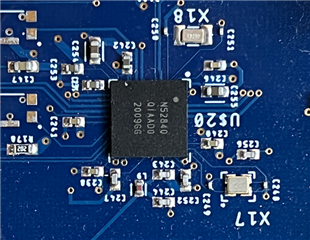
    What SoC are you using on the custom PCB? Could you send me an image of the PCB?

    ryerye120 said:
    I've read that I can erase/recover chips using the nrf connect app on my computer. 

    Sure, you could definitely try it, and it should be possible using both command line and the app. 

    ryerye120 said:
    When using nrf_connect's programmer I can see the dev kit that I'm using as a programmer, but I can't actually see the chip I'm trying to program (the custom board's microcontroller). Is there something I'm missing? I have definitely connected things properly since I can use segger to program working chips with this exact setup.

    Yeah I can imagine that being a bit confusing, but it is how it is supposed to be. Think of it as the debugger/programmer simply stating its the 52840DK, not what SoC the DK is necessarily programming.

    Regards,

    Elfving

  • Hi Elfving,

    Thanks for your response!

    Are you seeing the same issue on a DK? 

    No, all of my DKs seem to work just fine across bluetooth and non-bluetooth examples (and custom firmware)!

    What SoC are you using on the custom PCB? Could you send me an image of the PCB?

    It's one of the 7mmx7mm QFN packages!

    Trying to erase the custom board with the nrf connect app yielded the same errors. The chips just aren't detected... 

    Thanks so much for your help Elfving, I really appreciate it!

Reply
  • Hi Elfving,

    Thanks for your response!

    Are you seeing the same issue on a DK? 

    No, all of my DKs seem to work just fine across bluetooth and non-bluetooth examples (and custom firmware)!

    What SoC are you using on the custom PCB? Could you send me an image of the PCB?

    It's one of the 7mmx7mm QFN packages!

    Trying to erase the custom board with the nrf connect app yielded the same errors. The chips just aren't detected... 

    Thanks so much for your help Elfving, I really appreciate it!

Children
Related