This discussion has been locked.
You can no longer post new replies to this discussion. If you have a question you can start a new discussion

Softdevice - NRF_LOG_INFO not working.

Hello All,

I am using nRF52840 DK and Segger with nRF5SDK 17.0.2 version. There are many examples that prints a NRF_LOG_INFO(). But I want to understand how to configure by myself. So I was trying to implement.

So I have added a below header:

#include "nrf_log.h"
#include "nrf_log_ctrl.h"
#include "nrf_log_default_backends.h"

static void log_init(void)
{
   ret_code_t err_code = NRF_LOG_INIT(NULL);
   APP_ERROR_CHECK(err_code);
   NRF_LOG_DEFAULT_BACKENDS_INIT();
}

and called it in main function

int main(void)
{
log_init();
 NRF_LOG_INFO(" Hello ");

}

Added nrf_log_backend_rtt.c file in nRF_Log folder Also defined below in sdk_config.h file

#define NRF_LOG_BACKEND_RTT_ENABLED 1

#define NRF_LOG_ENABLED 1

But still I am getting below error:

SEGGER_RTT_Conf.h: No such file or directory

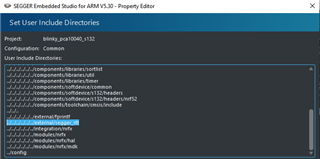
Also I was checking on forum about the same error and people asked to add ../../../../../../external/segger_rtt; In user include directory but I have also tried to do the same. But got another error

undefined reference to `nrf_log_default_backends_init'

I am not sure what I am missing to do?

I am attaching the screenshot for reference.
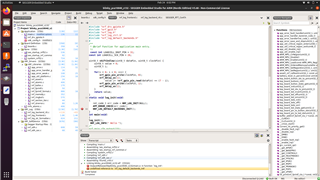
Please help me.

Thanks in advance.

Thanks and regards,

Neeraj Dhekale

  • Hi, 

    You said you are using nRF52840DK, but the project in the figure is blinky_pca10040_s132 which cannot run on nRF52840DK. I would suggest you use nRF52832DK for blinky_pca10040_s132 or use the projects for pca10056 (nRF52840DK)

    According to the figure, seems it needs the following:

    1. Adding source files

    Including header files

    2. Adding configurations for NRF_LOG_BACKEND_RTT and nRF_Segger_RTT to sdk_config.h

    // </h> 
    //==========================================================
    
    // </h> 
    //==========================================================
    
    // <h> nRF_Log 
    
    //==========================================================
    // <e> NRF_LOG_BACKEND_RTT_ENABLED - nrf_log_backend_rtt - Log RTT backend
    //==========================================================
    #ifndef NRF_LOG_BACKEND_RTT_ENABLED
    #define NRF_LOG_BACKEND_RTT_ENABLED 1
    #endif
    // <o> NRF_LOG_BACKEND_RTT_TEMP_BUFFER_SIZE - Size of buffer for partially processed strings. 
    // <i> Size of the buffer is a trade-off between RAM usage and processing.
    // <i> if buffer is smaller then strings will often be fragmented.
    // <i> It is recommended to use size which will fit typical log and only the
    // <i> longer one will be fragmented.
    
    #ifndef NRF_LOG_BACKEND_RTT_TEMP_BUFFER_SIZE
    #define NRF_LOG_BACKEND_RTT_TEMP_BUFFER_SIZE 64
    #endif
    
    // <o> NRF_LOG_BACKEND_RTT_TX_RETRY_DELAY_MS - Period before retrying writing to RTT 
    #ifndef NRF_LOG_BACKEND_RTT_TX_RETRY_DELAY_MS
    #define NRF_LOG_BACKEND_RTT_TX_RETRY_DELAY_MS 1
    #endif
    
    // <o> NRF_LOG_BACKEND_RTT_TX_RETRY_CNT - Writing to RTT retries. 
    // <i> If RTT fails to accept any new data after retries
    // <i> module assumes that host is not active and on next
    // <i> request it will perform only one write attempt.
    // <i> On successful writing, module assumes that host is active
    // <i> and scheme with retry is applied again.
    
    #ifndef NRF_LOG_BACKEND_RTT_TX_RETRY_CNT
    #define NRF_LOG_BACKEND_RTT_TX_RETRY_CNT 3
    #endif
    
    
    // </h> 
    
    //==========================================================
    
    // <h> nRF_Segger_RTT 
    
    //==========================================================
    // <h> segger_rtt - SEGGER RTT
    
    //==========================================================
    // <o> SEGGER_RTT_CONFIG_BUFFER_SIZE_UP - Size of upstream buffer. 
    // <i> Note that either @ref NRF_LOG_BACKEND_RTT_OUTPUT_BUFFER_SIZE
    // <i> or this value is actually used. It depends on which one is bigger.
    
    #ifndef SEGGER_RTT_CONFIG_BUFFER_SIZE_UP
    #define SEGGER_RTT_CONFIG_BUFFER_SIZE_UP 512
    #endif
    
    // <o> SEGGER_RTT_CONFIG_MAX_NUM_UP_BUFFERS - Maximum number of upstream buffers. 
    #ifndef SEGGER_RTT_CONFIG_MAX_NUM_UP_BUFFERS
    #define SEGGER_RTT_CONFIG_MAX_NUM_UP_BUFFERS 2
    #endif
    
    // <o> SEGGER_RTT_CONFIG_BUFFER_SIZE_DOWN - Size of downstream buffer. 
    #ifndef SEGGER_RTT_CONFIG_BUFFER_SIZE_DOWN
    #define SEGGER_RTT_CONFIG_BUFFER_SIZE_DOWN 16
    #endif
    
    // <o> SEGGER_RTT_CONFIG_MAX_NUM_DOWN_BUFFERS - Maximum number of downstream buffers. 
    #ifndef SEGGER_RTT_CONFIG_MAX_NUM_DOWN_BUFFERS
    #define SEGGER_RTT_CONFIG_MAX_NUM_DOWN_BUFFERS 2
    #endif
    
    // <o> SEGGER_RTT_CONFIG_DEFAULT_MODE  - RTT behavior if the buffer is full.
     
    
    // <i> The following modes are supported:
    // <i> - SKIP  - Do not block, output nothing.
    // <i> - TRIM  - Do not block, output as much as fits.
    // <i> - BLOCK - Wait until there is space in the buffer.
    // <0=> SKIP 
    // <1=> TRIM 
    // <2=> BLOCK_IF_FIFO_FULL 
    
    #ifndef SEGGER_RTT_CONFIG_DEFAULT_MODE
    #define SEGGER_RTT_CONFIG_DEFAULT_MODE 0
    #endif


    3. main

    int main(void)
    {
    
    
      log_init();
    
      NRF_LOG_INFO(" Hello ");
    
         while (true)
        {
            NRF_LOG_FLUSH();
            __SEV();
            __WFE();
            __WFE();
            // no implementation needed
        }
    
    }

    Then, you could get the log. 

    Test file: blinky_284808.7z, place it under nRF5_SDK_17.1.0_ddde560\examples\peripheral 

    Regards,
    Amanda

  • Thank you so much

    Thanks for your help. I was trying to do this from last 2 days Smiley. Appreciated.

    Just one more addition. I need to enable NRF_LOG_ENABLED as well in sdk_config.h file to make this work.

    Thanks and regards,

    Neeraj Dhekale
Related