This discussion has been locked.
You can no longer post new replies to this discussion. If you have a question you can start a new discussion

Configuring micro_ecc backend

Hallo,

I would love to receive some support in configuring micro_ecc backend for OTA DFU.

I am using SES and following the instructions on nordic InfoCenter. The link is here. https://infocenter.nordicsemi.com/index.jsp

In the instructions under "Installing micro-ecc" there are 5 points. 

1. "Install version 4.9-2015-q3-update of the GCC compiler toolchain for ARM. You can use ARM's Launchpad to find the toolchain for your operating system."

The have installed the correct version for my windows operating system.

2. "Make sure that make is installed (see, for example, MinGW, GNU Make, or Xcode)."

Can I receive a bit help here? I went through the documents but I am not able to figure out how to install make. Is this an additional step after installing GCC compiler toolchain?

3. "Clone the micro-ecc GitHub repository into <InstallFolder>\external\micro-ecc\micro-ecc."

I have downloaded and pasted the micro-ecc library from GitHub to the corresponding directory. 

4."Enter the subdirectory for the SoC and the toolchain that you are using to build your application:"

Can you please explain what is to do here? Where to enter the subdirectory for the SoC?

5. "Run make to compile the micro-ecc library."

How to do this? Can you please explain?

later in the document, it is mentioned to add micro-ecc library file to the project --> "micro_ecc_lib_nrf52.a". I am not able to find this file. Is this generated after running make to compile the micro-ecc library?

I would really appreciate your help. 

Thank you.

Best regards,

Adarsh

Parents
  • Hi,

    2. "Make sure that make is installed (see, for example, MinGW, GNU Make, or Xcode)."

    Can I receive a bit help here? I went through the documents but I am not able to figure out how to install make. Is this an additional step after installing GCC compiler toolchain?

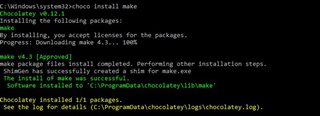
    Yes, make needs to be installed in addition to the GCC compiler. There are many ways to do this, but the simplest solution is likely to install it through Chocolatey, as described in this post.

    3. "Clone the micro-ecc GitHub repository into <InstallFolder>\external\micro-ecc\micro-ecc."

    I have downloaded and pasted the micro-ecc library from GitHub to the corresponding directory. 

    This will likely work, but you can also install Git for Windows, and clone the GitHub repository from cmd:

    git clone https://github.com/kmackay/micro-ecc.git

    If you have Git and the toolchain installed correctly, you can even run the .bat script in the micro-ecc directory (build_all.bat) to automatically clone and build the library for all compilers.

    4."Enter the subdirectory for the SoC and the toolchain that you are using to build your application:"

    Can you please explain what is to do here? Where to enter the subdirectory for the SoC?

    Since you are using SES, you need the gcc library, located in the directories ending with _armgcc. If you are using nRF52840, you can use the nrf52hf version of the library. You can either navigate to the directory in Windows explorer and then type "cmd"+enter into the address bar, to open a command prompt in the current directory, or open cmd from the start menu and cd to the correct directory:

    cd C:\PATH\TO\SDK\external\micro-ecc\nrf52hf_armgcc\armgcc

    5. "Run make to compile the micro-ecc library."

    How to do this? Can you please explain?

    In the cmd window you opened above, type make after cd to the directory.

    later in the document, it is mentioned to add micro-ecc library file to the project --> "micro_ecc_lib_nrf52.a". I am not able to find this file. Is this generated after running make to compile the micro-ecc library?

    Yes, this file is generated in the directory after running "make" command.

    Best regards,
    Jørgen

Reply
  • Hi,

    2. "Make sure that make is installed (see, for example, MinGW, GNU Make, or Xcode)."

    Can I receive a bit help here? I went through the documents but I am not able to figure out how to install make. Is this an additional step after installing GCC compiler toolchain?

    Yes, make needs to be installed in addition to the GCC compiler. There are many ways to do this, but the simplest solution is likely to install it through Chocolatey, as described in this post.

    3. "Clone the micro-ecc GitHub repository into <InstallFolder>\external\micro-ecc\micro-ecc."

    I have downloaded and pasted the micro-ecc library from GitHub to the corresponding directory. 

    This will likely work, but you can also install Git for Windows, and clone the GitHub repository from cmd:

    git clone https://github.com/kmackay/micro-ecc.git

    If you have Git and the toolchain installed correctly, you can even run the .bat script in the micro-ecc directory (build_all.bat) to automatically clone and build the library for all compilers.

    4."Enter the subdirectory for the SoC and the toolchain that you are using to build your application:"

    Can you please explain what is to do here? Where to enter the subdirectory for the SoC?

    Since you are using SES, you need the gcc library, located in the directories ending with _armgcc. If you are using nRF52840, you can use the nrf52hf version of the library. You can either navigate to the directory in Windows explorer and then type "cmd"+enter into the address bar, to open a command prompt in the current directory, or open cmd from the start menu and cd to the correct directory:

    cd C:\PATH\TO\SDK\external\micro-ecc\nrf52hf_armgcc\armgcc

    5. "Run make to compile the micro-ecc library."

    How to do this? Can you please explain?

    In the cmd window you opened above, type make after cd to the directory.

    later in the document, it is mentioned to add micro-ecc library file to the project --> "micro_ecc_lib_nrf52.a". I am not able to find this file. Is this generated after running make to compile the micro-ecc library?

    Yes, this file is generated in the directory after running "make" command.

    Best regards,
    Jørgen

Children
Related