Hallo,
I would love to receive some support in configuring micro_ecc backend for OTA DFU.
I am using SES and following the instructions on nordic InfoCenter. The link is here. https://infocenter.nordicsemi.com/index.jsp
In the instructions under "Installing micro-ecc" there are 5 points.
1. "Install version 4.9-2015-q3-update of the GCC compiler toolchain for ARM. You can use ARM's Launchpad to find the toolchain for your operating system."
The have installed the correct version for my windows operating system.
2. "Make sure that make is installed (see, for example, MinGW, GNU Make, or Xcode)."
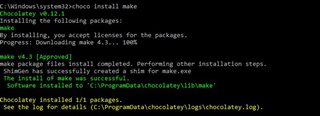
Can I receive a bit help here? I went through the documents but I am not able to figure out how to install make. Is this an additional step after installing GCC compiler toolchain?
3. "Clone the micro-ecc GitHub repository into <InstallFolder>\external\micro-ecc\micro-ecc."
I have downloaded and pasted the micro-ecc library from GitHub to the corresponding directory.
4."Enter the subdirectory for the SoC and the toolchain that you are using to build your application:"
Can you please explain what is to do here? Where to enter the subdirectory for the SoC?
5. "Run make to compile the micro-ecc library."
How to do this? Can you please explain?
later in the document, it is mentioned to add micro-ecc library file to the project --> "micro_ecc_lib_nrf52.a". I am not able to find this file. Is this generated after running make to compile the micro-ecc library?
I would really appreciate your help.
Thank you.
Best regards,
Adarsh