Using RTT and RTT terminal under VS Code

Hi,

When using RTT for debugging on the nRF5340, after every flash i have to press the following button:

Then every time i get presented with the following dialog:
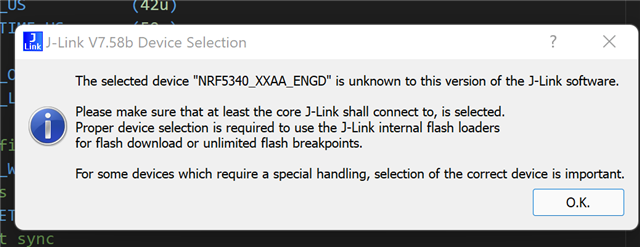
Then followed by:
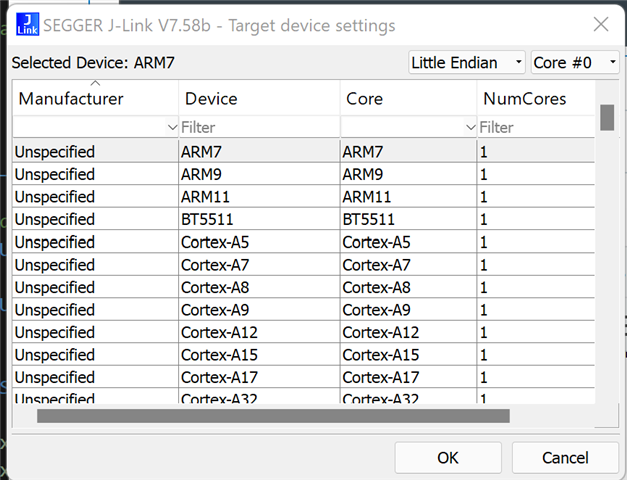
Where i have to manually find and choose the correct part

This can be very time consuming as i have to do it again after everytime i flash the part during debug

How can i set VS Code/JLink tools to automatically select the part so the RTT will work as soon as i press the button?

Also, how do we clear the contents of the nRF Terminal if we want to start afresh? I cannot find a clear option anywhere (and under windows the copy/paste does not work from the nRF terminal)

Many thanks

Parents
  • Hi,

    Also, how do we clear the contents of the nRF Terminal if we want to start afresh? I cannot find a clear option anywhere (and under windows the copy/paste does not work from the nRF terminal)

    This feature was added in the last version of nRF Terminal that was released just yesterday, so if you update the extension and reload VS Code you should be able to use the feature. You can either do it by clicking the clear button next to the RTT or serial port connection:

    Or you can use command palette and write nRF Terminal: Clear.

    How can i set VS Code/JLink tools to automatically select the part so the RTT will work as soon as i press the button?

    I have asked the developers if there is a simpler way to do this or if it is possible to add a feature where you can select the core directly in VS Code instead of having to go through the target device settings. I am still waiting for a response to this, and I will update you when I hear back from them.

    Best regards,

    Marte

Reply
  • Hi,

    Also, how do we clear the contents of the nRF Terminal if we want to start afresh? I cannot find a clear option anywhere (and under windows the copy/paste does not work from the nRF terminal)

    This feature was added in the last version of nRF Terminal that was released just yesterday, so if you update the extension and reload VS Code you should be able to use the feature. You can either do it by clicking the clear button next to the RTT or serial port connection:

    Or you can use command palette and write nRF Terminal: Clear.

    How can i set VS Code/JLink tools to automatically select the part so the RTT will work as soon as i press the button?

    I have asked the developers if there is a simpler way to do this or if it is possible to add a feature where you can select the core directly in VS Code instead of having to go through the target device settings. I am still waiting for a response to this, and I will update you when I hear back from them.

    Best regards,

    Marte

Children
Related
