nRF Connect Programmer v2.3.3 fails to detect nRF5340dk board

Hi to All Colleagues:

New to Nordic and its development platform. Finished installing required tools using nRF Connect for Desktop v3.10.0. Attempting to use nRF Connect Programmer v2.3.3 to download the Heart Rate Monitor (HRM) demo application as recommended on  "Running a first test", but the Programmer tool fails to detect the connected nRF5340dk board. No device is shown under "Select Device". Below some additional information:

nrfjprog -v
nrfjprog version: 10.15.4 external
JLinkARM.dll version: 7.62a

Attempted erasing the device after reading some recommendations on the forum by issuing a "nrfjprog --recover". It didn't correct the situation, only erased the demo application that came preloaded with the DK. We can connect to the J-Link onboard debugger using Segger Embedded Studio.

We have two DKs, both experience the same problem. Second one is set aside w/o modifications for reference.

Any advice you can give us to continue our development journey will be greatly appreciated. Please let us know if more information is required from us to determine the cause of the problem.

Thanks in advance, best regards

Parents
  • Hi Claudio,

    Looking at your original post

    Attempting to use nRF Connect Programmer v2.3.3 to download the Heart Rate Monitor (HRM) demo application as recommended on  "Running a first test"

    What is "Running a first test"? Can you provide a link?

    Claudius said:
    We have VS Code installed, but not familiar with it.

    We have video tutorials that can help you familiarize with nRF extension for VS Code.  Since you have VS code already installed, you can follow the video tutorial nRF Connect for VS Code installation to install nRF Connect extension for VS Code. You can find more video tutorials here.

    Claudius said:
    We followed the recommended sequence of commands, didn't correct the situation.

    These are proper commands, so this might not be an issue. You could however, try to restart the device to see if it helps.

    Best regards,
    Dejan

  • Hi Dejan,

    1. Here is the link:

    https://infocenter.nordicsemi.com/index.jsp?topic=%2Fug_gsg_ncs%2FUG%2Fgsg%2Ffirst_test.html

    2. We are aware of the video support, but will rather not get into the effort of learning a new tool until we can at least verify we can load pre-compiled code into our Dev Kits. The fact that the SEGGER ES tool detects the target indicates to us that there is something going on with the nRF Connect Programmer installation. We have re-installed it with same results.

    3. We executed the proposed commands and they did have an effect. Once executed, we got access to the CPU registers, see below:

    C:\Users\XXX>nrfjprog --readregs
    R0: 0x00000000
    R1: 0x00000000
    R2: 0x00000000
    R3: 0x00000000
    R4: 0x00000000
    R5: 0x00000000
    R6: 0x00000000
    R7: 0x00000000
    R8: 0xFFFFFFFF
    R9: 0xFFFFFFFF
    R10: 0xFFFFFFFF
    R11: 0xFFFFFFFF
    R12: 0xFFFFFFFF
    SP: 0xFFFFFFFC
    LR: 0xFFFFFFFF
    PC: 0xFFFFFFFE
    xPSR: 0xF9000000
    MSP: 0xFFFFFFFC
    PSP: 0x00000000

    But even after this, the nRF Connect Programmer application fails to detect the board. Are there any configuration settings for this tool that we might have missed?

    4. This is the shortcut installed on our system to invoke the programmer:

    "C:\Users\XXX\AppData\Local\Programs\nrfconnect\nRF Connect for Desktop.exe" --args --open-official-app pc-nrfconnect-programmer --source "official"

    Is this the correct shortcut/parameters?

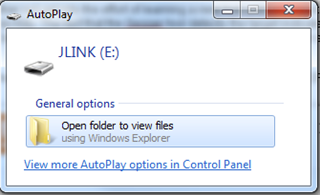
    5. Every time the Dev Kit is connected to the computer, the computer detects the device as an external drive as shown below:

    Thanks for your help, best regards

    Claudio

  • Hi Claudio,

    Which Windows version are you using?

    Claudius said:
    "C:\Users\XXX\AppData\Local\Programs\nrfconnect\nRF Connect for Desktop.exe" --args --open-official-app pc-nrfconnect-programmer --source "official"

    Is there any special reason why you would need to open Programmer in one command? You should open the nRF Connect Programmer application from nRF Connect for Desktop. 

    Best regards,
    Dejan

Reply
  • Hi Claudio,

    Which Windows version are you using?

    Claudius said:
    "C:\Users\XXX\AppData\Local\Programs\nrfconnect\nRF Connect for Desktop.exe" --args --open-official-app pc-nrfconnect-programmer --source "official"

    Is there any special reason why you would need to open Programmer in one command? You should open the nRF Connect Programmer application from nRF Connect for Desktop. 

    Best regards,
    Dejan

Children
No Data
Related