This discussion has been locked.
You can no longer post new replies to this discussion. If you have a question you can start a new discussion

host interface via UART - any examples code for it please?

Hello, support

I use nRF52833 SoC and need to host it with external NXP MCU to control its function, interface is 3 pins only, I wonder whether there is any example code for that please?

And also, I wonder which pins can be used for UART RX and TX. I currently use a nRF52 DK, and pins 5,6,7,8 are used for UART0 to JLink for debug console - I believe. If I need to use another UART, which pins should I use? are pins all configurable to this purpose?

Regards!

Ping

Parents
  • Hi, Håkon

    I had a look on the hci_uart example, looks like it initiated a UART0  with 4 pin hardware flow control ans seems able to receive and transmit some sort of cmd/data over the UART0 , I have no knowledge of the protocols used here,  may I modify it to use UART1 on nRF52833 with 2 pins without modify the software?

    I am also struggling to interact with it - lost in the ReadMe.lst file, I am a windows user and has been advised to user VS Code so far, if there a way I see it in action?  like with a terminal program? if it use UART0, then it should be able to communicate with Terminal program, what kind of command/messages shall I send to work with?

    Regards!

    Ping

  • Hi Ping

    Sorry for the slow response. Håkon is currently unavailable, and I will help you out in the mean time. 

    PingISTL said:
    The module on products is Nordic nRF52833 SoC, and I find that it has 2 UARTs, they are wired it to pin 31(RX) and 32(TX) by the hardware guy, I hope it can be configured as either UART0 or UART1?

    Yes, you can configure the pins freely in software, and assign either UART0 or UART1 to whatever GPIO's you want. 

    PingISTL said:
    I had a look on the hci_uart example, looks like it initiated a UART0  with 4 pin hardware flow control ans seems able to receive and transmit some sort of cmd/data over the UART0 , I have no knowledge of the protocols used here,  may I modify it to use UART1 on nRF52833 with 2 pins without modify the software?

    You can't change UART configuration without changing the software, no. This is statically configured in the example. 

    PingISTL said:
    I am also struggling to interact with it - lost in the ReadMe.lst file, I am a windows user and has been advised to user VS Code so far, if there a way I see it in action?  like with a terminal program? if it use UART0, then it should be able to communicate with Terminal program, what kind of command/messages shall I send to work with?

    The HCI interface is not designed to be used from a terminal, but if you can configure your terminal in binary (hex) mode it is possible to send and receive some simple commands. 

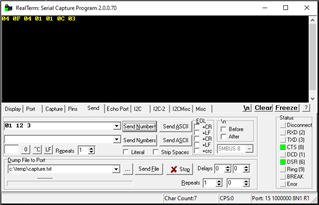
    Using RealTerm I tried sending the reset command to an nRF52DK flashed with the hci_uart sample, and got a response:

    I haven't read the HCI spec to see what the response means, but if you can get something similar it means the UART communication works. 

    Best regards
    Torbjørn

Reply
  • Hi Ping

    Sorry for the slow response. Håkon is currently unavailable, and I will help you out in the mean time. 

    PingISTL said:
    The module on products is Nordic nRF52833 SoC, and I find that it has 2 UARTs, they are wired it to pin 31(RX) and 32(TX) by the hardware guy, I hope it can be configured as either UART0 or UART1?

    Yes, you can configure the pins freely in software, and assign either UART0 or UART1 to whatever GPIO's you want. 

    PingISTL said:
    I had a look on the hci_uart example, looks like it initiated a UART0  with 4 pin hardware flow control ans seems able to receive and transmit some sort of cmd/data over the UART0 , I have no knowledge of the protocols used here,  may I modify it to use UART1 on nRF52833 with 2 pins without modify the software?

    You can't change UART configuration without changing the software, no. This is statically configured in the example. 

    PingISTL said:
    I am also struggling to interact with it - lost in the ReadMe.lst file, I am a windows user and has been advised to user VS Code so far, if there a way I see it in action?  like with a terminal program? if it use UART0, then it should be able to communicate with Terminal program, what kind of command/messages shall I send to work with?

    The HCI interface is not designed to be used from a terminal, but if you can configure your terminal in binary (hex) mode it is possible to send and receive some simple commands. 

    Using RealTerm I tried sending the reset command to an nRF52DK flashed with the hci_uart sample, and got a response:

    I haven't read the HCI spec to see what the response means, but if you can get something similar it means the UART communication works. 

    Best regards
    Torbjørn

Children
No Data
Related