This discussion has been locked.
You can no longer post new replies to this discussion. If you have a question you can start a new discussion

Update and Install Stuck at about 33%

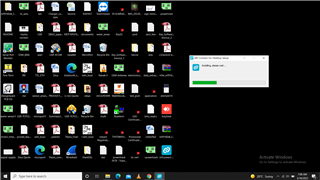
I am working on nRF Connect SDK 3,9.3 version. One day a dailog to update appeared. I clicked to update while SES was also opened and I was working on a project. Suddenly, wifi disconnnected. The install/ update did not resume. I uninstall the 3.9.3 version, download the setup for 3.10.0 version. But, the install stcuk at 33%. I removed install/ uninstall traces manually from Temporary, Program Files, Registery etc, but even then install hangs.
Gulzar Singh

  • Hi

    We've seen something similar before, where the installer asks to elevate some privileges, but the dialog for some reason is minimized and thus easy to miss. In that case, the installer will seem "stuck" until you open the permission window, so I suggest you check that. You could also try disabling any antivirus software during the install procedure. 

    Another thing that could cause this (although it should be fixed) is that the uninstall isn't done correctly, so some files aren't actually deleted during an uninstall. After uninstalling, please try checking the nrfconnect folder located at C:\Users\***\AppData\Roaming\nrfconnect and make sure it is empty before reinstalling.

    Best regards,

    Simon

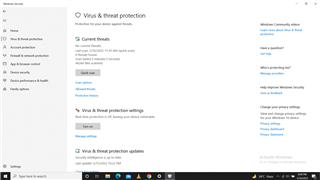
  • 1. I deleted the ....Roaming folder also and stopped Real Time Protection by Firewall as shown in image, but even then install stuck. I may give the access of my laptop through Anydesk to resolve the issue remotely. I observed that when Setup installation is started, just after click on Run, a dailog appears and hides rapidaly. and then only installer stuck dailog is visible. How to see the dialog ?

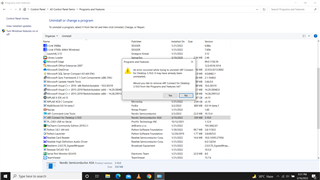
    2.Also, I checked the Programs and Features folder in Control Panel. Version 3.10.0 is shown installed. But trying to uninstall also is not possible as shown in second image.

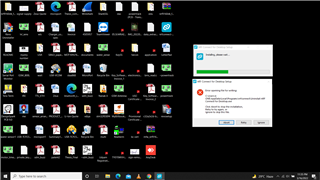
    3. In third try, I removed nrf connect SDK using Revo Uninstaller. Then, I tried to install nRF Connect SDK, the error shown in image 3, appears.

    4. At last right click nRF Connect SDK Setup and RUN As Administrator .. the installation was successful.

  • Hi

    If you see a dialog pop up rapidly and then minimize it should either be in the taskbar or it could be hidden in the icons on the bottom right side. Either in the hidden icons or the notifications tab. Are you not able to see anything here?

    Glad to hear you were able to set up and install it successfully in the end.

    Best regards,

    Simon

  • Hi

    Can you check if the uninstaller indeed is located at "C:\Users\xxxx\AppData\Local\Programs\nrfconnect\Uninstall nRF Connect for Desktop.exe"? We are not sure what could have happened, since the install.log only has so much information. But we see that there is a reference to the uninstaller in the registry that might have been used, only to fail if the uninstaller isn't there. If the uninstaller is there, could you try to run it manually and see if there are any error messages?

    Best regards,

    Simon

Related