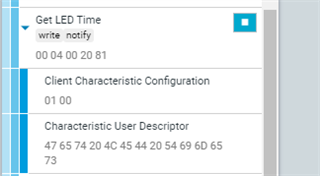
I'm trying to implement a Write / Notify type of GATT Characteristic to return 1 item out of an array of items.
So the Central sends an index, and the peripheral sends back a notification with the data at that index
the index is 1 byte, the data is 5 bytes.
I AM sending the notification in the context of BLE_GATTS_EVT_WRITE. But I see other examples doing that, like app_pwr_mgmt_main example.
The problem is it returns the wrong data.
I am expecting: 02, 01F4, 07D0 ( as output by NRF_LOG_INFO() )
I am getting: 00 04 00 20 81 ( as displayed by nRFConnect ) This never changes and I see the same values on other Characteristics that do the same thing
Code:
catch BLE_GATTS_EVT_WRITE
void ble_mtb_on_ble_evt(ble_evt_t const * p_ble_evt, void * p_context)
{
   if ((p_context == NULL) || (p_ble_evt == NULL))
   {
       return;
   }

   ble_mtgw_t * p_mtgw = (ble_mtgw_t *)p_context;

   switch (p_ble_evt->header.evt_id)
   {
      case BLE_GAP_EVT_CONNECTED:
         on_connect(p_mtgw, p_ble_evt);
         break;

      case BLE_GATTS_EVT_WRITE:
         on_write(p_mtgw, p_ble_evt);
         break;
Parse the handle and the index
Get the array data and send it as a notification
static void on_write(ble_mtgw_t * p_mtgw, ble_evt_t const * p_ble_evt)
{
    ret_code_t                    err_code;
    ble_mtb_evt_t                 evt;
    ble_mtb_client_context_t    * p_client;
    ble_gatts_evt_write_t const * p_evt_write = &p_ble_evt->evt.gatts_evt.params.write;
.
.
.
 else if (p_evt_write->handle == p_mtgw->Led_ReadTime_handle.value_handle)
    {
      uint8_t data[LED_TIME_LENGTH];
      uint16_t Period;
      uint16_t On;

      uint8_t Type = p_evt_write->data[0]; // GetValue8(p_ble_evt->evt.gatts_evt.conn_handle, p_evt_write->handle);

      GetLEDTimes(Type, &Period, &On);

      NRF_LOG_INFO("LED Time, %d, %04x, %04x", Type, On, Period);

      data[0] = Type;
      uint16_big_encode(Period, &data[1]);
      uint16_big_encode(On, &data[3]);

      //notify send 5 bytes
      SendNotify(p_ble_evt->evt.gap_evt.conn_handle,p_mtgw->Led_ReadTime_handle.value_handle, data, LED_TIME_LENGTH);
    }
Send the notification
static void SendNotify(uint16_t conn_handle, uint16_t char_handle, uint8_t *data, uint16_t len)
{

	ble_gatts_hvx_params_t  hvx_params;
	memset(&hvx_params, 0, sizeof(hvx_params));

	hvx_params.handle = char_handle;
	hvx_params.type   = BLE_GATT_HVX_NOTIFICATION;
	hvx_params.offset = 0;
	hvx_params.p_len  = &len;
	hvx_params.p_data = data;

	ret_code_t err_code = sd_ble_gatts_hvx( conn_handle, &hvx_params);
	if ((err_code != NRF_SUCCESS) && (err_code != NRF_ERROR_INVALID_STATE) && (err_code != NRF_ERROR_RESOURCES) && (err_code != BLE_ERROR_GATTS_SYS_ATTR_MISSING))
	{
		APP_ERROR_HANDLER(err_code);
	}

   NRF_LOG_RAW_INFO("Notify, %d, ", err_code);
   for(int i=0; i< len; i++)
   {
      NRF_LOG_RAW_INFO("%02x", data[i]);
   }
   NRF_LOG_RAW_INFO("\n");
}
Gatt Setup
    memset(&add_char_params, 0, sizeof(add_char_params));
    add_char_params.uuid_type                = m_mtb.uuid_type;
    add_char_params.max_len                  = BLE_SCAN_CHAR_LEN;
    add_char_params.init_len                 = BLE_SCAN_CHAR_LEN;
    add_char_params.is_var_len               = false;
    add_char_params.char_props.write         = 1;
    add_char_params.char_props.read          = 0;
    add_char_params.char_props.notify        = 1;

    add_char_params.read_access              = SEC_OPEN;
    add_char_params.write_access             = SEC_OPEN;
    add_char_params.cccd_write_access        = SEC_OPEN;
    add_char_params.is_value_user            = false;

   // Add the LED Blink Time Characteristic.
    descript.size                            = strlen("Get LED Times");
    descript.p_char_user_desc                = "ReGetad LED Times";
    descript.max_size                        = descript.size;

    add_char_params.uuid                     = BLE_UUID_LEDTIME_READ_CHAR;
    add_char_params.max_len                  = LED_TIME_LENGTH;
    add_char_params.init_len                 = 2;
    err_code =  characteristic_add(m_mtb.service_handle, &add_char_params, &m_mtb.Led_ReadTime_handle);
Thanks!
Keith Vasilakes