This discussion has been locked.
You can no longer post new replies to this discussion. If you have a question you can start a new discussion

SDK 16 nRF52840 Buttonless DFU - How to debug the app

Hi guys,

I am experimenting with OTA buttonless DFU.

I included the Buttonless Secure DFU Service to my application and I managed to flash the new image over the air through buttonless DFU

Now, what if I want to include new features in my application and debug it? I can't just build and debug the application because it requires the secure bootloader to be flashed.

How can I work around this?

Parents
  • Hi Nikos, 

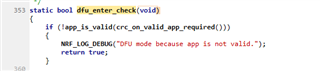
    If you are developing your application and need to update the application, you can modify the dfu_enter_check() in the nrf_bootloader.c to remove the CRC check on each boot: 

    If you comment out this or change it to return false then the bootloader will enter the app regardless if it's been modified and flashed via the debugger/programmer. 

    After this modification, you can just flash both bootloader and application to the flash. Then you can modify and debug the application as normal. 

    Another option is to autogenerate a bootloader setting that matched with your new app. Then flash both the app and the bootloader setting via the debugger/programmer. 


  • Thank you Hung,

    I went through modifying nrf_bootloader.c and it works fine. Could you please verify the following step sequence to perform buttonless OTA DFU?

    First time flashing:

    1. Build the app

    2. Generate the bootloader settings

    3. Merge and flash app + settings + bootloader + sd

    If I want to update the firmware:

    1. Update and build the firmware

    2. Generate the .zip file

    3. Start secure DFU

    This is the correct sequence?

  • Hi Nikos, 
    Yes it's the correct sequence for an image to be used in an end product. Please don't forget to remove the modification that I suggested in previous reply after you are done with the development. 

Reply Children
Related