This discussion has been locked.
You can no longer post new replies to this discussion. If you have a question you can start a new discussion

SDK 16 nRF52840 Buttonless DFU - How to debug the app

Hi guys,

I am experimenting with OTA buttonless DFU.

I included the Buttonless Secure DFU Service to my application and I managed to flash the new image over the air through buttonless DFU

Now, what if I want to include new features in my application and debug it? I can't just build and debug the application because it requires the secure bootloader to be flashed.

How can I work around this?

Parents
  • Hi Nikos, 

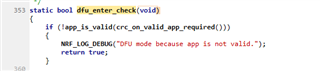
    If you are developing your application and need to update the application, you can modify the dfu_enter_check() in the nrf_bootloader.c to remove the CRC check on each boot: 

    If you comment out this or change it to return false then the bootloader will enter the app regardless if it's been modified and flashed via the debugger/programmer. 

    After this modification, you can just flash both bootloader and application to the flash. Then you can modify and debug the application as normal. 

    Another option is to autogenerate a bootloader setting that matched with your new app. Then flash both the app and the bootloader setting via the debugger/programmer. 


  • Thank you Hung,

    I went through modifying nrf_bootloader.c and it works fine. Could you please verify the following step sequence to perform buttonless OTA DFU?

    First time flashing:

    1. Build the app

    2. Generate the bootloader settings

    3. Merge and flash app + settings + bootloader + sd

    If I want to update the firmware:

    1. Update and build the firmware

    2. Generate the .zip file

    3. Start secure DFU

    This is the correct sequence?

  • Hi Nikos, 
    Yes it's the correct sequence for an image to be used in an end product. Please don't forget to remove the modification that I suggested in previous reply after you are done with the development. 

  • Thank you Hung,

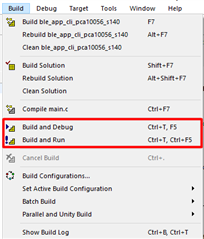
    When we update the app and download it to the target through "Build and Debug" or "Build and Run", why we do not need to flash the bootloader and the settings again?

    I mean, we flash the bootloader and the settings during the first time flashing through nrfjprog. When we update or debug the app through SES, the bootloader and the settings are not erased from the memory?

  • Hi Nikos, 

    No, the bootloader and bootloader setting is located at different place from the application. See the memory layout here

    When you do "build and run" or "build and debug" SES will only erase the area that the application occupied and leave the other area untouched. 

    If you want to erase the entire chip please follow the commands here: https://infocenter.nordicsemi.com/topic/ug_gsg_ses/UG/gsg/erase_board_ses.html?cp=1_0_2_6_0

  • That's clear!! Thank you a lot Slight smile

Reply Children
No Data
Related