Beware that this post is related to an SDK in maintenance mode
More Info: Consider nRF Connect SDK for new designs

Debugging strategy: how to make the OB JLink on nrf52dk work seamlessly (across several programs...)

Hello all

I am playing around with the nrf52dk for the last 14days, done some progress, namely the TWI is working and I can read the sensor and printing its values in the debugger inside, when the emStudio is working, without a problem, I have even started to use the RTT, indeed, JScope works all good...

The major problem I am having is with the " Debug terminal " within the emStudio. The JLink has to be reset all most every time after the programm has been flashed... how to make this stable? I am using basic nrf_log...  In addition, if you develop the RTT , do you even bother with this terminal? Or should I rather switch to the UART, putty and alike, what is the strategy usually with regard to the debugging processes ? However, I am not sure , can both be used at the same time :)

In previous setup the Arduino's pritnout and plotter was used and its design was just good enough to get the job done, indeed, the JScope looks much more sophisticated, faster, etc. however, I would like to have an option to define the thickness of the line in JScope, I still did not figure out how to use the zoom on y axis... 

So far I am running the program from the emStudio , and scanning is done in the JScope, however, can this be synchronized and automatically use the preview in JScope... etc.

Please let me know what kind of a strategy are you using when debugging? Maybe I am not using the code properly, and is this why the emStudio debugging terminal has issues, needs to be reset almost every time, a bit annoying ...  , or is something else , has any of you experienced similar issues? 

Best.

Parents
  • Hello,

    The major problem I am having is with the " Debug terminal " within the emStudio. The JLink has to be reset all most every time after the programm has been flashed...

    When the chip is reset, you need to reconnect the RTT viewer (or JScope, if that is what you are using). To be honest, I haven't seen JScope before now. Are you using this for logging, or to monitor the value of variables?

    I am not 100% sure of what you mean in this post, but I'll take a guess, so please correct me if I misunderstood.

    My understanding is that you want to monitor the log, and you have tried to monitor the RTT log using an "external" tool, like RTT Viewer while you are debugging in Segger Embedded Studio (SES), is that correct?

    As you may have noticed, we have two log backends. RTT and UART. Because of what you describe, I actually prefer to use the UART unless I need the UART for something else in the application, or if I need to log a lot very fast. In those cases, the RTT log is superior. 

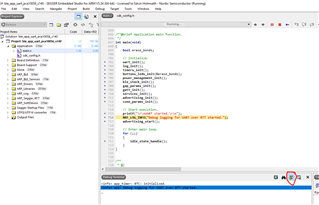
    However, when you reset or reprogram the nRF chip, you'll need to reconnect the RTT viewer, which is kind of annoying. But if you are using SES, then you can actually use the debug view to monitor the log:

    However, for some reason all of our SDK examples (I am assuming you are using the nRF5 SDK) have a configuration in sdk_config.h that some versions of Segger Embedded Studio doesn't like. If you have enabled the log in sdk_config.h, and use the RTT backend:

    #define NRF_LOG_ENABLED 1
    
    #define NRF_LOG_BACKEND_RTT_ENABLED 1
    

    And you don't see any log when you start a debug session, please look for this config in sdk_config.h, and set it to 0:

    #define NRF_FPRINTF_FLAG_AUTOMATIC_CR_ON_LF_ENABLED 1
    
    // Change it to:
    
    #define NRF_FPRINTF_FLAG_AUTOMATIC_CR_ON_LF_ENABLED 0

    And you should see the log in your debug view in SES.

    That being said, if you set a breakpoint after the softdevice (Bluetooth Low Energy stack) has started, you need to reset the application in order to continue, because the softdevice will miss several timing critical operations, and it will crash if you just continue after a breakpoint.

    Looking at JScope, it looks like a nice tool, but I have never seen it being used before. Did you use this with the nRF? If so, what are you using it for?

    BR,

    Edvin

Reply
  • Hello,

    The major problem I am having is with the " Debug terminal " within the emStudio. The JLink has to be reset all most every time after the programm has been flashed...

    When the chip is reset, you need to reconnect the RTT viewer (or JScope, if that is what you are using). To be honest, I haven't seen JScope before now. Are you using this for logging, or to monitor the value of variables?

    I am not 100% sure of what you mean in this post, but I'll take a guess, so please correct me if I misunderstood.

    My understanding is that you want to monitor the log, and you have tried to monitor the RTT log using an "external" tool, like RTT Viewer while you are debugging in Segger Embedded Studio (SES), is that correct?

    As you may have noticed, we have two log backends. RTT and UART. Because of what you describe, I actually prefer to use the UART unless I need the UART for something else in the application, or if I need to log a lot very fast. In those cases, the RTT log is superior. 

    However, when you reset or reprogram the nRF chip, you'll need to reconnect the RTT viewer, which is kind of annoying. But if you are using SES, then you can actually use the debug view to monitor the log:

    However, for some reason all of our SDK examples (I am assuming you are using the nRF5 SDK) have a configuration in sdk_config.h that some versions of Segger Embedded Studio doesn't like. If you have enabled the log in sdk_config.h, and use the RTT backend:

    #define NRF_LOG_ENABLED 1
    
    #define NRF_LOG_BACKEND_RTT_ENABLED 1
    

    And you don't see any log when you start a debug session, please look for this config in sdk_config.h, and set it to 0:

    #define NRF_FPRINTF_FLAG_AUTOMATIC_CR_ON_LF_ENABLED 1
    
    // Change it to:
    
    #define NRF_FPRINTF_FLAG_AUTOMATIC_CR_ON_LF_ENABLED 0

    And you should see the log in your debug view in SES.

    That being said, if you set a breakpoint after the softdevice (Bluetooth Low Energy stack) has started, you need to reset the application in order to continue, because the softdevice will miss several timing critical operations, and it will crash if you just continue after a breakpoint.

    Looking at JScope, it looks like a nice tool, but I have never seen it being used before. Did you use this with the nRF? If so, what are you using it for?

    BR,

    Edvin

Children
No Data
Related