I am having trouble powering my uicc. I feel like I am just looking for some setting, but I have not found the right one yet and I am at a loss at this point.
What I have done is the following. I have flashed modem firmware to my nrf9160 ic (v1.3.1). I have taken an example application (cloud client) and an existing board configuration (thingy91_nrf9160) based on the SDK v1.9.0. I then edited the board configuration to our own custom board, basically removing everything from it but the bare necessary (gpio debug pin, i2c interface and the necessary flash configuration which I just left as is from the existing configuration). I added some RTT logging to my configuration and built and flashed the thing, expecting to at least get some information transfer going between the modem and uicc.
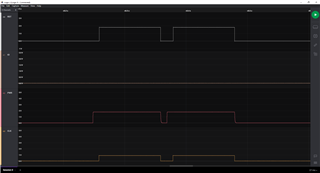
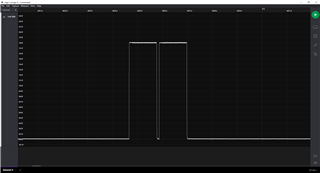
However, the modem seems to keep going into some sleep mode and is not powering my uicc. It turns on for a couple hundred ms and then turns off again. Then 30 seconds of nothingness, and the modem tries again. See the included capture of the uicc 1v8 line.
This goes with the following debug log:
Process: JLinkGDBServerCL.exe
D: RPC control base at 0x20008000 (0x4e8 bytes)
D: TX RPC memory at 0x200084e8 (0x2000 bytes)
D: RX RPC memory at 0x2000a4e8 (0x2000 bytes)
D: Trace RPC memory at 0x0 (0x0 bytes)
D: Application RPC descriptor at 0x20008000 (0x20 bytes)
D: Modem RPC descriptor at 0x20008020 (0x20 bytes)
D: Trace RPC descriptor at 0x0 (0x20 bytes)
D: Control list at 0x20008060 (0x44 bytes, 8 items)
D: Data list at 0x200080a4 (0x44 bytes, 8 items)
D: Control messages at 0x200080e8 (0x200 bytes, 8 items)
D: Data messages at 0x200082e8 (0x200 bytes, 8 items)
D: Application RPC descriptor in GPMEM 0x20008000
D: Application RPC descriptor at 0x20008000 is:
D: version: 0x10000
D: shmem_start: 0x2000a4e8
D: shmem_size: 0x2000
D: modem_desc: 0x20008020
D: trace_desc: 0x0
D: addr_ctrl: 0x20008060
D: addr_data: 0x200080a4
D: Modem RPC data: 0x2000a56c
D: Modem RPC ctrl: 0x2000a4e8
D: Libmodem v1.5.0-2-g9d10b74f1430 initialized.
*** Booting Zephyr OS build v2.7.99-ncs1  ***
D: AT CMD: AT%%XMODEMTRACE=0
D: Sending cmd: "AT%XMODEMTRACE=0"
D: AT CMD: AT%%XMAGPIO
D: Sending cmd: "AT%XMAGPIO"
D: AT CMD: AT%%XCOEX0
D: Sending cmd: "AT%XCOEX0"
D: MAGPIO successfully configured
I: Cloud client has started
D: Sending cmd: "AT+CGSN"
D: Sending cmd: "AT%MDMEV=1"
D: Sending cmd: "AT%XSYSTEMMODE?"
D: Sending cmd: "AT%XSYSTEMMODE=1,0,0,1"
D: System mode (1) and preference (1) configured
D: Sending cmd: "AT+CEREG=5"
D: Sending cmd: "AT+CSCON=1"
D: Sending cmd: "AT+CEREG?"
D: Sending cmd: "AT+CFUN?"
D: Sending cmd: "AT%XSYSTEMMODE=1,0,0,1"
D: Sending cmd: "AT+CEREG=5"
D: Sending cmd: "AT+CSCON=1"
D: Sending cmd: "AT+CFUN=1"
I: Connecting to LTE network, this may take several minutes...
D: +CEREG notification: +CEREG: 90

D: Network registration status: 90
D: LTE mode not found, error code: -22
D: Dispatching events:
D:  - handler=0x0001B201
D: Done
D: Dispatching events:
D:  - handler=0x0001B201
D: LTE cell changed: Cell ID: -1, Tracking area: -1
D: Done
The same happens with two SIM cards, both seen working in a Thingy91. Measuring 1V8 to the card on the Thingy91 board also revealed that the voltage there is a continuous 1V8.
At this point I have gone through the Kconfig a couple of times scanning for any sleep or power management configurations, but with no luck so far.
Can anyone point me in the direction of some sleep/powermanagement setting/documentation which might cause behaviour like this.