

Hi, I downloaded a project from Git. I tried to open in SES using nRF Connect SDK. During the initial Cmake, the error occurs as shown in attached image.
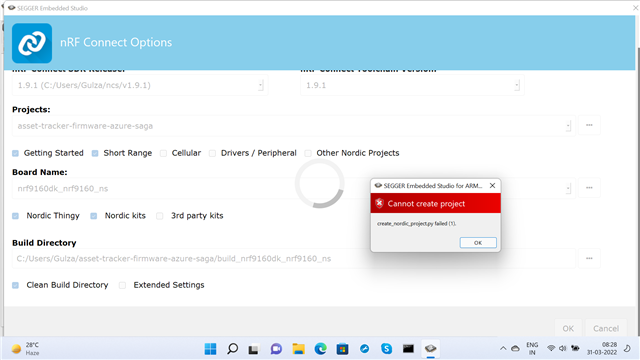
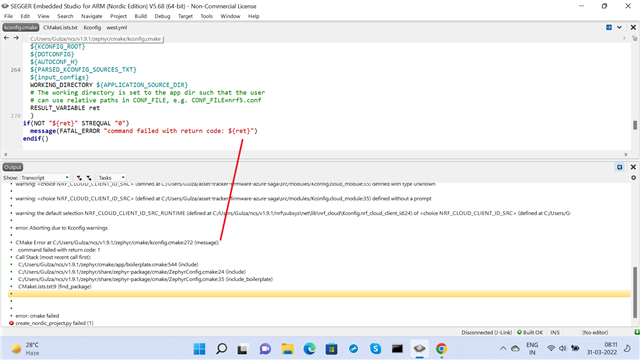
Hi, I downloaded a project from Git. I tried to open in SES using nRF Connect SDK. During the initial Cmake, the error occurs as shown in attached image.
Hi,
Could you give me a link to the project you downloaded? There seems to be some issues in the Kconfig files.
Hi, after making changes in Extra Settings, as suggested by you, the project got created. When, Build is RUN, the following error occurs
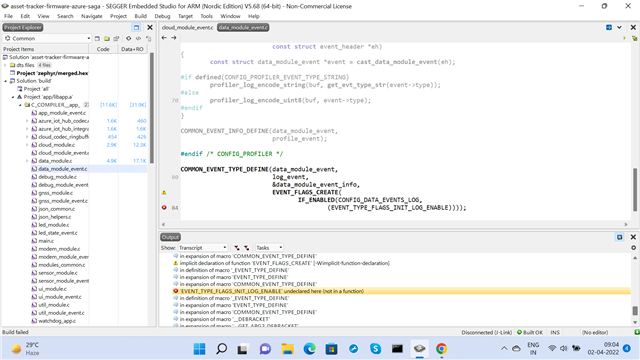
Yes, I tested in 1.9.1 also. Error appears, but the line number changes.
In 1.7.1 the error is .... /cmake/Kconfig.cmake: 209
in 1.9.1 /cmake/Kconfig.cmake: 213
in both case project is not created and opened.
Then, I copied azure-tracker-cloud-firmware-azure.conf file from the Git Asset_tracker and pasted in deafult asste_tracker_v2 folder. The project is created and opened but now Build error asking DPS_ID scope.
what changes should I make in azure_iot_hub_dps.c file so that azure cloud coonectivity is achieved ?
Do not add the conf file from another project.
You should go through the Getting Started section of the documentation that I linked, there you will set up Azure and get the value to should set CONFIG_AZURE_IOT_HUB_DPS_ID_SCOPE to.
Do not add the conf file from another project.
Where is the azure-tracker-cloud-firmware-azure.conf file in asset_tracker_v2 ..?
There are multiple versions of the application, and the version in 1.9.1 does not have that config file. So you can remove that file from the CMake Build Options when you are building the version found in 1.9.1.
Be sure to set the mandatory configs in overlay-azure.conf, as described in the sample's documentation: https://developer.nordicsemi.com/nRF_Connect_SDK/doc/1.9.1/nrf/applications/asset_tracker_v2/doc/cloud_module.html#mandatory-configurations
1. How to remove/ exclude the commands issued using Extra Settings while opening/ creating a project ?
2. In which file are the external settings saved after creation/ opening of project ?
3. Is it possible to manually edit the settings in file which were provided by extra settings option ?
1. How to remove/ exclude the commands issued using Extra Settings while opening/ creating a project ?
2. In which file are the external settings saved after creation/ opening of project ?
3. Is it possible to manually edit the settings in file which were provided by extra settings option ?
mexco said:1. How to remove/ exclude the commands issued using Extra Settings while opening/ creating a project ?
If you look at what you are writing in Extra CMake Build Options, you will see that the part after the '=' character is a list of config files separated by semicolons, if you remove azure-tracker-cloud-firmware-azure.conf, you are left with:
-DOVERLAY_CONFIG=overlay-azure.conf;overlay-debug.conf
These files are merged with prj.conf to create the full list of configs.
mexco said:2. In which file are the external settings saved after creation/ opening of project ?
Not entirely sure what you mean here, but the full list of config values used in the project can be found in the build folder. In <BUILD>/zephyr/.config and also with a different format in <BUILD>/zephyr/include/generated/autoconf.h
mexco said:3. Is it possible to manually edit the settings in file which were provided by extra settings option ?
Yes, you must edit overlay-azure.conf and add the correct values for your Azure Cloud in order to run the sample.

