This discussion has been locked.
You can no longer post new replies to this discussion. If you have a question you can start a new discussion

nRF52840 to nRF52833 code migration and long range test

Hi All!

I am using Segger Embedded Studio and nRF5_SDK_v15.0.0 .Available kits for testing are nrf52833DK and rak4630(nrf52840).

We want to test nRF52833 support on long-range. I referred to https://github.com/NordicPlayground/nRF52-ble-long-range-demo. In this link, code is available for the nrf52840. I tried to migrate the code for the scanner from nrf52840 to nrf52833. I tried to migrate it, but it generated errors like missing  pca10100.h / nrf52833.h and other files. I added all the missing files but still the error. Although migration from 52840 to 52833 is simple, we just have to change a few parameters in the .emproject file and it worked for me with other examples but not with this. Before that, I tried this link   https://devzone.nordicsemi.com/f/nordic-q-a/65136/migration-from-nrf52840-to-nrf52833  to migrate the code for other examples it worked perfectly for me.

I faced the following issues the first time while migrating the code.

nrf52833.h header files and the other two files were missing as shown in the image below. I added the files after that more errors occurred to show the missing files I added almost 10 files but still no success.
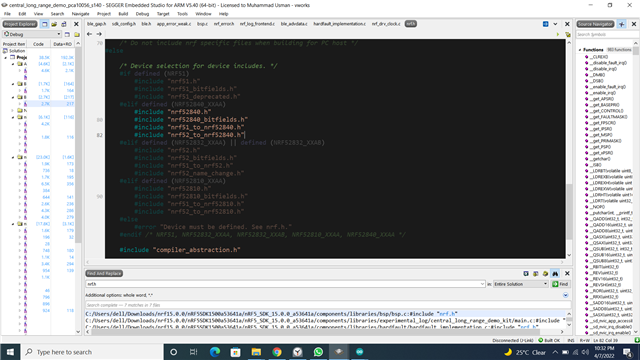
Is there any easy /alternate method to migrate the code for this type of situation? 

Parents
  • Hello,

    SDK 15.0.0 did not have support for the nRF52833 IC, so porting the project would require some additional patching of the SDK as well as setting up the project. It would be better to start with the latest nRF5 SDK (v17.1.0 at time of writing) and either port the long range sample to it, or make a new one based on existing sdk examples. The 'pca10100' configurations you will find in this SDK are configured for the 52833 ic.

    The diffs below show the few changes you can make to the  Nordic UART Service Client & UART/Serial Port Emulation over BLE  SDK example to use the long range mode if want to try that.

    diff --git a/examples/ble_peripheral/ble_app_uart/main.c b/examples/ble_peripheral/ble_app_uart/main.c
    index 36d1a82..1e8f88b 100644
    --- a/examples/ble_peripheral/ble_app_uart/main.c
    +++ b/examples/ble_peripheral/ble_app_uart/main.c
    @@ -616,12 +616,15 @@ static void advertising_init(void)
         init.advdata.include_appearance = false;
         init.advdata.flags              = BLE_GAP_ADV_FLAGS_LE_ONLY_LIMITED_DISC_MODE;
     
    -    init.srdata.uuids_complete.uuid_cnt = sizeof(m_adv_uuids) / sizeof(m_adv_uuids[0]);
    -    init.srdata.uuids_complete.p_uuids  = m_adv_uuids;
    +    init.advdata.uuids_complete.uuid_cnt = sizeof(m_adv_uuids) / sizeof(m_adv_uuids[0]);
    +    init.advdata.uuids_complete.p_uuids  = m_adv_uuids;
     
         init.config.ble_adv_fast_enabled  = true;
         init.config.ble_adv_fast_interval = APP_ADV_INTERVAL;
         init.config.ble_adv_fast_timeout  = APP_ADV_DURATION;
    +    init.config.ble_adv_primary_phy   = BLE_GAP_PHY_CODED;
    +    init.config.ble_adv_secondary_phy = BLE_GAP_PHY_CODED;
    +    init.config.ble_adv_extended_enabled = true;
         init.evt_handler = on_adv_evt;
     
         err_code = ble_advertising_init(&m_advertising, &init);
    

    diff --git a/examples/ble_central/ble_app_uart_c/main.c b/examples/ble_central/ble_app_uart_c/main.c
    index 62dac2c..e0a3023 100644
    --- a/examples/ble_central/ble_app_uart_c/main.c
    +++ b/examples/ble_central/ble_app_uart_c/main.c
    @@ -179,11 +179,29 @@ static void scan_init(void)
     {
         ret_code_t          err_code;
         nrf_ble_scan_init_t init_scan;
    +    ble_gap_scan_params_t scan_params;
    +
    +    memset(&scan_params, 0, sizeof(scan_params));
    +
    +    scan_params.extended      = 1;
    +    scan_params.active        = 1;
    +#if (NRF_SD_BLE_API_VERSION > 7)
    +    scan_params.interval_us   = NRF_BLE_SCAN_SCAN_INTERVAL * UNIT_0_625_MS;
    +    scan_params.window_us     = NRF_BLE_SCAN_SCAN_WINDOW * UNIT_0_625_MS;
    +#else
    +    scan_params.interval      = NRF_BLE_SCAN_SCAN_INTERVAL;
    +    scan_params.window        = NRF_BLE_SCAN_SCAN_WINDOW;
    +#endif // #if (NRF_SD_BLE_API_VERSION > 7)
    +    scan_params.timeout       = NRF_BLE_SCAN_SCAN_DURATION;
    +    scan_params.filter_policy = BLE_GAP_SCAN_FP_ACCEPT_ALL;
    +    scan_params.scan_phys     = NRF_BLE_SCAN_SCAN_PHY;
     
         memset(&init_scan, 0, sizeof(init_scan));
     
         init_scan.connect_if_match = true;
         init_scan.conn_cfg_tag     = APP_BLE_CONN_CFG_TAG;
    +    init_scan.p_scan_param = &scan_params;
    +
     
         err_code = nrf_ble_scan_init(&m_scan, &init_scan, scan_evt_handler);
         APP_ERROR_CHECK(err_code);
    diff --git a/examples/ble_central/ble_app_uart_c/pca10100/s140/config/sdk_config.h b/examples/ble_central/ble_app_uart_c/pca10100/s140/config/sdk_config.h
    index 0c2fa1a..615a249 100644
    --- a/examples/ble_central/ble_app_uart_c/pca10100/s140/config/sdk_config.h
    +++ b/examples/ble_central/ble_app_uart_c/pca10100/s140/config/sdk_config.h
    @@ -237,7 +237,7 @@
     #endif
     // <o> NRF_BLE_SCAN_BUFFER - Data length for an advertising set. 
     #ifndef NRF_BLE_SCAN_BUFFER
    -#define NRF_BLE_SCAN_BUFFER 31
    +#define NRF_BLE_SCAN_BUFFER 255
     #endif
     
     // <o> NRF_BLE_SCAN_NAME_MAX_LEN - Maximum size for the name to search in the advertisement report. 
    @@ -294,7 +294,7 @@
     // <255=> BLE_GAP_PHY_NOT_SET 
     
     #ifndef NRF_BLE_SCAN_SCAN_PHY
    -#define NRF_BLE_SCAN_SCAN_PHY 1
    +#define NRF_BLE_SCAN_SCAN_PHY 4
     #endif
     
     // <e> NRF_BLE_SCAN_FILTER_ENABLE - Enabling filters for the Scanning Module.
    

    (note: for more range you can also increase the TX output power to +8dBm like in the example you referred to)

  • Hi @Vidar Berg!

    Thank you again for your nice support and detailed answer! I will try it and update the forum soon!

    Regards,

    Muhammad Usman

Reply Children
Related
