This discussion has been locked.
You can no longer post new replies to this discussion. If you have a question you can start a new discussion

Route UART2 to external headers (not VCOM2)

Hi there, 

We are running the Serial LTE Modem sample on the nrf9160 DK. We are currently communicating AT commands via the USB cable and VCOM2.

However we would like to route these uart lines to the external pins, so that we can communicate with it from a different CPU. Our understanding is that we need to program P1.12 on the nrf52 to "0"? Is this indeed the case? How does one go about doing this? A switch would be a lot easier...

What firmware is by default running on the nrf52, if any, so that we can edit the correct firmware and not overwrite anything incorrectly.

Also, how do we route the uart signals on the nrf5340 DK to the external pins?

Regards,

Frikkie

Parents
  • Hi Frikkie

    For the nRF52 on the nRF9160DK, see This case.

    To change pins for the UART, you need to add board overlay files. See Devicetree HOWTOs and the our for example "nrf/samples/peripherals/lpuart/boards/".

    Regards,
    Sigurd Hellesvik

  • Thanks Sigurd, I honestly hope this does not take too long. This is quite an unnecessarily complicated system.

    And how do we route the uart to the external headers on the nrf5340 DK?

  • Hi Sigurd,

    Sorry for the late response, other items had higher priority and I can focus on this part now.

    For the nRF52 on the nRF9160DK, see This case.

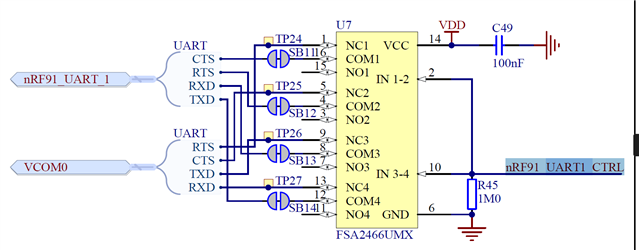
    Can you please advise how we get this source code into a project? We are having real frustating experiences with the nordic tools and Segger Embedded Studio.  Anyways, we simply only want to change the state of the nrf91_UART1_CTRL pin so that the UART signals are not routed to VCOM0:

    This only requires setting the state of a GPIO pin according to me? No board overlay files should be needed? We simply just want the get the source code provided in this case into a SES project so that we can change the state of the pin and program the nrf52 correctly as to not break the behavior of the entire devkit.

    Can you please provide us with such a project setup or at least just how we can add it to a project.

  • Hi

    To clarify:

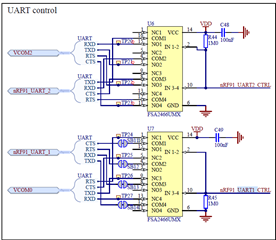
    The figure you post are of UART1.
    The original post is asking for UART2.

    Is it important for you which UART is routed to the external pins?

    Regards,
    Sigurd Hellesvik

  • Hi Sigurd, 

    It does not matter which UART really. We just want to be able to program the nrf91_UARTX_CTRL pins in order to disconnect the UART from the interface MCU.

    These pins are connected to the nrf52 on the DK. 

    We are thus looking for a project containing the source code that is running by default on the nrf52, so that we can edit the states of these pins.

    (By the way the signals are alreaddy routed the the external pins which we can access, however while the signals are also connected to the interface MCU, we are getting a lot of noise on the pins. When disconnecting the interface MCU, the signals work fine, but we want to have the interface MCU on in order to debug)

  • Hi

    The devicetree has its own function to toggle this, see Board controller firmware.

    From this:

    "

    And if you want to, for example, disable routing for the VCOM2 pins, add the following:

    &vcom2_pins_routing {
            status = "disabled";
    };

    "

    The same would be for vcom0.

    When doing this, you would build for the nRF52840 on the 9160DK, as it is the one controlling the pins. (nrf9160dk_nrf52840)
    I suggest putting the code above into a file in your project named boards/nrf9160dk_nrf52840.overlay.

    Is this what you are looking for?

    Regards,
    Sigurd Hellesvik

  • Hi Sigurd,

    The devicetree has its own function to toggle this, see Board controller firmware.

    From the description of the board controller firmware, this does indeed seem to be what we are looking for. 

    I suggest putting the code above into a file in your project named boards/nrf9160dk_nrf52840.overlay.

    We do not have a project for the nrf52. That is exactly what we are trying to figure out, what project should be loaded onto the nrf52.

    Can it be any random project (e.g. blinky etc.) to which we can just add the .overlay file, or should it be an empty project? Or is there a "Board Controller Firmware" example project which we can just not find?

Reply
  • Hi Sigurd,

    The devicetree has its own function to toggle this, see Board controller firmware.

    From the description of the board controller firmware, this does indeed seem to be what we are looking for. 

    I suggest putting the code above into a file in your project named boards/nrf9160dk_nrf52840.overlay.

    We do not have a project for the nrf52. That is exactly what we are trying to figure out, what project should be loaded onto the nrf52.

    Can it be any random project (e.g. blinky etc.) to which we can just add the .overlay file, or should it be an empty project? Or is there a "Board Controller Firmware" example project which we can just not find?

Children
Related