CRC on the nrf52840

Hello!

Regarding the CRC on the nrf52840 the specifications make it clear that the maximum length of the CRC is 3 bytes, We are working on an industrial communication protocol that we want to implement on the nrf52840. This protocol needs 4 bytes crc (crc32), is there a workaround for this? 

Thanks! 

Parents
  • Hello,

    The 3 byte CRC is first and foremost the standard of Bluetooth Low Energy, and not specific for the nRF52840.

    For a 4 byte CRC, check out the function crc32_compute() found in nRF5 SDK 17.1.0\components\libraries\crc32\crc32.c

    If you are using a different nRF5 SDK version, you will probably find something similar. If you are using NCS (and not the nRF5 SDK), there is probably something similar to that as well. In that case, please let me know if you can't find it.

    Best regards,

    Edvin

  • So to clarify what you are suggesting, the nrf52840 is capable of a 4-byte crc? Do you just need to configure it in such a way?

    Am I understanding you correctly?

  • I see, I will try to summarize the timing scheme within the IO-Link Wireless protocol as much as I can. 

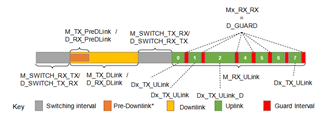
    Down below a picture of a sub-cycle between master and slave is shown. This is a scheme that show a complete communication exchange between master and slave. 

    As you can see the yellow part is the downlink (master to slave), and the green parts are the uplinks (slave to master). So a downlink is sent from the master and received by all slaves, and then, the uplinks are returned in a special order to the master.

    At the end of each uplink and downlink the IO-Link Wireless protocol requires a 4 byte CRC. Note that between each green slot, there is a red interval to avoid collision on air (guard interval). This guard interval is 8 us, which means that the master (considering this software solution) needs to be able to calculate a 4 byte CRC within LESS than 8 us

    So, we are very interested in knowing if the CPU is able to do this. Can it calculate a 4 byte CRC this fast? Is there a way to measure the processors execution time? I looked online and it seems to be a bit more complicated that I thought. Please let me know if this information that I have just provided is not sufficient for you to be able to determine weather or not this is possible.

    Thanks a lot Edvin for you inputs really means a grate deal for us 

    BR


  • Is there a CRC after each of the green sections (before the red sections)? Or is it a CRC after the entire thing in the picture? And is the CRC dependent on the downlink, or can you generate it before the downlink?

    kongstrupp said:
    This guard interval is 8 us, which means that the master (considering this software solution) needs to be able to calculate a 4 byte CRC within LESS than 8 us

    I did not forget to answer this, but I don't know how long it takes. You would need to test this. I guess it depends on what else the nRF is doing at the time, and even if it is doing this as the highest priority I don't know how long this function call will take. It probably depends on the length of what you need to generate the CRC of. Before you ask, I don't know how large a packet you could generate a 4byte CRC below 8µs is either. You need to test.

  • Yes there is a CRC after each of the green sections, Yes, the total length of the downlink is 52 bytes. Which means the CRC will be calculated on the 43 bytes of the downlink since preamble and syncword  does not count (5 bytes) and  i assume that you dont count CRC on CRC. So 52-9 = 43 

    Here you can see a picture of an uplink (the green slots in the picture above) and after that a D_GUARD which is 8 us 

    How do you test this in a sufficent way? I assume that you would just use the crc32_compute() function. So maybe generate a hello_world program and do something like this:

    #include <stdio.h>
    #include <time.h>       // for time()
    #include <unistd.h>     // for sleep()
     
    // main function to find the execution time of a C program
    int main()
    {
        time_t begin = time(NULL);
     
        crc32_compute() // some bytes to do CRC on
        sleep(3);
     
        time_t end = time(NULL);
     
        // calculate elapsed time by finding difference (end - begin)
        printf("The elapsed time is %d seconds", (end - begin));
     
        return 0;
    }
    this could to be a way of doing it, but it does not seem to work in nrf connect extension in VScode.
    What do you suggest?
    Best regards

  • This can be one way of doing it.

    kongstrupp said:
    this could to be a way of doing it, but it does not seem to work in nrf connect extension in VScode.
    What do you suggest?

    Why does it not work? Does it not compile? Is it not able to calculate the time? 

    I am not that familiar with the time libraries in NCS. Another simple way to test this is to toggle a pin before and after the calculations (crc32_compute()), and then monitor this using a logic analyzer or an oscilloscope. 

  • No I think the libraries does not support it. I am currently looking into a soft way of doing it, I need some kind of function that would help me do what is described above. Yes that is one way of doing it, I will have to look into it more

Reply Children
  • I see that you created a new ticket, where a colleague of mine answered one way to measure the time. However, this will work for ms (seconds/1000), but you probably want a higher resolution.

    I am not sure whether there are any libraries in Zephyr that you can use to measure µs, but you can use the TIMER peripheral.

    Try running this function from the hello world sample:

    void test_timer(void)
    {
        uint32_t sample_1;
        uint32_t sample_2;
        // Configure and start timer:
        NRF_TIMER3->BITMODE     = TIMER_BITMODE_BITMODE_32Bit << TIMER_BITMODE_BITMODE_Pos;
        NRF_TIMER3->MODE        = TIMER_MODE_MODE_Timer << TIMER_MODE_MODE_Pos;
        NRF_TIMER3->PRESCALER   = 0;
        NRF_TIMER3->TASKS_START = 1;
    
        NRF_TIMER3->TASKS_CAPTURE[0] = 1;   // Take first timestamp
        k_sleep(K_MSEC(1000));              // Do something that takes time
        NRF_TIMER3->TASKS_CAPTURE[1] = 1;   // Take second timestamp
    
        sample_1 = NRF_TIMER3->CC[0];       // Read out first timestamp
        sample_2 = NRF_TIMER3->CC[1];       // Read out second timestamp
    
        uint32_t diff_time = sample_2 - sample_1;   // Calculate diff
    
        LOG_INF("test_timer used %d ticks.", diff_time);    // Note that clock ticks at 16 000 000 Hz
    }

    Just copy this function and call it from main.c. 

    As I wrote in the last comment in this snippet, note that the TIMER is running at 16MHz, so 1 second = 16000000 ticks, which means that 1µs would be 16 ticks. This is the highest resolution you can get with a timer onboard the nRF52840.

    BR,

    Edvin

  • Thanks a lot Edvin!!! 

    This is great, When doing the crc32_compute I got 3 ticks which is less than 1 µs, do you think this is legit? It seems really really fast.

    If its legit it means that the algorithm is really fast in itself, but then it becomes a question if it could be used on received packets in the radio an how long that takes. 

    Just posting the code that I used:

    uint32_t crc32_compute(uint8_t const * p_data, uint32_t size, uint32_t const * p_crc)
    {
        uint32_t crc;

        crc = (p_crc == NULL) ? 0xFFFFFFFF : ~(*p_crc);
        for (uint32_t i = 0; i < size; i++)
        {
            crc = crc ^ p_data[i];
            for (uint32_t j = 8; j > 0; j--)
            {
                crc = (crc >> 1) ^ (0xEDB88320 & -(crc & 1));
            }
        }
        return ~crc;
    }


    void test_timer(void)
    {
        uint32_t sample_1;
        uint32_t sample_2;
        // Configure and start timer:
        NRF_TIMER3->BITMODE     = TIMER_BITMODE_BITMODE_32Bit << TIMER_BITMODE_BITMODE_Pos;
        NRF_TIMER3->MODE        = TIMER_MODE_MODE_Timer << TIMER_MODE_MODE_Pos;
        NRF_TIMER3->PRESCALER   = 0;
        NRF_TIMER3->TASKS_START = 1;


        uint8_t packetCRC[43];

        for (uint8_t i = 0; i < sizeof(packetCRC) - 1; i++) {
            packetCRC[i + 1] = 0xCC;
        }


        NRF_TIMER3->TASKS_CAPTURE[0] = 1;   // Take first timestamp
        crc32_compute(packetCRC,sizeof(packetCRC),NULL); // Do something that takes time
        NRF_TIMER3->TASKS_CAPTURE[1] = 1;   // Take second timestamp

        sample_1 = NRF_TIMER3->CC[0];       // Read out first timestamp
        sample_2 = NRF_TIMER3->CC[1];       // Read out second timestamp

        uint32_t diff_time = sample_2 - sample_1;   // Calculate diff

        printk("test_timer used %d ticks.", diff_time);    // Note that clock ticks at 16 000 000 Hz
    }


    void main(void)
    {

    test_timer();


    }
Related