nRF Connect for Desktop v0.10.3 install SDK just only download toolchain

Hi 

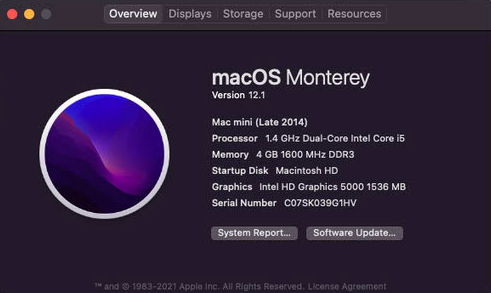
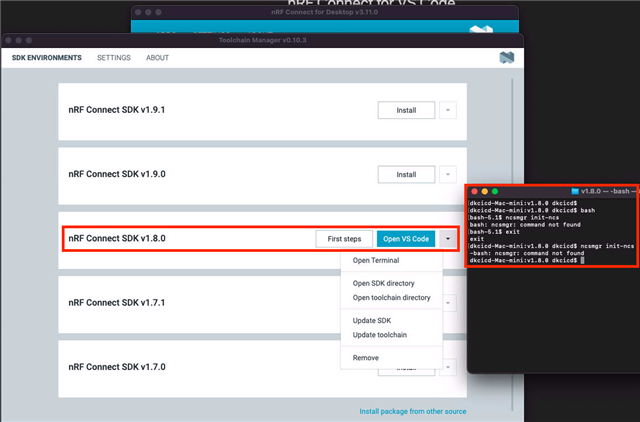
I used Toolchain Manager v0.10.3 to install nRF SDK v1.8.0 at Mac mini(Monterey - 12.1) two times get same issue.

The issue is Toolchain Manager just download toolchain only. 

  • Mac mini information:

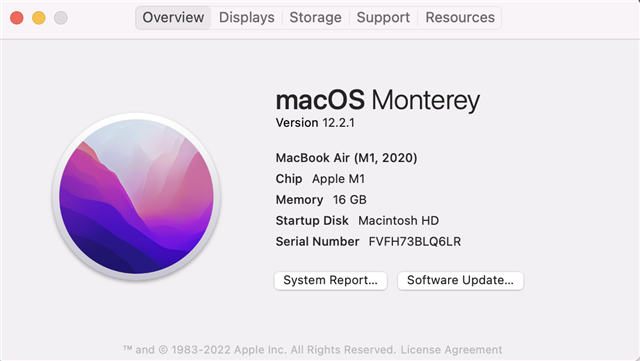
This is my another MacBook Air install folder.
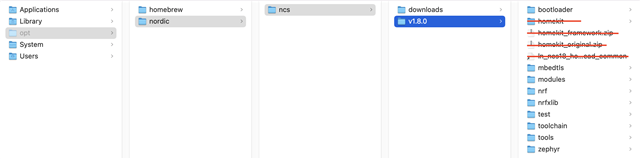
  

  • MacBook Air information:

I don't know why it different on 2 platform, do you have any suggestion that can auto install all SDK in my Mac mini?

Thanks,

Prince 

  • Hi Prince,

    Sometimes the SDK is not installed correctly due to VPN or being blocked by a strict firewall. Can you try following the steps in this comment by Markus? When the complete SDK is installed you should have the following folders:

    v1.9.1
    ├── bootloader
    ├── mbedtls ├── modules
    ├── nrf
    ├── nrfxlib
    ├── test
    ├── toolchain
    ├── tools └── zephyr

    Best regards,

    Marte

  • Hi Marte,

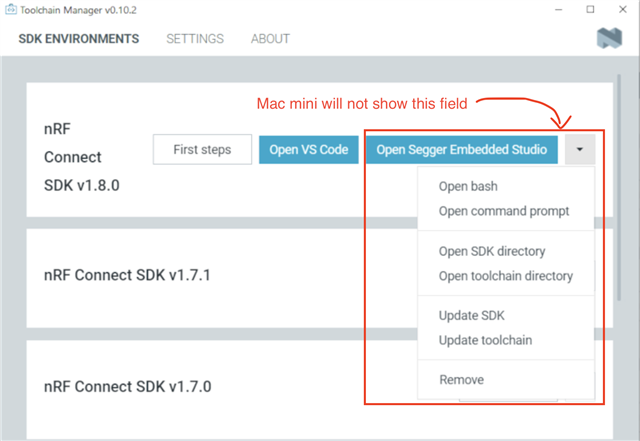
    I follow up the comment. But on Mac mini the GUI doesn't show ""

    The comment tutorial :

    Thanks,

    Prince

  • Hi Prince,

    Can you try updating both the toolchain and SDK using the buttons seen in your pictures? If this does not work, please try uninstalling the SDK completely and reinstalling it.

    Best regards,

    Marte

  • Unfortunately, the issue still exist after I did all processes.

    I dump the log file of Toolchain Manager v0.10.3, hope it will help.

    2022-04-11T01:23:30.073Z INFO Initializing environments...
    2022-04-11T01:23:30.273Z INFO Locally exsisting environment found at /opt/nordic/ncs/v1.8.0/toolchain
    2022-04-11T01:23:30.273Z INFO With version: v1.8.0
    2022-04-11T01:23:30.273Z INFO With west found: no
    2022-04-11T01:23:31.415Z DEBUG Application data folder: /Users/dkcicd/Library/Application Support/nrfconnect/pc-nrfconnect-toolchain-manager
    2022-04-11T01:23:45.897Z DEBUG iface: en0
    2022-04-11T01:23:45.897Z DEBUG IP4: 192.168.82.203
    2022-04-11T01:23:45.898Z DEBUG IP6: fe80::1423:7ba5:cecc:34bf
    2022-04-11T01:23:45.898Z DEBUG MAC: a8:60:b6:13:22:9e
    2022-04-11T01:23:45.899Z DEBUG Client Id: 7cdd651155bdac0aa3415c689de0dfb75105358b
    2022-04-11T01:23:45.902Z DEBUG Google Analytics for category pc-nrfconnect-toolchain-manager has initialized
    2022-04-11T01:23:45.917Z DEBUG App pc-nrfconnect-toolchain-manager v0.10.3 official
    2022-04-11T01:23:45.917Z DEBUG App path: /Users/dkcicd/.nrfconnect-apps/node_modules/pc-nrfconnect-toolchain-manager
    2022-04-11T01:23:45.917Z DEBUG nRFConnect 3.11.0, required by the app is (^3.7.0)
    2022-04-11T01:23:45.917Z DEBUG nRFConnect path: /Applications/nRF Connect for Desktop.app/Contents/Resources/app.asar
    2022-04-11T01:23:45.917Z DEBUG HomeDir: /Users/dkcicd
    2022-04-11T01:23:45.917Z DEBUG TmpDir: /var/folders/x0/mgcffgtn5g73pdj96tll75lc0000gq/T/
    2022-04-11T01:23:46.290Z INFO Using nrf-device-lib-js version: 0.4.5
    2022-04-11T01:23:46.290Z INFO Using nrf-device-lib version: 0.11.0
    2022-04-11T01:23:46.291Z INFO Using nrfjprog DLL version: 10.15.1
    2022-04-11T01:23:46.291Z INFO Using JLink version: JLink_V7.58b
    2022-04-11T01:23:47.402Z DEBUG Downloading index json with buffer length: 7347
    2022-04-11T01:23:47.524Z DEBUG Index json has been downloaded with result: [
        {
            "version": "v1.4.99-dev1",
            "toolchains": [
                {
                    "version": "20201207",
                    "name": "ncs-toolchain-v1.4.99-dev1-20201207-43d4695.dmg",
                    "sha512": "9eab039a75e8b2003e896b1a5832b642524fd225eb8b4d03fda4593e610785401e7600ac3f63533ea2bfee51bdd52eece0bb52073f79d20978ad3a01e5803d18"
                }
            ]
        },
        {
            "version": "v1.4.1",
            "toolchains": [
                {
                    "version": "20201215",
                    "name": "ncs-toolchain-v1.4.1-20201215-7ecf886.dmg",
                    "sha512": "9f8b07e1074177a3f821dc5b5eeccdf3af6cf7e38531db809ee5e185aeab12e5e7e92bf9ae7096ff2ec5be3d112bfacac90dea17ed02354c416d4404a1981d56"
                }
            ]
        },
        {
            "version": "v1.4.0",
            "toolchains": [
                {
                    "version": "20201030",
                    "name": "ncs-toolchain-v1.4.0-20201030-2750604.dmg",
                    "sha512": "b856df471eb8c05eef6bcadb1df0c8569d68b5da1f2e9f6bd5a7aaf80e35d4d02f615bba7bc10767abb88274d6d65e0e5565ea775831c0228170102d03c943fb"
                }
            ]
        },
        {
            "version": "v1.3.2",
            "toolchains": [
                {
                    "version": "20201012",
                    "name": "ncs-toolchain-v1.3.2-20201012-09b2ade.dmg",
                    "sha512": "2ba77cb1ab4e3f43c44214d653e78efb2b567d95faead5804aebaafeb7bba4691adc432d57f368aad2b8105b489e21cd640a9bd8af98a8697ed53d653f3b9dc1"
                }
            ]
        },
        {
            "version": "v1.3.1",
            "toolchains": [
                {
                    "version": "20200921",
                    "name": "ncs-toolchain-v1.3.1-20200921-509f057.dmg",
                    "sha512": "d02566fcd719b44db2985068e0d190d93876d8d867d53a8e0119de0a6060522a608305f2cf1bc61e3c89c7eb999e4cdfbad5654424e7cda746ff7cbf21438bb6"
                }
            ]
        },
        {
            "version": "v1.3.0",
            "toolchains": [
                {
                    "version": "20200618",
                    "name": "ncs-toolchain-v1.3.0-20200618-509f057.dmg",
                    "sha512": "a17558612678b33afd1b710a96e1ff68c56b7a75e52d63cd48f8781f8b9a8bca700e05e9a855d305d501a080ee930ebbda225df7f1b5575b1a0a8c5bef5f3621"
                }
            ]
        },
        {
            "version": "v1.3.0-rc1",
            "toolchains": [
                {
                    "version": "20200602",
                    "name": "ncs-toolchain-v1.3.0-rc1-20200602-dbcfd6c.dmg",
                    "sha512": "6d43ac2808ba3ba6a17e3f1c31eeb679886aa8a16fca6f3ad4b82077c66c3210e3c46581fc852da5fce07d098f170cc780cc05a41148ddf6a7032a0ff315307d"
                },
                {
                    "version": "20200609",
                    "name": "ncs-toolchain-v1.3.0-rc1-20200609-590da70.dmg",
                    "sha512": "2c58b3b2b4773da95ca95a2cea5e03ed48144b0d2dc0e03e00b06d8f65c56e5091d6b6410d78251ef5aa3bd03c8718cf5a04b5e8c7f3f08eadf1b518129dc708"
                }
            ]
        },
        {
            "version": "v1.4.2",
            "toolchains": [
                {
                    "version": "20210113",
                    "name": "ncs-toolchain-v1.4.2-20210113-7ecf886.dmg",
                    "sha512": "e4b9f8cac9e77305be89e3ea8b90dbcc22415e87379ff34c7c0cb0100c5109498167e22829e8bad5c01a84a84309467f970d7b4b8ecc46bf8b6724ef6f70e8cb"
                }
            ]
        },
        {
            "version": "v1.5.0-rc1",
            "toolchains": [
                {
                    "version": "20210215",
                    "name": "ncs-toolchain-v1.5.0-rc1-20210215-2c30941.dmg",
                    "sha512": "4c8c127c27ca67ac555f6d02c4bee3c50fc53d32fc6989a7158c2c95be87c2fb5b86b0953a8eb99342c6145b3fbfea035cda2e7e13d0b921868c63c7f1f4388f"
                }
            ]
        },
        {
            "version": "v1.5.0",
            "toolchains": [
                {
                    "version": "20210225",
                    "name": "ncs-toolchain-v1.5.0-20210225-607a0e0.dmg",
                    "sha512": "40d395b683c1b7680db30ba167a7d7742d2b756d7f7f8c2b4780091339f8141779b6e2d5f236b6e4ff13eba0ccf67a3240108ec76180950fbe2346a60220d404"
                }
            ]
        },
        {
            "version": "v1.5.1-rc1",
            "toolchains": [
                {
                    "version": "20210409",
                    "name": "ncs-toolchain-v1.5.1-rc1-20210409-96ab6aa.dmg",
                    "sha512": "c4b22656ce6e08b6881cd07fe446e75bb4400582f6dcf9d93e53feb116a1e3819a5d08dc0e87abaaf230054c8a396d5972b3573ad653f9bc5cdf479df336e5bc"
                }
            ]
        },
        {
            "version": "v1.5.1",
            "toolchains": [
                {
                    "version": "20210416",
                    "name": "ncs-toolchain-v1.5.1-20210416-96ab6aa.dmg",
                    "sha512": "b853cb30f76601ea9edefa2faade433280517b2262b1126efacf030c9c5582629b25974dfde4038327a5ffccc5a17a801597aee6e43f43767038abd3b8a89714"
                }
            ]
        },
        {
            "version": "v1.6.0",
            "toolchains": [
                {
                    "version": "20210701",
                    "name": "ncs-toolchain-v1.6.0-20210701-de414c8.dmg",
                    "sha512": "8aab26ffb89ff250882e272b262ddacc38fc1dc4cbec39f4e76468a0bfd899bc571caa1cb60b467e396422765fd207e8b48aaf48b25b0741ea375b39bd52d691"
                }
            ]
        },
        {
            "version": "v1.6.1",
            "toolchains": [
                {
                    "version": "20210907",
                    "name": "ncs-toolchain-v1.6.1-20210907-80db958.dmg",
                    "sha512": "b2e5c2da037e8ce577a799427b4a4bcc4a5d2608126bd152da4c52664e16cd2443528c040426163b7938f65c0c62dc80038ae76d74f72cb7b2e66fe9f254f6db"
                }
            ]
        },
        {
            "version": "v1.7.0",
            "toolchains": [
                {
                    "version": "20210923",
                    "name": "ncs-toolchain-v1.7.0-20210923-4c380d0.dmg",
                    "sha512": "6691fee7190f940e6adfa8fd2881ca14bae2a299671a58e21b8a1727944bf31542f62b97adb8c81c32d1baed03badfb96247de5d71f24052f00fc0f62124d5ec"
                }
            ]
        },
        {
            "version": "v1.7.1",
            "toolchains": [
                {
                    "version": "20211028",
                    "name": "ncs-toolchain-v1.7.1-20211028-4c380d0.dmg",
                    "sha512": "6d567b869613d8722cf542e3d7bea883987958e70dd2e6ba69ac846ad68ff002c676c9b1647bd7dc1197af3ac6c75d56945a8de8f93655dc1656d19391df992a"
                }
            ]
        },
        {
            "version": "v1.8.0",
            "toolchains": [
                {
                    "version": "20220103",
                    "name": "ncs-toolchain-v1.8.0-20220103-7d41729.dmg",
                    "sha512": "fb931ed3773c6745c1eeca4963d30aebe2f1a1b41a4340121fc7999ccb0340a76d671defa50b5bdae1b4317d9e49bd7a08583cc6d210fe30c16b0e0bbcfc736b"
                }
            ]
        },
        {
            "version": "v1.9.0",
            "toolchains": [
                {
                    "version": "20220217",
                    "name": "ncs-toolchain-v1.9.0-20220217-728bbd5.dmg",
                    "sha512": "bcaa5697112032effac35ccfa9a9a111fbf832e85e5f9d3e5b64ca05ddaa0fcfaf02a119f37b36c5bc17e4633642bde3cd55118c61c1a0b6c3106c25b942e144"
                }
            ]
        },
        {
            "version": "v1.9.1",
            "toolchains": [
                {
                    "version": "20220304",
                    "name": "ncs-toolchain-v1.9.1-20220304-728bbd5.dmg",
                    "sha512": "5475252a21ee6c378550bf0824f581e32f03edf4d6b072ce2e54feee062cd6b8a80ed0de332393c667c7be54417fb14a8814b49a6c5382a994867240ab07a69d"
                }
            ]
        }
    ]
    2022-04-11T01:23:47.531Z INFO Toolchain v1.4.99-dev1 has been added to the list
    2022-04-11T01:23:47.768Z INFO Toolchain v1.4.1 has been added to the list
    2022-04-11T01:23:47.809Z INFO Toolchain v1.4.0 has been added to the list
    2022-04-11T01:23:47.839Z INFO Toolchain v1.3.2 has been added to the list
    2022-04-11T01:23:48.061Z INFO Toolchain v1.3.1 has been added to the list
    2022-04-11T01:23:48.266Z INFO Toolchain v1.3.0 has been added to the list
    2022-04-11T01:23:48.295Z INFO Toolchain v1.3.0-rc1 has been added to the list
    2022-04-11T01:23:48.417Z INFO Toolchain v1.4.2 has been added to the list
    2022-04-11T01:23:48.515Z INFO Toolchain v1.5.0-rc1 has been added to the list
    2022-04-11T01:23:48.525Z INFO Toolchain v1.5.0 has been added to the list
    2022-04-11T01:23:48.726Z INFO Toolchain v1.5.1-rc1 has been added to the list
    2022-04-11T01:23:48.755Z INFO Toolchain v1.5.1 has been added to the list
    2022-04-11T01:23:48.760Z INFO Toolchain v1.6.0 has been added to the list
    2022-04-11T01:23:48.792Z INFO Toolchain v1.6.1 has been added to the list
    2022-04-11T01:23:48.891Z INFO Toolchain v1.7.0 has been added to the list
    2022-04-11T01:23:48.961Z INFO Toolchain v1.7.1 has been added to the list
    2022-04-11T01:23:48.977Z INFO Toolchain v1.8.0 has been added to the list
    2022-04-11T01:23:48.988Z INFO Toolchain v1.9.0 has been added to the list
    2022-04-11T01:23:48.999Z INFO Toolchain v1.9.1 has been added to the list
    2022-04-11T01:23:49.357Z DEBUG Sending usage data...
    2022-04-11T01:23:49.359Z DEBUG Category: pc-nrfconnect-toolchain-manager
    2022-04-11T01:23:49.359Z DEBUG Action: Report locally existing environments
    2022-04-11T01:23:49.359Z DEBUG Label: v1.8.0; west not found
    2022-04-11T01:23:49.376Z DEBUG Usage data has been sent
    2022-04-11T01:23:49.376Z DEBUG Sending usage data...
    2022-04-11T01:23:49.376Z DEBUG Category: pc-nrfconnect-toolchain-manager
    2022-04-11T01:23:49.377Z DEBUG Action: Status of VS Code installation
    2022-04-11T01:23:49.377Z DEBUG Label: VS Code not installed
    2022-04-11T01:23:49.454Z DEBUG Usage data has been sent
    2022-04-11T01:23:49.525Z DEBUG Sending usage data...
    2022-04-11T01:23:49.525Z DEBUG Category: pc-nrfconnect-toolchain-manager
    2022-04-11T01:23:49.525Z DEBUG Action: Status of nrfjprog installation
    2022-04-11T01:23:49.525Z DEBUG Label: Installed
    2022-04-11T01:23:49.527Z DEBUG Usage data has been sent
    

  • Hi,

    I was able to reproduce your problem and find a way to fix it on my side, so hopefully this will fix the issue for you as well. Open the terminal from toolchain manager and make sure you are in the folder of the ncs installation (so inside v1.8.0 in your case), then run the following:

    ./toolchain/ncsmgr/ncsmgr init-ncs

    This did not succeed at first try for me, so if it fails look for the following:

    • Any missing modules. I got an error that I did not have a module named configobj, so I had to install it with pip3 install configobj
    • West manifest version. You need to have at least version 0.12.0 of west. If you have older versions you need to upgrade it with pip3 install --upgrade west. If you do not have west installed you must install it with pip3 install west.

    Running the init command above will initialize west and create a hidden folder called .west inside the v1.8.0 folder. If you try to run the init command in a folder that has already been initialized you will get an error stating that it is already initialized. Therefore, if you get any errors running the command, such as missing modules or west version as above, you must delete the .west folder before running the init command again.

    Best regards,

    Marte

Related