

Hi
How can I readout the actual timer value on the fly? I use the timer in capture compare mode and like to read out the timer value.
nrfx_timer_clear(&m_pyq5848_timer); is to clear. Which function is to read?
Thanks a lot
Hi
How can I readout the actual timer value on the fly? I use the timer in capture compare mode and like to read out the timer value.
nrfx_timer_clear(&m_pyq5848_timer); is to clear. Which function is to read?
Thanks a lot
Hello,
You can use the nrfx_timer_capture or nrfx_timer_capture_get to capture the timer value.
Best regards,
Karl
Hello,
You can use the nrfx_timer_capture or nrfx_timer_capture_get to capture the timer value.
Best regards,
Karl

Thanks. This works, but doesn't solve my problem.
I set and reset an IO PIN in the IRQ to implement a single wire communication. I can't use the GPIOTE because I have to switch between Input and Output Config of this PIN. Now the problem is, that sometimes, the frame is corrupt when something in parallel is working on the nRF (GPIOTE, BLE Mesh, ...)
I like to delete this frame by checking the complete time of this bit frame. Reading out the timer value (Timer1) after the last Bit doesn't fix the problem, I have the same timer value even in a frame which is too long. Maybe I need to check it with Systick or what do you suggest?
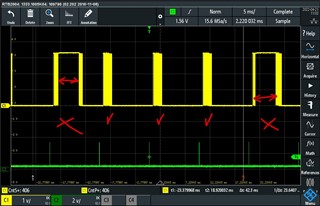
Here is the Picture with the frames with timegaps:
The green CH2 is the 10ms tick which start this timer

Hello again,
Dominik Eugster said:This works, but doesn't solve my problem.
No problem, let us look closer at the application and see what we can do!
Dominik Eugster said:I set and reset an IO PIN in the IRQ to implement a single wire communication. I can't use the GPIOTE because I have to switch between Input and Output Config of this PIN. Now the problem is, that sometimes, the frame is corrupt when something in parallel is working on the nRF (GPIOTE, BLE Mesh, ...)
In general you may never guarantee that a GPIO toggle by the CPU directly will happen at a specific time in a task-event system, since the CPU may be busy processing a higher priority interrupt (such as an BLE radio event). The only way to ensure this is thus to cut the necessary CPU intervention out of the loop, such as when using PPI to have a peripheral event trigger another peripherals task.
Dominik Eugster said:I like to delete this frame by checking the complete time of this bit frame. Reading out the timer value (Timer1) after the last Bit doesn't fix the problem, I have the same timer value even in a frame which is too long. Maybe I need to check it with Systick or what do you suggest?
I am not sure I understand what you mean when you say that you are getting the same value for frames of different length. What frequency is the TIMER instance you are using configured to?
Best regards,
Karl
Thanks for the Input. I can't use the GPIOTE becazse I have to switch between Input and Output (single wire communication to a chip)
But it works now, If I pasue and resume the timer, because the timer is really fast (20us tick), timer is runs at 16MHz and a capture compare value lower than approx. 240 (timer value) can't be handled because of the switch from input and output and setting the GPIO levels, the irq routine needs to much time and it can't be shorter because of the single wire communication to the chip... But I manged that I set CC2 value to 120% of the expected frame time and when this CC2 event occurs, I know that a radio event or some other higher priorized IRQ blocked this routine.
The timer works correctly, but sometimes the IRQ CC1 event isn't triggered because of a BLE radio interrupt. With CC2 I can detect this "problem" and ignore this currupt frame.
Thanks a best reagrds, Dominik
Hello again, Dominik
Dominik Eugster said:Thanks for the Input.
No problem at all, I am happy to help! :)
I am glad to hear that the timer capture now works as intended.
Please do not hesitate to open another ticket if you should encounter any issues or questions in the future.
Good luck with your development!
Best regards,
Karl