Hello,
I'm having some issues troubleshooting, my knowledge is limited on how to trace down where the error occurs.
Se logs below ->
E: ***** BUS FAULT *****
E:   Precise data bus error
E:   BFAR Address: 0x73220905
E: r0/a1:  0x20014874  r1/a2:  0x73220909  r2/a3:  0x2002f20c
E: r3/a4:  0x20014870 r12/ip:  0x0000000a r14/lr:  0x000292e9
E:  xpsr:  0x21000000
E: s[ 0]:  0x00000000  s[ 1]:  0x00000000  s[ 2]:  0x00000000  s[ 3]:  0x00000000
E: s[ 4]:  0x00000000  s[ 5]:  0x00000000  s[ 6]:  0x00000000  s[ 7]:  0x00000000
E: s[ 8]:  0x00000000  s[ 9]:  0x00000000  s[10]:  0x00000000  s[11]:  0x00000000
E: s[12]:  0x00000000  s[13]:  0x00000000  s[14]:  0x00000000  s[15]:  0x00000000
E: fpscr:  0x2002f554
E: Faulting instruction address (r15/pc): 0x000353a2
E: >>> ZEPHYR FATAL ERROR 0: CPU exception on CPU 0
E: Current thread: 0x20016b90 (unknown)
E: Resetting system
*** Booting Zephyr OS build v2.4.99-ncs2  ***
I: Starting bootloader
I: Primary image: magic=unset, swap_type=0x1, copy_done=0x3, image_ok=0x3
I: Secondary image: magic=unset, swap_type=0x1, copy_done=0x3, image_ok=0x3
I: Boot source: none
I: Swap type: none
I: Bootloader chainload address offset: 0x10000
I: Jumping to the first image slot
*** Booting Zephyr OS build v2.4.99-ncs2  ***
Flash regions		Domain		Permissions
00 02 0x00000 0x18000 	Secure		rwxl
03 31 0x18000 0x100000 	Non-Secure	rwxl

Non-secure callable region 0 placed in flash region 2 with size 32.

SRAM region		Domain		Permissions
00 07 0x00000 0x10000 	Secure		rwxl
08 31 0x10000 0x40000 	Non-Secure	rwxl

Peripheral		Domain		Status
00 NRF_P0               Non-Secure	OK
01 NRF_CLOCK            Non-Secure	OK
02 NRF_RTC0             Non-Secure	OK
03 NRF_RTC1             Non-Secure	OK
04 NRF_NVMC             Non-Secure	OK
05 NRF_UARTE1           Non-Secure	OK
06 NRF_UARTE2           Secure		SKIP
07 NRF_TWIM2            Non-Secure	OK
08 NRF_SPIM3            Non-Secure	OK
09 NRF_TIMER0           Non-Secure	OK
10 NRF_TIMER1           Non-Secure	OK
11 NRF_TIMER2           Non-Secure	OK
12 NRF_SAADC            Non-Secure	OK
13 NRF_PWM0             Non-Secure	OK
14 NRF_PWM1             Non-Secure	OK
15 NRF_PWM2             Non-Secure	OK
16 NRF_PWM3             Non-Secure	OK
17 NRF_WDT              Non-Secure	OK
18 NRF_IPC              Non-Secure	OK
19 NRF_VMC              Non-Secure	OK
20 NRF_FPU              Non-Secure	OK
21 NRF_EGU1             Non-Secure	OK
22 NRF_EGU2             Non-Secure	OK
23 NRF_DPPIC            Non-Secure	OK
24 NRF_REGULATORS       Non-Secure	OK
25 NRF_GPIOTE1          Non-Secure	OK

SPM: NS image at 0x1c200
SPM: NS MSP at 0x2002b750
SPM: NS reset vector at 0x26231
SPM: prepare to jump to Non-Secure image.
*** Booting Zephyr OS build v2.4.99-ncs2  ***
Watchdog feed enabled

Watchdog enabled, please feed the WDT within 180 seconds

Entering STATE [APP_STATE_BOOT]

******** The Euroskilt ES401 application is starting ********


Application version: 2.0

nRF9160 reset reason ---------------------------------------------------------------------- (0x70000)

Reset from AIRCR.SYSRESETREQ detected

Reset from CPU lock-up detected

Reset triggered through CTRL-AP


GPIO_0 opened OK

Setting up pins

Array size = 500

Radar UART RX configured

Entering STATE [APP_STATE_INIT] from [APP_STATE_BOOT]

RT timer started, interval = 60 seconds

KV and HP timers started, interval = 1 second

GPS timer started, interval = 1 second

Entering STATE [APP_STATE_ATTACH] from [APP_STATE_INIT]

I: Disabling PSM and eDRX
I: LTE Link Connecting...
+CEREG: 2,"765D","031E7B00",7,0,0,"11100000","11100000"
+CSCON: 1
+CEREG: 1,"765D","031E7B00",7,,,"11100000","11100000"
I: LTE Link Connected!
I: We are connected and will start normal operations, starting MQTT
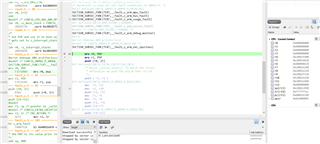
Any tips on how to find out where is error occurs?
Regards, David