

Hi,
I need to configure an nRF52832 to wake up periodically from SYSTEM_ON and SYSTEM_OFF and, also, when a GPIO pin changes.
Where can I find sample code and docs for this?
I'm using nRF Connect SDK version 1.9.1 and Visual Studio Code.
BR
Hi,
I need to configure an nRF52832 to wake up periodically from SYSTEM_ON and SYSTEM_OFF and, also, when a GPIO pin changes.
Where can I find sample code and docs for this?
I'm using nRF Connect SDK version 1.9.1 and Visual Studio Code.
BR
Hi
First off, to clarify. When the nRF52832 (or any of our devices are in "system OFF") the CPU and all peripherals are completely turned off, so it can't be waken up periodically from the RTC in system OFF mode. That will only be possible in system ON mode. To wake up the device from System OFF mode you have to use an external source, like when a button is pressed or have an external timer going that trigs a GPIO every X amount of time.
We have a sample project showing how you can put the nRF5x series devices into system OFF here.
We don't have an official example showing how to use the RTC in the nRF Connect SDK at the moment, but one of my colleagues made this example for the RTC on the nRF91. Since the same driver is used in the nRF52 series, it should be pretty straight forward to modify to work on an nRF52832 as well. Alternatively, you can check out the Zephyr kernel timer that can perform an application-defined action after a specific time limit is reached.
Best regards,
Simon
Hi
First off, to clarify. When the nRF52832 (or any of our devices are in "system OFF") the CPU and all peripherals are completely turned off, so it can't be waken up periodically from the RTC in system OFF mode. That will only be possible in system ON mode. To wake up the device from System OFF mode you have to use an external source, like when a button is pressed or have an external timer going that trigs a GPIO every X amount of time.
We have a sample project showing how you can put the nRF5x series devices into system OFF here.
We don't have an official example showing how to use the RTC in the nRF Connect SDK at the moment, but one of my colleagues made this example for the RTC on the nRF91. Since the same driver is used in the nRF52 series, it should be pretty straight forward to modify to work on an nRF52832 as well. Alternatively, you can check out the Zephyr kernel timer that can perform an application-defined action after a specific time limit is reached.
Best regards,
Simon
Simonr, thanks for your comments, I couldn't test until now.
I tried to compile the sample application for system OFF but it failed in both ways I tried, "Add existing application" and "Create a new application from sample". Build log is at the end.
Then I took the code and incorporated it to my application, enabling CONFIG_PM and CONFIG_PM_DEVICE in my prj.conf. Here below is the code:
///...headers here...

#define CONSOLE_LABEL DT_LABEL(DT_CHOSEN(zephyr_console))
#define BUSY_WAIT_S 4U
#define SLEEP_S 2U
#define CONSOLE_LABEL DT_LABEL(DT_CHOSEN(zephyr_console))

static int disable_ds_1(const struct device *dev)
{
	ARG_UNUSED(dev);

	pm_constraint_set(PM_STATE_SOFT_OFF);
	return 0;
}

SYS_INIT(disable_ds_1, PRE_KERNEL_2, 0);

/* main */
void main(void)
{
	int rc;
	const struct device *cons = device_get_binding(CONSOLE_LABEL);

	nrf_gpio_cfg_input(DT_GPIO_PIN(DT_NODELABEL(button0), gpios), NRF_GPIO_PIN_PULLUP);
	nrf_gpio_cfg_sense_set(DT_GPIO_PIN(DT_NODELABEL(button0), gpios), NRF_GPIO_PIN_SENSE_LOW);

	printk("Busy-wait %u s\n", BUSY_WAIT_S);
	k_busy_wait(BUSY_WAIT_S * USEC_PER_SEC);

	printk("Busy-wait %u s with UART off\n", BUSY_WAIT_S);
	rc = pm_device_action_run(cons, PM_DEVICE_ACTION_SUSPEND);
	k_busy_wait(BUSY_WAIT_S * USEC_PER_SEC);
	rc = pm_device_action_run(cons, PM_DEVICE_ACTION_RESUME);

	printk("Sleep %u s\n", SLEEP_S);
	k_sleep(K_SECONDS(SLEEP_S));

	printk("Sleep %u s with UART off\n", SLEEP_S);
	rc = pm_device_action_run(cons, PM_DEVICE_ACTION_SUSPEND);
	k_sleep(K_SECONDS(SLEEP_S));
	rc = pm_device_action_run(cons, PM_DEVICE_ACTION_RESUME);

	printk("Entering system off; press BUTTON1 to restart\n");

	pm_power_state_force(0u, (struct pm_state_info){PM_STATE_SOFT_OFF, 0, 0});

	printk("ERROR: System off failed\n");


	volatile int stay = true;

	while (stay)
	{
	}
}
Here is what comes out in the console:
*** Booting Zephyr OS build v2.7.99-ncs1-1  ***
Busy-wait 4 s
Busy-wait 4 s with UART off
Sleep 2 s
Sleep 2 s with UART off
Entering system off; press BUTTON1 to restart
ERROR: System off failed
I have the DK connected to a PPK-II and I can see the changes in power consumption after the calls to k_sleep() ,so I can confirm it did not enter power off after the call to pm_power_state_force().
BR
---- build log for original sample project ----
> Executing task: nRF Connect: Build: system_off/build (active) <
Building system_off
west build --build-dir d:\nordic\v1.9.1\zephyr\samples\boards\nrf\system_off\build d:\nordic\v1.9.1\zephyr\samples\boards\nrf\system_off
-- west build: generating a build system
Including boilerplate (Zephyr base (cached)): D:/nordic/v1.9.1/zephyr/cmake/app/boilerplate.cmake
-- Application: D:/nordic/v1.9.1/zephyr/samples/boards/nrf/system_off
-- Zephyr version: 2.7.99 (D:/nordic/v1.9.1/zephyr), build: v2.7.99-ncs1-1
-- Found west (found suitable version "0.12.0", minimum required is "0.7.1")
-- Board: nrf52dk_nrf52832
-- Cache files will be written to: D:/nordic/v1.9.1/zephyr/.cache
-- Found dtc: D:/nordic/v1.9.1/toolchain/opt/bin/dtc.exe (found suitable version "1.4.7", minimum required is "1.4.6")
-- Found toolchain: gnuarmemb (d:/nordic/v1.9.1/toolchain/opt)
-- Found BOARD.dts: D:/nordic/v1.9.1/zephyr/boards/arm/nrf52dk_nrf52832/nrf52dk_nrf52832.dts
-- Generated zephyr.dts: D:/nordic/v1.9.1/zephyr/samples/boards/nrf/system_off/build/zephyr/zephyr.dts
-- Generated devicetree_unfixed.h: D:/nordic/v1.9.1/zephyr/samples/boards/nrf/system_off/build/zephyr/include/generated/devicetree_unfixed.h
-- Generated device_extern.h: D:/nordic/v1.9.1/zephyr/samples/boards/nrf/system_off/build/zephyr/include/generated/device_extern.h
-- Including generated dts.cmake file: D:/nordic/v1.9.1/zephyr/samples/boards/nrf/system_off/build/zephyr/dts.cmake
Parsing D:/nordic/v1.9.1/zephyr/samples/boards/nrf/system_off/Kconfig
Loaded configuration 'D:/nordic/v1.9.1/zephyr/boards/arm/nrf52dk_nrf52832/nrf52dk_nrf52832_defconfig'
Merged configuration 'D:/nordic/v1.9.1/zephyr/samples/boards/nrf/system_off/prj.conf'
Merged configuration 'D:/nordic/v1.9.1/zephyr/samples/boards/nrf/system_off/build/zephyr/misc/generated/extra_kconfig_options.conf'
Traceback (most recent call last):
File "D:/nordic/v1.9.1/zephyr/scripts/kconfig/kconfig.py", line 278, in <module>
main()
File "D:/nordic/v1.9.1/zephyr/scripts/kconfig/kconfig.py", line 65, in main
if kconf.syms['WARN_EXPERIMENTAL'].tri_value == 2:
KeyError: 'WARN_EXPERIMENTAL'
CMake Error at D:\nordic\v1.9.1\zephyr\cmake\kconfig.cmake:272 (message):
command failed with return code: 1
Call Stack (most recent call first):
D:\nordic\v1.9.1\zephyr\cmake\app\boilerplate.cmake:544 (include)
D:\nordic\v1.9.1\zephyr\share\zephyr-package\cmake\ZephyrConfig.cmake:24 (include)
D:\nordic\v1.9.1\zephyr\share\zephyr-package\cmake\ZephyrConfig.cmake:40 (include_boilerplate)
d:\nordic\v1.9.1\zephyr\samples\boards\nrf\system_off\build\CMakeLists.txt:4 (find_package)
-- Configuring incomplete, errors occurred!
FATAL ERROR: command exited with status 1: 'd:\nordic\v1.9.1\toolchain\opt\bin\cmake.EXE' '-DWEST_PYTHON=d:\nordic\v1.9.1\toolchain\opt\bin\python.exe' '-Bd:\nordic\v1.9.1\zephyr\samples\boards\nrf\system_off\build' '-Sd:\nordic\v1.9.1\zephyr\samples\boards\nrf\system_off' -GNinja
The terminal process terminated with exit code: 1.
Terminal will be reused by tasks, press any key to close it.
In regard to the power off sample project, I found out that calling pm_power_state_force() and checking immediately after it returns would always be interpreted as an error since nothing was done in that function but setting some flags. Then I came across this recent thread here [^] dealing with same issue, a bug in the sample code.
It was reported [^] to zephyr project and the solution is straight forward (see here [^]), the thread must be put to sleep, as simple as calling k_sleep(K_SECONDS(SLEEP_S)) after the call to pm_power_state_force(), so the power manager detects the idle task is running and enforces the power off mode.
Now I'm dealing with some strange behaviour I see in the current consumption while in power off in the power profiler (PPK-II). Current is not flat and peaks at an approximately constant pace.
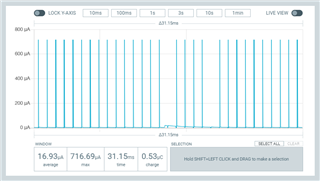
Before going to power off, I disable the console's uart with a call to pm_device_action_run(cons, PM_DEVICE_ACTION_SUSPEND), where cons is const struct device *cons = device_get_binding(DT_LABEL(DT_CHOSEN(zephyr_console))).
Is there any reason to expect such behaviour?
Simonr, please find here the data captured and the project for reproducing the behaviour.
It was not possible for me to compile neither the original project nor a new project created using the sample as a template. This project uses snippets from the original code.
BR

