This discussion has been locked.
You can no longer post new replies to this discussion. If you have a question you can start a new discussion

Drag and Drop Option for nRF52840

I have a nrF52840-DK and would like to try some precompiled test, but I got an error when copying a hex file to it. The error message is that The currently active SWD interface does not
support MSD drag and drop. With the same method I can copy files to nrF52832-DK. I would like to check whether nRF52840-DK supports the drag-and-drop feature. If not, is it possible to enable it, or what's the other way to easily use the hex file instead of build or compile the test? Thanks for your support in advance!

Parents
  • Hi, 

    What is the hardware version of your nrF52840-DK? You can check the white sticker on the DK.

    What is the J-Link firmware version? Could you try to update to the last version to see if it can help or not? 

    If that still cannot help, you can try the nRF Connect Programmer to program the image file. See Programming a Development Kit section.

    Regards,
    Amanda

  • Hi Amanda,

    Thanks a lot for your answers. 

    The info on the sticker is PC10056, 3.0.0, 2022.7. Could you please let me know whether this one support the drag-and-drop feature?

    Previous firmware is J-Link OB-nRF5340-NordicSemi compiled Jul  2 2021 10:55:25. I updated it to latest, J-Link OB-nRF5340-NordicSemi compiled Dec  3 2021 15:46:49, but still have the same failure. I'm not quite sure whether this is the firmware you refer to. I checked this through J-Link Commander. Let me know if there is another way to check it.

    I've tried the nRF Connect Programmer. In my understanding I need to copy the SoftDevice hex file to board before further program it, is it right? I got same failure about drag-and-drop.

    Looking forward to your reply!

  • Hi,

    cindy66666 said:
    The info on the sticker is PC10056, 3.0.0, 2022.7. Could you please let me know whether this one support the drag-and-drop feature?

    That needs to wait for Segger to support PC10056, 3.0.0 for the drag-and-drop feature. 

    cindy66666 said:
    In my understanding I need to copy the SoftDevice hex file to board before further program it, is it right?

    If the application needs SD, it also needs to program the SD image. In the nRF Connect Programmer, you can select SD and App images to program at the same time. 

    -Amanda

Reply
  • Hi,

    cindy66666 said:
    The info on the sticker is PC10056, 3.0.0, 2022.7. Could you please let me know whether this one support the drag-and-drop feature?

    That needs to wait for Segger to support PC10056, 3.0.0 for the drag-and-drop feature. 

    cindy66666 said:
    In my understanding I need to copy the SoftDevice hex file to board before further program it, is it right?

    If the application needs SD, it also needs to program the SD image. In the nRF Connect Programmer, you can select SD and App images to program at the same time. 

    -Amanda

Children
  • Hi Amanda,

    Thanks for your clarification.

    Do you have a timeline when will Segger support drag-and-drop feature on this board? I saw on the nRF52840 page it specified drag-and-drop feature. https://infocenter.nordicsemi.com/topic/ug_nrf52840_dk/UG/dk/intro.html Is there certain version of nRF52840 support it? If so could you please let me know the version and how I can purchase that version specifically. When I ordered online I didn't see any option to choose.

    Also I ordered one nRF52833-DK.  https://infocenter.nordicsemi.com/topic/ug_nrf52833_dk/UG/dk/intro.html

    Does all nRF52833-DK board version support drag-and-drop?

    Regarding selecting SD and image, could you point me to the instruction page or let me know more details of how to do that? On the page you pointed to me in last reply, the instruction for program SD is pretty simple without detail.

  • Hi, 

    cindy66666 said:
    Do you have a timeline when will Segger support drag-and-drop feature on this board?

    Unfortunately, we don't have that. 

    cindy66666 said:
    Is there certain version of nRF52840 support it?

    It is supported before nRF52840 version 3.0.0, so you can use version 1.x.x or 2.x.x for the drag-and-drop feature.   

    cindy66666 said:
    Does all nRF52833-DK board version support drag-and-drop?

    No, I would suggest you use v1.0.0 or 1.0.1. I test nRF52833DK v1.0.0 on my side and it can support drag-and-drop. 

    cindy66666 said:
    could you point me to the instruction page or let me know more details of how to do that?
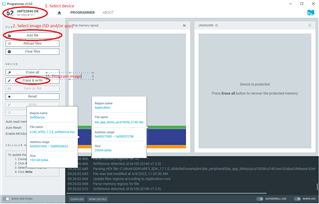
    See the following procedure.
    1. Open nRF Connect for Desktop and launch nRF Connect Programmer.
    2. Connect a development kit to the computer with a micro-USB cable, and turn it on.
      In the navigation bar, No devices available changes to Select device.
    3. Click Select device and select the device from the drop-down list.
      The button text changes to the SEGGER ID of the selected device, and the Device Memory Layout section indicates that the device is connected.
    4. If you have not selected the Auto read memory option under the Device menu and wish to visually see the memory layout before you program, click Read in the menu. If you have selected it, the memory layout will update automatically.
    5. Drag and drop the HEX file into the File Memory Layout section. Alternatively, click Add HEX file on the right pane (named as File) to add the files you want to program, by using one of the following options:
      • Select the files you used recently.
      • If there are no recently used files, click Browse from the drop-down list.
    6. Select the firmware image file (with the extension .hex) from the file browser that opens up.
    7. Click Erase & write in the Device pane to program the device.

    -Amanda

  • Hi Amanda,

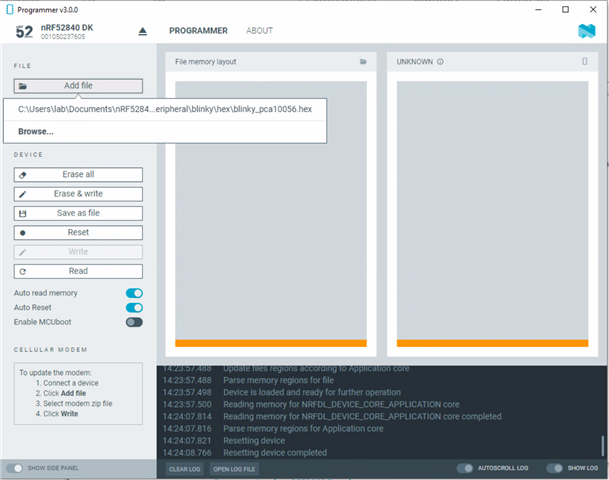
    Thanks a lot for your detailed instruction! I followed your instruction and the programmer doesn't return error, but I didn't see the memory layout change as showed on your picture. Should I also see the file updated in the JLINK folder in file explorer? I didn't see any file added either.

    I selected only the blinky hex file. Do I need to select anything else like SoftDevice? I also attached log txt file. Any comment on how to debug?

    2022-05-20T17:27:11.910Z DEBUG Application data folder: C:\Users\lab\AppData\Roaming\nrfconnect\pc-nrfconnect-programmer
    2022-05-20T17:27:12.802Z DEBUG App pc-nrfconnect-programmer v3.0.0 official
    2022-05-20T17:27:12.803Z DEBUG App path: C:\Users\lab\.nrfconnect-apps\node_modules\pc-nrfconnect-programmer
    2022-05-20T17:27:12.803Z DEBUG nRFConnect 3.11.0, required by the app is (^3.10.0)
    2022-05-20T17:27:12.803Z DEBUG nRFConnect path: C:\Users\lab\AppData\Local\Programs\nrfconnect\resources\app.asar
    2022-05-20T17:27:12.803Z DEBUG HomeDir: C:\Users\lab
    2022-05-20T17:27:12.803Z DEBUG TmpDir: C:\Users\lab\AppData\Local\Temp
    2022-05-20T17:27:12.806Z INFO Using nrf-device-lib-js version: 0.4.5
    2022-05-20T17:27:12.807Z INFO Using nrf-device-lib version: 0.11.0
    2022-05-20T17:27:12.820Z INFO Using nrfjprog DLL version: 10.15.1
    2022-05-20T17:27:12.820Z INFO Using JLink version: JLink_V7.58b
    2022-05-20T17:27:16.064Z DEBUG iface: Wi-Fi
    2022-05-20T17:27:16.064Z DEBUG IP4: 172.16.0.48
    2022-05-20T17:27:16.064Z DEBUG IP6: fe80::4c37:7a43:a023:fce1
    2022-05-20T17:27:16.064Z DEBUG MAC: e8:2a:44:ff:53:bf
    2022-05-20T17:27:16.065Z DEBUG Client Id: e33c44e89bdc67566bc83273ba5f2c4edd2ec338
    2022-05-20T17:27:16.067Z DEBUG Google Analytics for category pc-nrfconnect-programmer has initialized
    2022-05-20T21:09:22.119Z INFO Using @nordicsemiconductor/nrf-device-lib-js to communicate with target via JLink
    2022-05-20T21:09:22.142Z INFO JLink OB firmware version J-Link OB-nRF5340-NordicSemi compiled Jul  2 2021 10:55:25
    2022-05-20T21:09:22.146Z DEBUG Sending usage data...
    2022-05-20T21:09:22.147Z DEBUG Category: pc-nrfconnect-programmer
    2022-05-20T21:09:22.147Z DEBUG Action: Open jlink OB version
    2022-05-20T21:09:22.147Z DEBUG Label: J-Link OB-nRF5340-NordicSemi compiled Jul  2 2021 10:55:25
    2022-05-20T21:09:22.148Z DEBUG Usage data has not been sent. isSendingUsageData is set to false.
    2022-05-20T21:09:22.148Z INFO Device family NRF52
    2022-05-20T21:09:22.149Z DEBUG Sending usage data...
    2022-05-20T21:09:22.150Z DEBUG Category: pc-nrfconnect-programmer
    2022-05-20T21:09:22.150Z DEBUG Action: Open jlink device family
    2022-05-20T21:09:22.150Z DEBUG Label: NRF52
    2022-05-20T21:09:22.150Z DEBUG Usage data has not been sent. isSendingUsageData is set to false.
    2022-05-20T21:09:22.150Z INFO Device version UNKNOWN
    2022-05-20T21:09:22.151Z DEBUG Sending usage data...
    2022-05-20T21:09:22.152Z DEBUG Category: pc-nrfconnect-programmer
    2022-05-20T21:09:22.152Z DEBUG Action: Open jlink device version
    2022-05-20T21:09:22.152Z DEBUG Label: UNKNOWN
    2022-05-20T21:09:22.152Z DEBUG Usage data has not been sent. isSendingUsageData is set to false.
    2022-05-20T21:09:22.152Z INFO Board version PCA10056
    2022-05-20T21:09:22.153Z DEBUG Sending usage data...
    2022-05-20T21:09:22.153Z DEBUG Category: pc-nrfconnect-programmer
    2022-05-20T21:09:22.153Z DEBUG Action: Open jlink device board version
    2022-05-20T21:09:22.153Z DEBUG Label: PCA10056
    2022-05-20T21:09:22.154Z DEBUG Usage data has not been sent. isSendingUsageData is set to false.
    2022-05-20T21:09:22.155Z INFO Loading readback protection status for Application core
    2022-05-20T21:09:22.155Z DEBUG Sending usage data...
    2022-05-20T21:09:22.156Z DEBUG Category: pc-nrfconnect-programmer
    2022-05-20T21:09:22.156Z DEBUG Action: Open device
    2022-05-20T21:09:22.156Z DEBUG Label: jlink
    2022-05-20T21:09:22.156Z DEBUG Usage data has not been sent. isSendingUsageData is set to false.
    2022-05-20T21:09:26.768Z INFO Readback protection status: NRFDL_PROTECTION_STATUS_ALL
    2022-05-20T21:09:26.773Z INFO Parse memory regions for Application core
    2022-05-20T21:09:26.782Z INFO Update files regions according to Application core
    2022-05-20T21:09:26.782Z INFO Parse memory regions for file
    2022-05-20T21:09:26.788Z INFO Device is loaded and ready for further operation
    2022-05-20T21:13:37.813Z INFO Parsing HEX file:  C:\Users\lab\Documents\nRF52840\nRF5_SDK_17.1.0_ddde560\examples\peripheral\blinky\hex\blinky_pca10056.hex
    2022-05-20T21:13:38.651Z INFO File was last modified at  8/21/2021, 6:27:04 AM
    2022-05-20T21:13:38.770Z INFO Update files regions according to Application core
    2022-05-20T21:13:38.770Z INFO Parse memory regions for file
    2022-05-20T21:13:49.639Z INFO Recovering NRFDL_DEVICE_CORE_APPLICATION core
    2022-05-20T21:13:54.619Z INFO Recovering NRFDL_DEVICE_CORE_APPLICATION core completed
    2022-05-20T21:13:54.622Z INFO Device recovery completed
    2022-05-20T21:13:54.622Z INFO Writing procedure starts for NRFDL_DEVICE_CORE_APPLICATION core
    2022-05-20T21:13:54.630Z INFO Writing HEX to NRFDL_DEVICE_CORE_APPLICATION core
    2022-05-20T21:13:55.522Z INFO Uploading image through JLink: 0%
    2022-05-20T21:13:55.999Z INFO Uploading image through JLink: 100%
    2022-05-20T21:13:56.221Z INFO Writing HEX to NRFDL_DEVICE_CORE_APPLICATION core completed
    2022-05-20T21:13:56.221Z INFO Writing procedure ends for NRFDL_DEVICE_CORE_APPLICATION core
    2022-05-20T21:13:56.223Z INFO Resetting device
    2022-05-20T21:13:57.229Z INFO Resetting device completed
    2022-05-20T21:13:57.232Z INFO Using @nordicsemiconductor/nrf-device-lib-js to communicate with target via JLink
    2022-05-20T21:13:57.232Z INFO JLink OB firmware version J-Link OB-nRF5340-NordicSemi compiled Jul  2 2021 10:55:25
    2022-05-20T21:13:57.233Z DEBUG Sending usage data...
    2022-05-20T21:13:57.233Z DEBUG Category: pc-nrfconnect-programmer
    2022-05-20T21:13:57.233Z DEBUG Action: Open jlink OB version
    2022-05-20T21:13:57.233Z DEBUG Label: J-Link OB-nRF5340-NordicSemi compiled Jul  2 2021 10:55:25
    2022-05-20T21:13:57.233Z DEBUG Usage data has not been sent. isSendingUsageData is set to false.
    2022-05-20T21:13:57.233Z INFO Device family NRF52
    2022-05-20T21:13:57.233Z DEBUG Sending usage data...
    2022-05-20T21:13:57.233Z DEBUG Category: pc-nrfconnect-programmer
    2022-05-20T21:13:57.233Z DEBUG Action: Open jlink device family
    2022-05-20T21:13:57.234Z DEBUG Label: NRF52
    2022-05-20T21:13:57.234Z DEBUG Usage data has not been sent. isSendingUsageData is set to false.
    2022-05-20T21:13:57.234Z INFO Device version UNKNOWN
    2022-05-20T21:13:57.234Z DEBUG Sending usage data...
    2022-05-20T21:13:57.234Z DEBUG Category: pc-nrfconnect-programmer
    2022-05-20T21:13:57.234Z DEBUG Action: Open jlink device version
    2022-05-20T21:13:57.234Z DEBUG Label: UNKNOWN
    2022-05-20T21:13:57.234Z DEBUG Usage data has not been sent. isSendingUsageData is set to false.
    2022-05-20T21:13:57.234Z INFO Board version PCA10056
    2022-05-20T21:13:57.235Z DEBUG Sending usage data...
    2022-05-20T21:13:57.235Z DEBUG Category: pc-nrfconnect-programmer
    2022-05-20T21:13:57.235Z DEBUG Action: Open jlink device board version
    2022-05-20T21:13:57.235Z DEBUG Label: PCA10056
    2022-05-20T21:13:57.235Z DEBUG Usage data has not been sent. isSendingUsageData is set to false.
    2022-05-20T21:13:57.235Z INFO Loading readback protection status for Application core
    2022-05-20T21:13:58.162Z INFO Readback protection status: NRFDL_PROTECTION_STATUS_NONE
    2022-05-20T21:13:59.509Z INFO Parse memory regions for Application core
    2022-05-20T21:13:59.510Z INFO Update files regions according to Application core
    2022-05-20T21:13:59.510Z INFO Parse memory regions for file
    2022-05-20T21:13:59.514Z INFO Device is loaded and ready for further operation
    2022-05-20T21:14:20.172Z INFO Reading memory for NRFDL_DEVICE_CORE_APPLICATION core
    2022-05-20T21:14:30.857Z INFO Reading memory for NRFDL_DEVICE_CORE_APPLICATION core completed
    2022-05-20T21:14:30.860Z INFO Parse memory regions for Application core
    2022-05-20T21:14:30.866Z INFO Resetting device
    2022-05-20T21:14:31.902Z INFO Resetting device completed
    2022-05-20T21:14:49.210Z INFO Recovering NRFDL_DEVICE_CORE_APPLICATION core
    2022-05-20T21:14:54.075Z INFO Recovering NRFDL_DEVICE_CORE_APPLICATION core completed
    2022-05-20T21:14:54.077Z INFO Device recovery completed
    2022-05-20T21:14:54.077Z INFO Writing procedure starts for NRFDL_DEVICE_CORE_APPLICATION core
    2022-05-20T21:14:54.087Z INFO Writing HEX to NRFDL_DEVICE_CORE_APPLICATION core
    2022-05-20T21:14:55.547Z INFO Uploading image through JLink: 0%
    2022-05-20T21:14:56.105Z INFO Uploading image through JLink: 100%
    2022-05-20T21:14:56.309Z INFO Writing HEX to NRFDL_DEVICE_CORE_APPLICATION core completed
    2022-05-20T21:14:56.310Z INFO Writing procedure ends for NRFDL_DEVICE_CORE_APPLICATION core
    2022-05-20T21:14:56.314Z INFO Resetting device
    2022-05-20T21:14:57.674Z INFO Resetting device completed
    2022-05-20T21:14:57.677Z INFO Using @nordicsemiconductor/nrf-device-lib-js to communicate with target via JLink
    2022-05-20T21:14:57.677Z INFO JLink OB firmware version J-Link OB-nRF5340-NordicSemi compiled Jul  2 2021 10:55:25
    2022-05-20T21:14:57.677Z DEBUG Sending usage data...
    2022-05-20T21:14:57.677Z DEBUG Category: pc-nrfconnect-programmer
    2022-05-20T21:14:57.677Z DEBUG Action: Open jlink OB version
    2022-05-20T21:14:57.677Z DEBUG Label: J-Link OB-nRF5340-NordicSemi compiled Jul  2 2021 10:55:25
    2022-05-20T21:14:57.677Z DEBUG Usage data has not been sent. isSendingUsageData is set to false.
    2022-05-20T21:14:57.677Z INFO Device family NRF52
    2022-05-20T21:14:57.678Z DEBUG Sending usage data...
    2022-05-20T21:14:57.678Z DEBUG Category: pc-nrfconnect-programmer
    2022-05-20T21:14:57.678Z DEBUG Action: Open jlink device family
    2022-05-20T21:14:57.678Z DEBUG Label: NRF52
    2022-05-20T21:14:57.678Z DEBUG Usage data has not been sent. isSendingUsageData is set to false.
    2022-05-20T21:14:57.678Z INFO Device version UNKNOWN
    2022-05-20T21:14:57.678Z DEBUG Sending usage data...
    2022-05-20T21:14:57.678Z DEBUG Category: pc-nrfconnect-programmer
    2022-05-20T21:14:57.678Z DEBUG Action: Open jlink device version
    2022-05-20T21:14:57.678Z DEBUG Label: UNKNOWN
    2022-05-20T21:14:57.678Z DEBUG Usage data has not been sent. isSendingUsageData is set to false.
    2022-05-20T21:14:57.678Z INFO Board version PCA10056
    2022-05-20T21:14:57.679Z DEBUG Sending usage data...
    2022-05-20T21:14:57.679Z DEBUG Category: pc-nrfconnect-programmer
    2022-05-20T21:14:57.679Z DEBUG Action: Open jlink device board version
    2022-05-20T21:14:57.679Z DEBUG Label: PCA10056
    2022-05-20T21:14:57.679Z DEBUG Usage data has not been sent. isSendingUsageData is set to false.
    2022-05-20T21:14:57.679Z INFO Loading readback protection status for Application core
    2022-05-20T21:14:58.942Z INFO Readback protection status: NRFDL_PROTECTION_STATUS_NONE
    2022-05-20T21:14:59.979Z INFO Parse memory regions for Application core
    2022-05-20T21:14:59.983Z INFO Update files regions according to Application core
    2022-05-20T21:14:59.984Z INFO Parse memory regions for file
    2022-05-20T21:14:59.995Z INFO Device is loaded and ready for further operation
    2022-05-20T21:15:06.890Z INFO Reading memory for NRFDL_DEVICE_CORE_APPLICATION core
    2022-05-20T21:15:17.246Z INFO Reading memory for NRFDL_DEVICE_CORE_APPLICATION core completed
    2022-05-20T21:15:17.249Z INFO Parse memory regions for Application core
    2022-05-20T21:15:17.253Z INFO Resetting device
    2022-05-20T21:15:18.215Z INFO Resetting device completed
    2022-05-20T21:17:45.452Z INFO Reading memory for NRFDL_DEVICE_CORE_APPLICATION core
    2022-05-20T21:17:55.756Z INFO Reading memory for NRFDL_DEVICE_CORE_APPLICATION core completed
    2022-05-20T21:17:55.758Z INFO Parse memory regions for Application core
    2022-05-20T21:17:55.760Z INFO Resetting device
    2022-05-20T21:17:56.710Z INFO Resetting device completed
    2022-05-20T21:22:46.913Z INFO Resetting device
    2022-05-20T21:22:48.123Z INFO Resetting device completed
    2022-05-20T21:23:17.741Z INFO Recovering NRFDL_DEVICE_CORE_APPLICATION core
    2022-05-20T21:23:22.556Z INFO Recovering NRFDL_DEVICE_CORE_APPLICATION core completed
    2022-05-20T21:23:22.560Z INFO Device recovery completed
    2022-05-20T21:23:22.560Z INFO Writing procedure starts for NRFDL_DEVICE_CORE_APPLICATION core
    2022-05-20T21:23:22.566Z INFO Writing HEX to NRFDL_DEVICE_CORE_APPLICATION core
    2022-05-20T21:23:23.288Z INFO Uploading image through JLink: 0%
    2022-05-20T21:23:23.691Z INFO Uploading image through JLink: 100%
    2022-05-20T21:23:23.869Z INFO Writing HEX to NRFDL_DEVICE_CORE_APPLICATION core completed
    2022-05-20T21:23:23.869Z INFO Writing procedure ends for NRFDL_DEVICE_CORE_APPLICATION core
    2022-05-20T21:23:23.882Z INFO Resetting device
    2022-05-20T21:23:24.781Z INFO Resetting device completed
    2022-05-20T21:23:24.790Z INFO Using @nordicsemiconductor/nrf-device-lib-js to communicate with target via JLink
    2022-05-20T21:23:24.790Z INFO JLink OB firmware version J-Link OB-nRF5340-NordicSemi compiled Jul  2 2021 10:55:25
    2022-05-20T21:23:24.791Z DEBUG Sending usage data...
    2022-05-20T21:23:24.792Z DEBUG Category: pc-nrfconnect-programmer
    2022-05-20T21:23:24.792Z DEBUG Action: Open jlink OB version
    2022-05-20T21:23:24.792Z DEBUG Label: J-Link OB-nRF5340-NordicSemi compiled Jul  2 2021 10:55:25
    2022-05-20T21:23:24.792Z DEBUG Usage data has not been sent. isSendingUsageData is set to false.
    2022-05-20T21:23:24.792Z INFO Device family NRF52
    2022-05-20T21:23:24.793Z DEBUG Sending usage data...
    2022-05-20T21:23:24.793Z DEBUG Category: pc-nrfconnect-programmer
    2022-05-20T21:23:24.794Z DEBUG Action: Open jlink device family
    2022-05-20T21:23:24.794Z DEBUG Label: NRF52
    2022-05-20T21:23:24.794Z DEBUG Usage data has not been sent. isSendingUsageData is set to false.
    2022-05-20T21:23:24.794Z INFO Device version UNKNOWN
    2022-05-20T21:23:24.795Z DEBUG Sending usage data...
    2022-05-20T21:23:24.795Z DEBUG Category: pc-nrfconnect-programmer
    2022-05-20T21:23:24.795Z DEBUG Action: Open jlink device version
    2022-05-20T21:23:24.795Z DEBUG Label: UNKNOWN
    2022-05-20T21:23:24.796Z DEBUG Usage data has not been sent. isSendingUsageData is set to false.
    2022-05-20T21:23:24.796Z INFO Board version PCA10056
    2022-05-20T21:23:24.796Z DEBUG Sending usage data...
    2022-05-20T21:23:24.796Z DEBUG Category: pc-nrfconnect-programmer
    2022-05-20T21:23:24.796Z DEBUG Action: Open jlink device board version
    2022-05-20T21:23:24.797Z DEBUG Label: PCA10056
    2022-05-20T21:23:24.797Z DEBUG Usage data has not been sent. isSendingUsageData is set to false.
    2022-05-20T21:23:24.797Z INFO Loading readback protection status for Application core
    2022-05-20T21:23:25.759Z INFO Readback protection status: NRFDL_PROTECTION_STATUS_NONE
    2022-05-20T21:23:26.731Z INFO Parse memory regions for Application core
    2022-05-20T21:23:26.734Z INFO Update files regions according to Application core
    2022-05-20T21:23:26.734Z INFO Parse memory regions for file
    2022-05-20T21:23:26.742Z INFO Device is loaded and ready for further operation
    2022-05-20T21:23:26.744Z INFO Reading memory for NRFDL_DEVICE_CORE_APPLICATION core
    2022-05-20T21:23:36.766Z INFO Reading memory for NRFDL_DEVICE_CORE_APPLICATION core completed
    2022-05-20T21:23:36.769Z INFO Parse memory regions for Application core
    2022-05-20T21:23:36.774Z INFO Resetting device
    2022-05-20T21:23:37.789Z INFO Resetting device completed
    2022-05-20T21:23:48.560Z INFO Recovering NRFDL_DEVICE_CORE_APPLICATION core
    2022-05-20T21:23:53.155Z INFO Recovering NRFDL_DEVICE_CORE_APPLICATION core completed
    2022-05-20T21:23:53.156Z INFO Device recovery completed
    2022-05-20T21:23:53.156Z INFO Writing procedure starts for NRFDL_DEVICE_CORE_APPLICATION core
    2022-05-20T21:23:53.160Z INFO Writing HEX to NRFDL_DEVICE_CORE_APPLICATION core
    2022-05-20T21:23:53.853Z INFO Uploading image through JLink: 0%
    2022-05-20T21:23:54.264Z INFO Uploading image through JLink: 100%
    2022-05-20T21:23:54.453Z INFO Writing HEX to NRFDL_DEVICE_CORE_APPLICATION core completed
    2022-05-20T21:23:54.453Z INFO Writing procedure ends for NRFDL_DEVICE_CORE_APPLICATION core
    2022-05-20T21:23:54.455Z INFO Resetting device
    2022-05-20T21:23:55.383Z INFO Resetting device completed
    2022-05-20T21:23:55.392Z INFO Using @nordicsemiconductor/nrf-device-lib-js to communicate with target via JLink
    2022-05-20T21:23:55.394Z INFO JLink OB firmware version J-Link OB-nRF5340-NordicSemi compiled Jul  2 2021 10:55:25
    2022-05-20T21:23:55.395Z DEBUG Sending usage data...
    2022-05-20T21:23:55.396Z DEBUG Category: pc-nrfconnect-programmer
    2022-05-20T21:23:55.396Z DEBUG Action: Open jlink OB version
    2022-05-20T21:23:55.396Z DEBUG Label: J-Link OB-nRF5340-NordicSemi compiled Jul  2 2021 10:55:25
    2022-05-20T21:23:55.396Z DEBUG Usage data has not been sent. isSendingUsageData is set to false.
    2022-05-20T21:23:55.397Z INFO Device family NRF52
    2022-05-20T21:23:55.397Z DEBUG Sending usage data...
    2022-05-20T21:23:55.398Z DEBUG Category: pc-nrfconnect-programmer
    2022-05-20T21:23:55.398Z DEBUG Action: Open jlink device family
    2022-05-20T21:23:55.398Z DEBUG Label: NRF52
    2022-05-20T21:23:55.398Z DEBUG Usage data has not been sent. isSendingUsageData is set to false.
    2022-05-20T21:23:55.398Z INFO Device version UNKNOWN
    2022-05-20T21:23:55.399Z DEBUG Sending usage data...
    2022-05-20T21:23:55.399Z DEBUG Category: pc-nrfconnect-programmer
    2022-05-20T21:23:55.399Z DEBUG Action: Open jlink device version
    2022-05-20T21:23:55.400Z DEBUG Label: UNKNOWN
    2022-05-20T21:23:55.400Z DEBUG Usage data has not been sent. isSendingUsageData is set to false.
    2022-05-20T21:23:55.400Z INFO Board version PCA10056
    2022-05-20T21:23:55.401Z DEBUG Sending usage data...
    2022-05-20T21:23:55.401Z DEBUG Category: pc-nrfconnect-programmer
    2022-05-20T21:23:55.401Z DEBUG Action: Open jlink device board version
    2022-05-20T21:23:55.401Z DEBUG Label: PCA10056
    2022-05-20T21:23:55.402Z DEBUG Usage data has not been sent. isSendingUsageData is set to false.
    2022-05-20T21:23:55.402Z INFO Loading readback protection status for Application core
    2022-05-20T21:23:56.482Z INFO Readback protection status: NRFDL_PROTECTION_STATUS_NONE
    2022-05-20T21:23:57.486Z INFO Parse memory regions for Application core
    2022-05-20T21:23:57.488Z INFO Update files regions according to Application core
    2022-05-20T21:23:57.488Z INFO Parse memory regions for file
    2022-05-20T21:23:57.498Z INFO Device is loaded and ready for further operation
    2022-05-20T21:23:57.500Z INFO Reading memory for NRFDL_DEVICE_CORE_APPLICATION core
    2022-05-20T21:24:07.814Z INFO Reading memory for NRFDL_DEVICE_CORE_APPLICATION core completed
    2022-05-20T21:24:07.816Z INFO Parse memory regions for Application core
    2022-05-20T21:24:07.821Z INFO Resetting device
    2022-05-20T21:24:08.766Z INFO Resetting device completed
    

  • Hi, 

    You use the image from Blinky Example which is the same as the factory image, so the memory layout is the same. 

    The images used in my example figure are the s140_nrf52_7.2.0_softdevice.hex from nRF5_SDK_17.1.0\components\softdevice\s140\hex and ble_app_blinky_pca10056_s140.hex generated from nRF5_SDK_17.1.0_ddde560\examples\ble_peripheral\ble_app_blinky\pca10056. 

    -Amanda

Related