conflicting Nordic Dk with Texas programmer ?

Our product consists of a Texas MSP430 and a Nordic nRF52832 Chip, with serial/UART between

for MSP programming, debug and development : I'm using the official TI MSP-FET Flash Emulation Tool (USB device)
for Nordic : I have a nRF52DK-52832 (PCA10040), several 52840 dongles (PCA10059) and the final hardware with 52832

When the Texas MSP is connected via USB most of the Nordic stuff is not properly working:
- It seems I can download code with Segger Studio into the PCA10040, but it crashes right after start
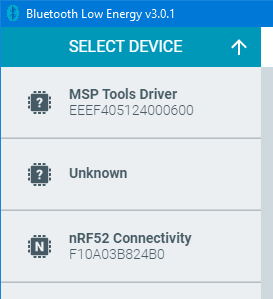
- I wonder why nRF Conenct for desktop lists the Texas MSP programmer as valid device
- I cannot use the 52840 dongle for Bluetooth with nrf connect for desktop, is just brings an error=-1

The MSP programmer works without problems, it can download code and debug - and when I pull it off my computer USB, all the Nordic things work again. Just plug it in - no need to start any session with Texas' code composer - Nordic tools are not working right.

Anyone experiencing a similar issue ? This is most annoying since I need to develop and work with both controllers

thanks for any advice, Matthias

Parents
  • sorry, I just tried it again and I still have the same problems.

    - I'm using nRF Connect for Desktop 3.11.1 and installed all pending updates
    - I started the BLE tool, bluetooth low energy, v3.0.1

    - then I inserted my 52840 dongle into USB, ok, its reported as "nRF52 Connectivity" with Mac/ID F10A03B824B0
    - I select this device and hit "start scan" and everything works

    - now I stop this tool and plug in my Texas-Instruments MSP -FET Flash Emulation Tool into USB
    - start again nRF Connect BLE
    - and now I see both, the 52840 dongle and the Texas MSP Tools Driver, like this

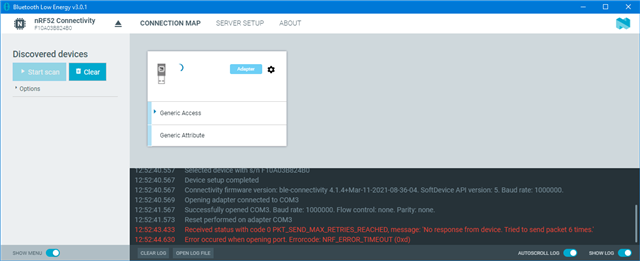
    when I now select the dongle, like above, I see these errors in the log window and I'm not able to use the dongle anymore

    I did not start Texas' Code Composer Studio - its just enough to connect the MSP-FET programmer to USB in order to "confuse" the BLE tool and the same things happens when I'm trying to use the BLE programmer tool.

    While the Texas MSP-FET is plugged to USB, I'm not able to use the nRF Connect tools.

    I already showed this (teamviewer session) to your german technical colleague a few weeks ago, but at this time I was not aware that the trouble seems to be caused by the Texas programme. I can easily repeat this on another Win10 PC and I know about another BLE developer having the same issues.

    Matthias

  • I have been testing with the MSP430 USB-Debug-Interface MSP-FET430UIF and was not able to reproduce the issue. So I am not sure what exactly is causing the issue, if it is to a specific MSP-FET programmer that is causing the "crash" of the Nordic device on the Nordic desktop app. 
    Might be that the issue is specific to the version MSP-FET that you are using, currently I have not been able to preproduce, this could also be a specific driver issue or a somewhat strange windows anomaly. 

    Can you share what drivers for the TI MSP you have installed and what version the USB device you connect is? 

    Regards,
    Jonathan

Reply
  • I have been testing with the MSP430 USB-Debug-Interface MSP-FET430UIF and was not able to reproduce the issue. So I am not sure what exactly is causing the issue, if it is to a specific MSP-FET programmer that is causing the "crash" of the Nordic device on the Nordic desktop app. 
    Might be that the issue is specific to the version MSP-FET that you are using, currently I have not been able to preproduce, this could also be a specific driver issue or a somewhat strange windows anomaly. 

    Can you share what drivers for the TI MSP you have installed and what version the USB device you connect is? 

    Regards,
    Jonathan

Children
No Data
Related