FOTA doesn't work on nrf5340-DK

Hello,

I am using an nrf5340-DK board and the SDK 1.9.0.

I want integrate the FOTA functionality into the example which was provided by Nordic Semi:

nRF Connect SDK Bluetooth Low Energy tutorial part 1: Custom Service in Peripheral role - Getting Started - nRF Connect SDK guides - Nordic DevZone (nordicsemi.com) 

I  made 3 modifications according to "FOTA over Blutooth LE" from here: 

https://developer.nordicsemi.com/nRF_Connect_SDK/doc/latest/nrf/ug_nrf5340.html?highlight=over%20air#id25

Modification 1 (main.c)

#include <img_mgmt/img_mgmt.h>
#include <os_mgmt/os_mgmt.h>
#include <mgmt/mcumgr/smp_bt.h>

Modificationn 2 (main.c)

os_mgmt_register_group();
img_mgmt_register_group();
smp_bt_register(); 

Modification 3 (prj.conf)

CONFIG_MCUMGR=y
CONFIG_MCUMGR_CMD_OS_MGMT=y
CONFIG_MCUMGR_CMD_IMG_MGMT=y
CONFIG_MCUMGR_SMP_BT=y
CONFIG_BOOTLOADER_MCUBOOT=y
Then I create a simple second program which based on "hello_world" example. This program let the LED1 on nrf5340 Board blink let's call it "blinky".
The "blinky" program (app_update.bin) was transfered to the smartphone.
Now the nRF Connect App on the smartphone was started:
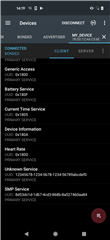
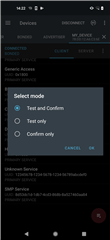
DFU was started with "app_update.bin" (blinky) and "Test and Confirm" was selected:
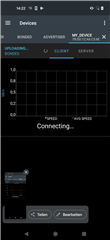
Then I see this for 20 seconds without any progress and "blinky" was not programmed.
I see some similar problems in the DevZone but didn't find the solution for the problem.
What do I have to do to get the FOTA run ?
Parents Reply Children
  • Hello Øyvind,

    sorry for the delayed answer, I was a few days out of office.

    Here is some additional information:

    1. Wireshark logging

    2. Nrf Connect logging

    Fota.pcapng

    nRF Connect, 2022-06-20
    My_Device (F3:AD:40:4F:4C:4C)
    V	09:56:28.189	Connecting to F3:AD:40:4F:4C:4C...
    D	09:56:28.189	gatt = device.connectGatt(autoConnect = false, TRANSPORT_LE, preferred PHY = LE 1M)
    D	09:56:28.719	[Callback] Connection state changed with status: 0 and new state: CONNECTED (2)
    I	09:56:28.719	Connected to F3:AD:40:4F:4C:4C
    D	09:56:28.719	wait(1600ms)
    D	09:56:28.726	[Broadcast] Action received: android.bluetooth.device.action.ACL_CONNECTED
    I	09:56:29.165	Connection parameters updated (interval: 7.5ms, latency: 0, timeout: 5000ms)
    I	09:56:29.274	PHY updated (TX: LE 2M, RX: LE 2M)
    I	09:56:29.704	Connection parameters updated (interval: 45.0ms, latency: 0, timeout: 5000ms)
    V	09:56:30.321	Discovering services...
    D	09:56:30.321	gatt.discoverServices()
    D	09:56:30.332	[Callback] Services discovered with status: 0
    I	09:56:30.332	Services discovered
    V	09:56:30.353	Generic Attribute (0x1801)
    - Service Changed [I] (0x2A05)
       Client Characteristic Configuration (0x2902)
    - Client Supported Features [R W] (0x2B29)
    - Database Hash [R] (0x2B2A)
    Generic Access (0x1800)
    - Device Name [R] (0x2A00)
    - Appearance [R] (0x2A01)
    - Peripheral Preferred Connection Parameters [R] (0x2A04)
    Unknown Service (75c276c3-8f97-20bc-a143-b354244886d4)
    - Unknown Characteristic [W WNR] (6acf4f08-cc9d-d495-6b41-aa7e60c4e8a6)
    - Unknown Characteristic [N] (d3d46a35-4394-e9aa-5a43-e7921120aaed)
       Client Characteristic Configuration (0x2902)
    - Unknown Characteristic [W WNR] (6acf4f08-cc9d-d495-6b41-aa7e60c4e8a6)
    - Unknown Characteristic [N] (d3d46a35-4394-e9aa-5a43-e7921120aaed)
       Client Characteristic Configuration (0x2902)
    SMP Service (8d53dc1d-1db7-4cd3-868b-8a527460aa84)
    - SMP Characteristic [N WNR] (da2e7828-fbce-4e01-ae9e-261174997c48)
    - SMP Characteristic [N WNR] (da2e7828-fbce-4e01-ae9e-261174997c48)
       Client Characteristic Configuration (0x2902)
    D	09:56:30.353	gatt.setCharacteristicNotification(00002a05-0000-1000-8000-00805f9b34fb, true)
    D	09:56:30.355	gatt.setCharacteristicNotification(d3d46a35-4394-e9aa-5a43-e7921120aaed, true)
    D	09:56:30.357	gatt.setCharacteristicNotification(d3d46a35-4394-e9aa-5a43-e7921120aaed, true)
    I	09:56:33.934	Connection parameters updated (interval: 45.0ms, latency: 0, timeout: 420ms)
    V	09:56:34.799	[McuMgr] Connecting...
    D	09:56:34.804	[McuMgr] gatt = device.connectGatt(autoConnect = false, TRANSPORT_LE, LE 1M)
    D	09:56:34.836	[McuMgr] [Callback] Connection state changed with status: 0 and new state: 2 (CONNECTED)
    I	09:56:34.839	[McuMgr] Connected to F3:AD:40:4F:4C:4C
    D	09:56:34.843	[McuMgr] wait(1600)
    V	09:56:36.453	[McuMgr] Discovering services...
    D	09:56:36.462	[McuMgr] gatt.discoverServices()
    I	09:56:36.470	[McuMgr] Services discovered
    V	09:56:36.475	[McuMgr] Primary service found
    V	09:56:36.481	[McuMgr] Requesting new MTU...
    D	09:56:36.485	[McuMgr] gatt.requestMtu(498)
    I	09:56:36.544	[McuMgr] MTU changed to: 247
    A	09:56:36.551	[McuMgr] Sending (10 bytes) Header (Op: 0, Flags: 0, Len: 2, Group: 1, Seq: 0, Command: 0) CBOR {}
    V	09:56:36.555	[McuMgr] Writing characteristic da2e7828-fbce-4e01-ae9e-261174997c48 (WRITE COMMAND)
    D	09:56:36.559	[McuMgr] gatt.writeCharacteristic(da2e7828-fbce-4e01-ae9e-261174997c48)
    I	09:56:36.568	[McuMgr] Data written to da2e7828-fbce-4e01-ae9e-261174997c48, value: (0x) 00-00-00-02-00-01-00-00-BF-FF
    V	09:57:06.583	[McuMgr] Disconnecting...
    D	09:57:06.590	[McuMgr] gatt.disconnect()
    D	09:57:06.597	[McuMgr] [Callback] Connection state changed with status: 0 and new state: 0 (DISCONNECTED)
    I	09:57:06.603	[McuMgr] Disconnected
    D	09:57:06.610	[McuMgr] gatt.close()
    

    Is there a example  for the nrf5340 available with running FOTA functionality ?

    Best regards,

    Georg

  • Hi Georg! Thanks for providing this information. I will need some time to look into it. 

    Georg said:
    Is there a example  for the nrf5340 available with running FOTA functionality ?

    No sample comes to my mind at the moment. Have you seen the chapter on FOTA upgrades in the nRF5340 DK user guide?

    Kind regards,
    Øyvind

Related