nRF 52840 thread application stops at otSysProcessDrivers on Fanstel BT840

Hello,

I am working on BLE+Thread multiprotocol and took ble_thread_swi_template as a base code. I am using nRF5_SDK_for_Thread_and_Zigbee_v4.1.0_32ce5f8. My development hardware is Fanstel BT840. I am using softdevice - s140_nrf52_7.0.1_softdevice.

When I run the template example, the thread gets up but suddenly stops working.

When debugged I found that - When this function - otSysProcessDrivers(mp_ot_instance); is called inside thread_process(), the application suddenly stops.

void thread_process(void)
{
    ASSERT(mp_ot_instance != NULL);
    otTaskletsProcess(mp_ot_instance);
    otSysProcessDrivers(mp_ot_instance);
}

I also have made internal clock related changes for BT 840: https://devzone.nordicsemi.com/f/nordic-q-a/58956/softdevice-not-working-on-bt840-based-custom-board

#define NRF_SDH_CLOCK_LF_SRC 0
#define NRF_SDH_CLOCK_LF_RC_CTIV 16
#define NRF_SDH_CLOCK_LF_RC_TEMP_CTIV 2
#define NRF_SDH_CLOCK_LF_ACCURACY 1

This same example works on nRF Development Kit but does not work on BT840. I was wondering how does the underlying hardware affecting the thread operation? Kindly let me know if there is any information on this.

Thanks in Advance,

Rajendra

Parents Reply Children
  • Hi Sigurd,

    Here in 'ble_thread_swi_template' either THREAD or BLE is running. When BLE is running it runs well. I can see advertising messages, I can connect and disconnect from 'nRF Connect for Mobile'. The issue arises when I switch from BLE to THREAD by calling - 'switch_ble_to_thread()'.
    When I am in THREAD I do not see any advertising messages since BLE is OFF(BLE deinit was called during switching). I also checked in 'nRF5_SDK_for_Thread_and_Zigbee_2.0.0_29775ac' and found that THREAD works well with this SDK
    Here is the summary of the working SDKs.

    SDK OPENTHREAD-VERSION WORKS ON NRF52840-DK? WORKS ON BT840-DK?
    nRF5_SDK_for_Thread_v0.10.0_e1c3d11 OPENTHREAD/g6a15261b-dirty; NRF52840; Jun 29 2017 09:15:02 Yes Yes
    nRF5_SDK_for_Thread_and_Zigbee_2.0.0_29775ac OPENTHREAD/g591ec62; NRF52840; Sep 19 2018 11:42:29 Yes Yes
    nrf5sdkforthreadandzigbeev300d310e71 OPENTHREAD/20180926-00501-g23ff1015; NRF52840; Mar 25 2019 13:04:52 Yes Yes
    nrf5sdkforthreadandzigbeev3209fade31 OPENTHREAD/20180926-00632-g2279ef61; NRF52840; May 23 2019 20:44:20 Yes Yes
    nRF5_SDK_for_Thread_and_Zigbee_v4.1.0_32ce5f8 OPENTHREAD/20191113-00534-gc6a258e3; NRF52840; Apr  5 2020 21:51:18 Yes No
    nrf5_sdk_for_thread_and_zigbee_v4.2.0_af27f76 OPENTHREAD/20191113-00534-gc6a258e3; NRF52840; Apr  5 2020 21:51:18 Yes No

    Best Regards,
    Rajendra

  • Hi Rajendra,

    It is definitively interesting that it works for previous versions of the SDK.
    I will check this with our developers to see if this is caused by a bug or a purposeful change.

    I will return here when I know.

    Thank you for the thorough testing.

    Regards,
    Sigurd Hellesvik

  • Hi Rajendra,

    First up: The nRF Connect SDK is the newest SDK we have. Therefore, our developers are not able to look too closely at your issue.

    But since you found that there is a difference between version 4.1.0 and 3.2.0, I suggest that you have a look at the difference between these two, and see if you can find the issue yourself here.
    Our developers suggest that you start looking at the thread_init function, as it seems to have changed between 4.1.0 and 3.2.0.

    Another solution could be to try to run Multiprotocol with our nRF Connect SDK, since we recommend the nRF Connect SDK for new projects.

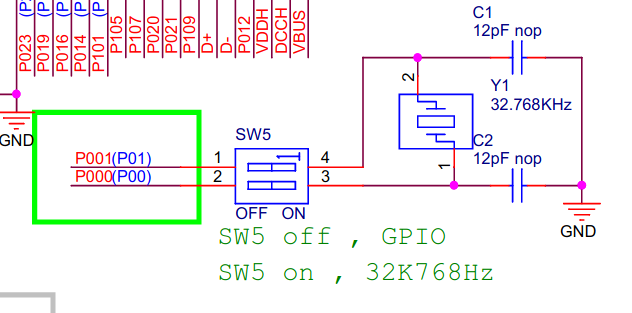
    By the way, do you see the same issue with the BT840 DK if you turn on the SW5?

    Regards,
    Sigurd Hellesvik

Related