pc-ble-driver-py setup

I am trying to setup and run the existing scripts, which are part of pc-ble-driver-py.

The following are the steps and tools

1. Installed the pc-ble-driver-py
pip install pc-ble-driver-py

2. Python Installed version
Python 3.9.5

3. Hardware used :
NRF52840 Board

Tried with C:\Python39\Lib\site-packages\pc_ble_driver_py\examples>python serial_port_enum.py NRF52 COM3

the output shows the serial port details and it flashes already build firmware form hex folder.
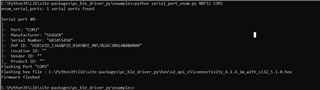
But when we try the "Advertising" script, getting an error

C:\Python39\Lib\site-packages\pc_ble_driver_py\examples>python advertising.py NRF52 COM3
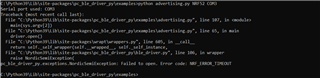
I have followed the existing thread and found that the baud rate the pc-ble-driver lib uses is 115k2. I have attempted that too. Still get the same error.

Can some one help how to try the existing script. 

Note : As of now i am not trying to build the .hex files, just want to try the existing python scripts to make sure my setup is working.

Regards,
Venkat

Parents
  • Hi,

    The connectivity_4.1.4_1m_with_s132_5.1.0.hex is the connectivity firmware for using 1m baud on the uart. (The "1m" part fo the name represents the baud.) In other words, the flashed firmware should be correct.

    Since pc-ble-driver is also used for the nRF Connect for Desktop BLE app, you could try launching that one (and accepting programming the connectivity firmware for it) to confirm there is not something else wrong. You can then try the pc-ble-driver-py example, which should work without re-flashing the connectivity firmware (provided the API version used is the same.)

    Regards,
    Terje

Reply
  • Hi,

    The connectivity_4.1.4_1m_with_s132_5.1.0.hex is the connectivity firmware for using 1m baud on the uart. (The "1m" part fo the name represents the baud.) In other words, the flashed firmware should be correct.

    Since pc-ble-driver is also used for the nRF Connect for Desktop BLE app, you could try launching that one (and accepting programming the connectivity firmware for it) to confirm there is not something else wrong. You can then try the pc-ble-driver-py example, which should work without re-flashing the connectivity firmware (provided the API version used is the same.)

    Regards,
    Terje

Children
Related