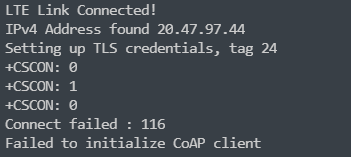
CoAP with DTLS 1.2 on download sample

hi,

I use download sample on nRF9160DK. I try to use CoAP with DTLS, but the SAMPLE_FILE_URL only support http and https url, I can't find another coaps server to replace it. How can I use CoAP with DTLS on download sample?

Parents
  • Hello,
    You need to set SAMPLE_FILE_CUSTOM to specify a custom server, and enable CONFIG_COAP for COAP to work, And change the cert_provision function to write a PSK rather than a CA chain.

    So set up a CoAPs server, set CONFIG_SAMPLE_FILE_URL to point to your CoAPs server.
    SAMPLE_FILE_URL supports all possible types of servers (it is just a string), but we only have defaults for HTTP and HTTPS. So you need to set up one for yourself.

    Regards,
    Jonathan

Reply
  • Hello,
    You need to set SAMPLE_FILE_CUSTOM to specify a custom server, and enable CONFIG_COAP for COAP to work, And change the cert_provision function to write a PSK rather than a CA chain.

    So set up a CoAPs server, set CONFIG_SAMPLE_FILE_URL to point to your CoAPs server.
    SAMPLE_FILE_URL supports all possible types of servers (it is just a string), but we only have defaults for HTTP and HTTPS. So you need to set up one for yourself.

    Regards,
    Jonathan

Children
  • Hi,

    I use NCS 2.0 and 9160modem V1.3.2. Imodified it according to your idea, but still fail. In the code I need to add the following code, I don't known what else I need to add.

    nrf_sec_cipher_t cipher_list[] = { 0xC0A8 };
    err = setsockopt(dl->fd, SOL_TLS, TLS_CIPHERSUITE_LIST, cipher_list, sizeof(cipher_list));
    if (err) {
        /* Failed to set up cipher suite list. */
        goto cleanup;
    }

    static int cert_provision(void)
    {
    	int err;
    	bool exists;
    
        /*----------- PSK -----------------*/
        err = modem_key_mgmt_exists(SEC_TAG,
    				    MODEM_KEY_MGMT_CRED_TYPE_PSK,
    				    &exists);
    	if (err) {
    		printk("Failed to check for certificates err %d\n", err);
    		return err;
    	}
    
    	if (exists) {
    		printk("PSK ");
    		/* Let's compare the existing credential */
    		err = modem_key_mgmt_cmp(SEC_TAG,
    					 MODEM_KEY_MGMT_CRED_TYPE_PSK,
    					 key, sizeof(key));
    		printk("%s\n", err ? "mismatch" : "match");
    		if (!err) {
    			return 0;
    		}
    	} else {
            printk("PSK is nonexistent\n");
        }
    
        printk("Provisioning PSK\n");
    	err = modem_key_mgmt_write(SEC_TAG,
    				   MODEM_KEY_MGMT_CRED_TYPE_PSK,
    				   key, sizeof(key));
    	if (err) {
    		printk("Failed to provision certificate, err %d\n", err);
    		return err;
    	}
    
    	return 0;
    }

    My trace log as follow:

    trace-2022-07-14T10-04-46.760Z.zip

  • Hi,

    Now I modify the code and try to connect to the server `coap://californium.eclipseprojects.io`

    Firstly, I download zephyr-coaps-client to my nRF9160 DK, and it can connect to the server properly

    Then, I use my program which base on NCS2.0 nrf/sample/nrf9160/coap-client

    Here is the PSK and PSK Identity I used.

    static unsigned char psk_id[] = "cali.351516172719221"; 
    static size_t psk_id_length = sizeof(psk_id) - 1; 
    static unsigned char psk_key[] = ".fornium"; 
    static size_t psk_key_length = sizeof(psk_key) - 1;
    
    /* Provision certificate to modem */
    static int cert_provision(void)
    {
    	int err;
    
        err = modem_key_mgmt_write(SEC_TAG,
    				   MODEM_KEY_MGMT_CRED_TYPE_IDENTITY,
    				   psk_id, psk_id_length);
    	if (err) {
    		printk("Failed to provision certificate, err %d\n", err);
    		return err;
    	}
    
        printk("Provisioning PSK\n");
    	/*  Provision PSK to the modem */
    	err = modem_key_mgmt_write(SEC_TAG,
    				   MODEM_KEY_MGMT_CRED_TYPE_PSK,
    				   psk_key, psk_key_length);
    	if (err) {
    		printk("Failed to provision certificate, err %d\n", err);
    		return err;
    	}
    
    	return 0;
    }

    And I set my `encryption suite` as follow. That doesn't seem like a problem, right.

    #define TLS_NULL_WITH_NULL_NULL 0x0000 /< NULL cipher */ 
    #define TLS_PSK_WITH_AES_128_CCM 0xC0A4 /< see RFC 6655 */ 
    #define TLS_PSK_WITH_AES_128_CCM_8 0xC0A8 /**< see RFC 6655 */
    
    nrf_sec_cipher_t cipher_list[] = { 
    TLS_PSK_WITH_AES_128_CCM, 
    TLS_PSK_WITH_AES_128_CCM_8, 
    TLS_NULL_WITH_NULL_NULL, };
    
    err = setsockopt(fd, SOL_TLS, TLS_CIPHERSUITE_LIST, cipher_list, sizeof(cipher_list)); 
    if (err) { /* Failed to set up cipher suite list. */ return -errno; } 


    Now I use this PSK、PSK Identity and encryption suite to connect the server `californium.eclipseprojects.io`. But when the client sends `client key exchange`, the server does not respond.


    My Wireshark log as follow:

    trace-2022-07-19T12-27-14.230Z.zip

  • Hi, and sorry for the slow response.

    Jonathan has left on vacation, so I have taken over your ticket.

    Here is a version of the coap_client project that is modified to use DTLS: 5327.coap_client.zip (my changes aren't the cleanest, but it should be good enough to show what must be done)

    One important thing to note is that the PSK must be converted to ASCII hex (I used the "Client_identity"/"secretPSK" pair).

    Best regards,

    Didrik

Related