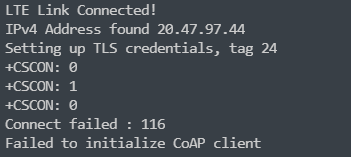
CoAP with DTLS 1.2 on download sample

hi,

I use download sample on nRF9160DK. I try to use CoAP with DTLS, but the SAMPLE_FILE_URL only support http and https url, I can't find another coaps server to replace it. How can I use CoAP with DTLS on download sample?

Parents
  • Hello,
    You need to set SAMPLE_FILE_CUSTOM to specify a custom server, and enable CONFIG_COAP for COAP to work, And change the cert_provision function to write a PSK rather than a CA chain.

    So set up a CoAPs server, set CONFIG_SAMPLE_FILE_URL to point to your CoAPs server.
    SAMPLE_FILE_URL supports all possible types of servers (it is just a string), but we only have defaults for HTTP and HTTPS. So you need to set up one for yourself.

    Regards,
    Jonathan

  • Hi,

    Now I modify the code and try to connect to the server `coap://californium.eclipseprojects.io`

    Firstly, I download zephyr-coaps-client to my nRF9160 DK, and it can connect to the server properly

    Then, I use my program which base on NCS2.0 nrf/sample/nrf9160/coap-client

    Here is the PSK and PSK Identity I used.

    static unsigned char psk_id[] = "cali.351516172719221"; 
    static size_t psk_id_length = sizeof(psk_id) - 1; 
    static unsigned char psk_key[] = ".fornium"; 
    static size_t psk_key_length = sizeof(psk_key) - 1;
    
    /* Provision certificate to modem */
    static int cert_provision(void)
    {
    	int err;
    
        err = modem_key_mgmt_write(SEC_TAG,
    				   MODEM_KEY_MGMT_CRED_TYPE_IDENTITY,
    				   psk_id, psk_id_length);
    	if (err) {
    		printk("Failed to provision certificate, err %d\n", err);
    		return err;
    	}
    
        printk("Provisioning PSK\n");
    	/*  Provision PSK to the modem */
    	err = modem_key_mgmt_write(SEC_TAG,
    				   MODEM_KEY_MGMT_CRED_TYPE_PSK,
    				   psk_key, psk_key_length);
    	if (err) {
    		printk("Failed to provision certificate, err %d\n", err);
    		return err;
    	}
    
    	return 0;
    }

    And I set my `encryption suite` as follow. That doesn't seem like a problem, right.

    #define TLS_NULL_WITH_NULL_NULL 0x0000 /< NULL cipher */ 
    #define TLS_PSK_WITH_AES_128_CCM 0xC0A4 /< see RFC 6655 */ 
    #define TLS_PSK_WITH_AES_128_CCM_8 0xC0A8 /**< see RFC 6655 */
    
    nrf_sec_cipher_t cipher_list[] = { 
    TLS_PSK_WITH_AES_128_CCM, 
    TLS_PSK_WITH_AES_128_CCM_8, 
    TLS_NULL_WITH_NULL_NULL, };
    
    err = setsockopt(fd, SOL_TLS, TLS_CIPHERSUITE_LIST, cipher_list, sizeof(cipher_list)); 
    if (err) { /* Failed to set up cipher suite list. */ return -errno; } 


    Now I use this PSK、PSK Identity and encryption suite to connect the server `californium.eclipseprojects.io`. But when the client sends `client key exchange`, the server does not respond.


    My Wireshark log as follow:

    trace-2022-07-19T12-27-14.230Z.zip

Reply
  • Hi,

    Now I modify the code and try to connect to the server `coap://californium.eclipseprojects.io`

    Firstly, I download zephyr-coaps-client to my nRF9160 DK, and it can connect to the server properly

    Then, I use my program which base on NCS2.0 nrf/sample/nrf9160/coap-client

    Here is the PSK and PSK Identity I used.

    static unsigned char psk_id[] = "cali.351516172719221"; 
    static size_t psk_id_length = sizeof(psk_id) - 1; 
    static unsigned char psk_key[] = ".fornium"; 
    static size_t psk_key_length = sizeof(psk_key) - 1;
    
    /* Provision certificate to modem */
    static int cert_provision(void)
    {
    	int err;
    
        err = modem_key_mgmt_write(SEC_TAG,
    				   MODEM_KEY_MGMT_CRED_TYPE_IDENTITY,
    				   psk_id, psk_id_length);
    	if (err) {
    		printk("Failed to provision certificate, err %d\n", err);
    		return err;
    	}
    
        printk("Provisioning PSK\n");
    	/*  Provision PSK to the modem */
    	err = modem_key_mgmt_write(SEC_TAG,
    				   MODEM_KEY_MGMT_CRED_TYPE_PSK,
    				   psk_key, psk_key_length);
    	if (err) {
    		printk("Failed to provision certificate, err %d\n", err);
    		return err;
    	}
    
    	return 0;
    }

    And I set my `encryption suite` as follow. That doesn't seem like a problem, right.

    #define TLS_NULL_WITH_NULL_NULL 0x0000 /< NULL cipher */ 
    #define TLS_PSK_WITH_AES_128_CCM 0xC0A4 /< see RFC 6655 */ 
    #define TLS_PSK_WITH_AES_128_CCM_8 0xC0A8 /**< see RFC 6655 */
    
    nrf_sec_cipher_t cipher_list[] = { 
    TLS_PSK_WITH_AES_128_CCM, 
    TLS_PSK_WITH_AES_128_CCM_8, 
    TLS_NULL_WITH_NULL_NULL, };
    
    err = setsockopt(fd, SOL_TLS, TLS_CIPHERSUITE_LIST, cipher_list, sizeof(cipher_list)); 
    if (err) { /* Failed to set up cipher suite list. */ return -errno; } 


    Now I use this PSK、PSK Identity and encryption suite to connect the server `californium.eclipseprojects.io`. But when the client sends `client key exchange`, the server does not respond.


    My Wireshark log as follow:

    trace-2022-07-19T12-27-14.230Z.zip

Children
Related