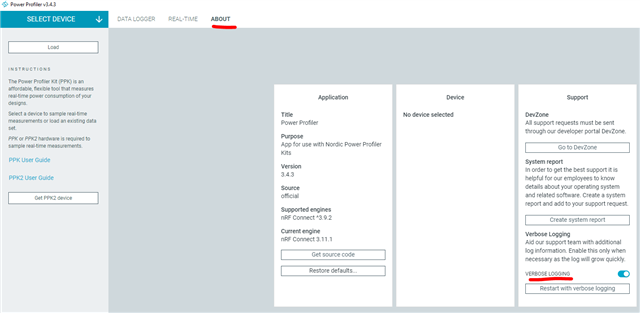
PPK2 Strange Error message at startup

Hi there

I have noticed a strange error message at startup of the PPK2

11:23:44.790   Failed to get the library versions: JLINKARM_DLL_NOT_FOUND (Origin: "Failed to get module versions.")
11:23:48.361   Validating firmware for device with s/n EA349DCA72C3
11:23:48.368   Opening device with s/n EA349DCA72C3
Why is it even bothering with the JLINK ARM_DLL_NOT_FOUND ??
I do have a Debug pod... ST-Link connected.
Thanks
Simon
  • Hi

    Does the PPK2 start up correctly after this or not?

    If not: Can you confirm that the PPK2 is connected to the USB DATA/POWER port to your computer? Please check if the USB cable is damaged or faulty by trying another USB cable and another USB port. What version of the Power Profiler app and nRF Connect for desktop app are you running, and are you using Windows, MacOS or Linux? You can also try turning on Verbose Logging so we can take a better look at your log


  • Ok, thanks. This is not the case on my end, but you might not have installed the nRF Command Line Tools or a supported version of J-Link installed? If not it's recommended you make sure to download those and I think that should resolve your error message.

    My log for reference:

    11:11:58.813	Using nrf-device-lib-js version: 0.4.11
    11:11:58.813	Using nrf-device-lib version: 0.11.8
    11:11:58.814	Using nrfjprog DLL version: 10.15.4
    11:11:58.814	Using JLink version: JLink_V7.58b
    11:12:01.537	Validating firmware for device with s/n FA802E9AB886
    11:12:01.548	Opening device with s/n FA802E9AB886
    11:12:01.935	Trigger length updated to 10 ms
    11:12:02.009	PPK started
    11:12:02.095	PPK opened
    11:12:02.106	DUT ON

    Best regards,

    Simon

  • Wee I'm not using this for a Nordic device  We are using an ST part but about to change.  I saw an article online which raved about the PPK2...  For years now I've looked for something similar and short of spending several thousand dollars on a fluke or similar (which isn't half as good).  But this is a fantastic little tool.

    A++ marks for the developer.

    installing the online tools changed the messages:

    08:14:26.434   Using nrf-device-lib-js version: 0.4.11
    08:14:26.434   Using nrf-device-lib version: 0.11.8
    08:14:26.434   Using nrfjprog DLL version: 10.15.4
    08:14:26.434   Using JLink version: JLink_V7.66a
    08:14:26.471   Installed JLink version does not match the provided version (V7.58b).
    But why does it even check for JLINK.. its a power profiler, not a debugger / programmer!

    Simon

  • Hi

    Glad to hear you like it, I'll forward the feedback to the development team!

    The reason the Power Profiler app checks for JLink is because the PPK mark 1 needs to be connected to a DK (and the J-Link Interface MCU) to communicate with the computer. So the check is there for backwards compatibility.

    Best regards,

    Simon

Related