Hello,
I am trying to save data on an microSD card using SPI1. I am following the firmware in this discussion Working NRF9160 SD Card Example on SDK 1.9.0. In addition I have another peripheral on SPI0 bus which is working correctly. Disk initialization do not work (I am using basically the same code as the link) and returns error code of '-5'. I experimented a bit with the configurations and either I am getting an error code of -5 or the main function resets.
When
&spi1 {
	compatible = "nordic,nrf-spim";
	.
	.
	.
	}
I get rebooted back to the main function.
When
&spi1 {
	compatible = "nordic,nrf-spi";
	.
	.
	.
	}
I get error code of -5
I researched the forum and found lots of topic about SPI SDHC interfacing issues, yet, they did not solve my problem. I tried changing pins since -5 seems to be EIO code ( disk program files return -EIO etc.) but not sure of that actually represents 'EIO' error code. It also might be FR_NO_PATH
Here is the debugging output,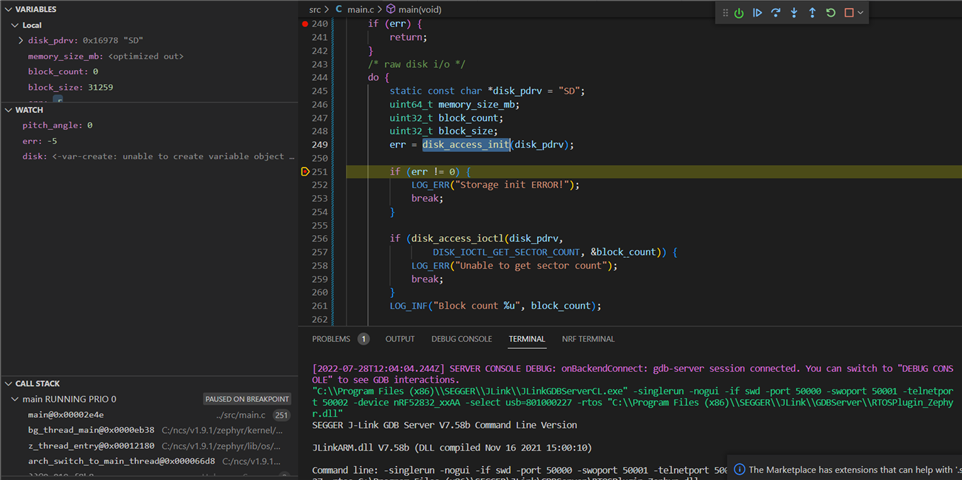
And the devicetree and .conf files,
// Copyright (c) 2022 Nordic Semiconductor ASA
// SPDX-License-Identifier: Apache-2.0

/dts-v1/;
#include <nordic/nrf52832_qfaa.dtsi>

/ {
	model = "pedal_board";
	compatible = "pedal-board";

	chosen {
		zephyr,sram = &sram0;
		zephyr,flash = &flash0;
		zephyr,code-partition = &slot0_partition;
	};
};

&gpio0 {
	status = "okay";
};

&spi0 {
	compatible = "nordic,nrf-spi";
	/* BMX160 IMU sensor */
	status = "okay";
	sck-pin = <12>;
	mosi-pin = <13>;
	miso-pin = <14>;
	//cs-gpios = <&gpio0 11 GPIO_ACTIVE_LOW>;
};

&spi1 {
	compatible = "nordic,nrf-spi";
	status = "okay";
	sck-pin = <19>;
	mosi-pin = <24>;
	miso-pin = <22>;
	miso-pull-up;

	cs-gpios = <&gpio0 23 GPIO_ACTIVE_LOW>;

	sdhc0: sdhc@0 {
			compatible = "zephyr,mmc-spi-slot";
			reg = <0x0>;
			status = "okay";
			label = "SDHC0";
			spi-max-frequency = <24000000>;
	};
};


&flash0 {
	partitions {
		compatible = "fixed-partitions";
		#address-cells = <1>;
		#size-cells = <1>;

		boot_partition: partition@0 {
			label = "mcuboot";
			reg = <0x0 0xc000>;
		};
		slot0_partition: partition@c000 {
			label = "image-0";
			reg = <0xc000 0x32000>;
		};
		slot1_partition: partition@3e000 {
			label = "image-1";
			reg = <0x3e000 0x32000>;
		};
		scratch_partition: partition@70000 {
			label = "image-scratch";
			reg = <0x70000 0xa000>;
		};
		storage_partition: partition@7a000 {
			label = "storage";
			reg = <0x7a000 0x6000>;
		};
	};
};
# enable GPIO
CONFIG_GPIO=y

# Enable hardware stack protection
CONFIG_HW_STACK_PROTECTION=y

#Configure cloock
CONFIG_CLOCK_CONTROL=y

# Console
CONFIG_UART_CONSOLE=n
CONFIG_CONSOLE=y
CONFIG_USE_SEGGER_RTT=y
CONFIG_RTT_CONSOLE=y
CONFIG_LOG=y
CONFIG_LOG_MODE_DEFERRED=y
CONFIG_LOG_DEFAULT_LEVEL=4
CONFIG_LOG_BACKEND_RTT=y
CONFIG_LOG_BACKEND_RTT_BUFFER=0

# Heap memory
CONFIG_HEAP_MEM_POOL_SIZE=2048
# Some command handlers require a large stack.
CONFIG_SYSTEM_WORKQUEUE_STACK_SIZE=4096

# IMU Stuff...:
CONFIG_SPI=y
CONFIG_MAIN_STACK_SIZE=4096
# IMU 6-axis fusion (enables inclusion of 'math.h' library)
CONFIG_NEWLIB_LIBC=y
CONFIG_CBPRINTF_FP_SUPPORT=y
CONFIG_NEWLIB_LIBC_FLOAT_PRINTF=y
# additional board options
CONFIG_GPIO_AS_PINRESET=n

# debugging
CONFIG_DEBUG_OPTIMIZATIONS=y
CONFIG_DEBUG_THREAD_INFO=y

#esb
CONFIG_NCS_SAMPLES_DEFAULTS=y
CONFIG_ESB=y


# Beyond base settings
CONFIG_SPI=y
CONFIG_NRFX_SPI=y

CONFIG_NRFX_SPIM=y
CONFIG_NRFX_SPI0=y
CONFIG_NRFX_SPI1=y
CONFIG_NRFX_SPIM0=y
CONFIG_NRFX_SPIM1=y

CONFIG_SPI_NRFX_RAM_BUFFER_SIZE=8
CONFIG_DISK_ACCESS=y
CONFIG_FILE_SYSTEM=y
CONFIG_FAT_FILESYSTEM_ELM=y
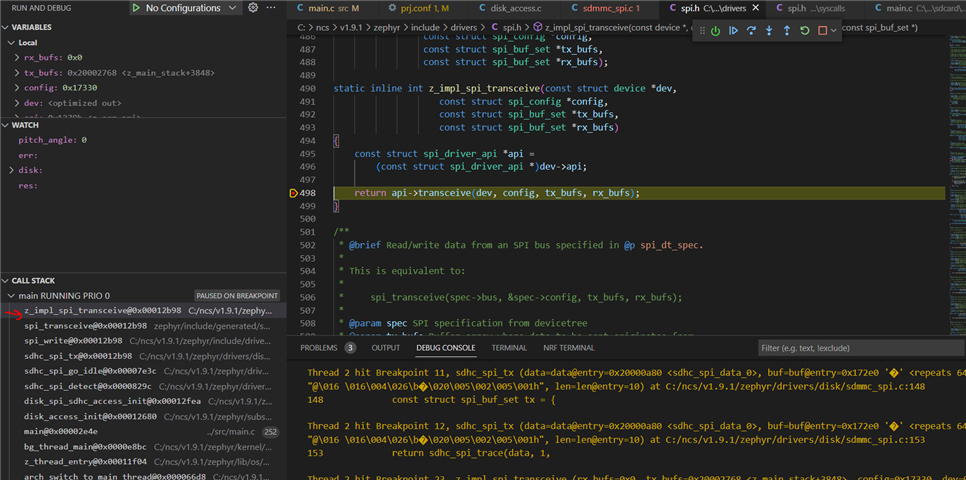
EDIT1:
I have traced the stacks just before the systes reboots back to the main function, its 'z_impl_spi_transceive()' function. Here is the stack call-list,