

Hi,
NCS1.9.99, VSCode, peripheral_lbs_DFU
nRF5340-DK DFU got error:
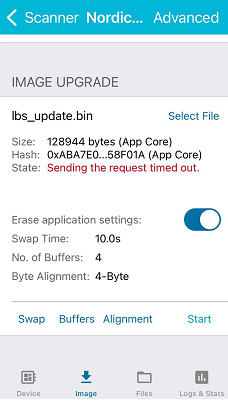
IOS sending time out, android apk i have not fond.
Best regards
Hi,
NCS1.9.99, VSCode, peripheral_lbs_DFU
nRF5340-DK DFU got error:
IOS sending time out, android apk i have not fond.
Best regards
Hi,
I built your project against SDK v2.0.0, but was not able to replicate the error. Could you try the same?
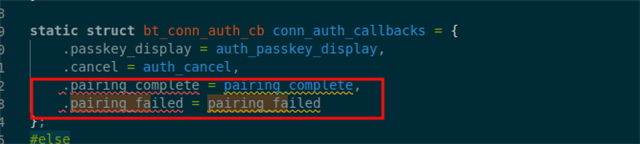
Note: I had to remove these struct elements to build your project:
Thanks,
Vidar
Edit: here is the update image I used: 5684.app_update.bin

Hi,
thank you very much,
i remove tow line,the same "sending time out".
and as follow is a Simpler example, it work well in NCS1.9.1,
but in NCS1.9.99 the same error "sending time out".
i don't know why!
Best regards

Hi,
Please consider using the 1.9.1 or the 2.0.x release tag. The development tag, v1.9.99-dev1, was created to give early access to LE audio support officially introduced in v2.0.0.
Hi,
thanks for reply,
i've update to NCS2.0.99,
but the two project got the same error, "sending time out "
please check hello_world_dfu.rar
I am in a hurry for dfu.
is it lost DFU after 1.9.99?
Best regards
Hi,
thanks for reply,
i've update to NCS2.0.99,
but the two project got the same error, "sending time out "
please check hello_world_dfu.rar
I am in a hurry for dfu.
is it lost DFU after 1.9.99?
Best regards
Hi,
I'm not sure how you are updating the SDK since there is no v2.0.99 release available."99" is used in the documentation to refer to the main branch as explained in the note here: https://developer.nordicsemi.com/nRF_Connect_SDK/doc/latest/nrf/release_notes.html
Currently the latest release is v2.0.2, but you can probably use v2.0.0 from the toolchain manager as there were no BLE related changes between v2.0.0 and v2.0.2 as you can see from the release notes.
Hi
i update by cmd "west init -m github.com/.../sdk-nrf --mr main"
a lot of project that define self pin can not build,
because set pin by another psels
	i2s0_default_alt: i2s0_default_alt {
		group1 {
			psels = <NRF_PSEL(I2S_SCK_S, 0, 0X15)>,
					<NRF_PSEL(I2S_LRCK_S, 1, 0X08)>,
					<NRF_PSEL(I2S_SDOUT, 0, 0X13)>;
					// <NRF_PSEL(I2S_SDIN, 0, 0xFF)>;
		};
	};
android DeviceManage app DFU got ok,
ios phone sending time out.
even ios app i've remove and reinstll it.
Hi,
Please consider working with a stable release tag instead. Excerpt from the documentation regarding use of the main branch:
"The main branch of the sdk-nrf repository always contains the latest development state of the nRF Connect SDK. Since all development is done openly, you can use it if you are not particularly concerned about stability and want to track the latest changes that are being merged continuously into the different repositories." https://developer.nordicsemi.com/nRF_Connect_SDK/doc/latest/nrf/dm_code_base.html#revisions
yoyou said:because set pin by another psels
This is covered in the migration document here: https://developer.nordicsemi.com/nRF_Connect_SDK/doc/latest/nrf/migration/migration_guide_1.x_to_2.x.html#ncs-2-0-0-migration
yoyou said:ios phone sending time out.
even ios app i've remove and reinstll it.
In case the iphone may have stale bonding information stored for your peripheral, you may try to go tho the device list in settings->bluetooth and forget your peripheral device if it is listed, then turn Bluetooth off and on before you attempt DFU again.
Hi
thanks for reply,
i have reinstall 2.0.2.
nrf5340dk_nrf5340_cpuapp i2s build.
(1) how to disable i2s SDIN pin?
it can't set to 0xFF, no set means disable?
&pinctrl {
	spi3_default: spi3_default {
		phandle = < 0xa >;
		group1 {
			psels = <NRF_PSEL(SPIM_SCK, 0, 0x1f)>,
			<NRF_PSEL(SPIM_MISO, 1, 0x00)>,
			<NRF_PSEL(SPIM_MOSI, 1, 0x0d)>;
			// <NRF_PSEL(SPIS_CSN, 0, 0x0f)>;
		};
	};
	spi3_sleep: spi3_sleep {
		phandle = < 0xb >;
		group1 {
			psels = <NRF_PSEL(SPIM_SCK, 0, 0x1f)>,
			<NRF_PSEL(SPIM_MISO, 1, 0x00)>,
			<NRF_PSEL(SPIM_MOSI, 1, 0x0d)>;
			// <NRF_PSEL(SPIS_CSN, 0, 0x0f)>;
			low-power-enable;
		};
	};

	i2s0_default_alt: i2s0_default_alt {
		group1 {
			psels = <NRF_PSEL(I2S_SCK_S, 0, 0X19)>,
					<NRF_PSEL(I2S_LRCK_S, 1, 0X18)>,
					<NRF_PSEL(I2S_SDOUT, 0, 0X08)>,
					<NRF_PSEL(I2S_SDIN, 1, 0x07)>;
		};
	};

};
&spi3 {
    compatible = "nordic,nrf-spim";
    label = "SPI_3";
    status = "okay";
	cs-gpios = < &gpio0 0x10 0x1 >;
	pinctrl-0 = < &spi3_default >;
	pinctrl-1 = < &spi3_sleep >;
	pinctrl-names = "default", "sleep";
};
(2) in NCS1.9.99- get i2s pin number from overlay note as follow line:
how to get i2s pin number in NCS2.0.2?
(3) DeviceManage app DFU error "sending time out" on IOS,
but work well on Android. maybe Nordic should update IOS app.
tips: IOS phone had forget peripheral device , then close Bluetooth and restart,
and then restart phone, and then reinstall app.
Thanks !
Best regards
Hi,
Sorry for the delayed response.
1) Setting the pin as unused is currently not supported through the pinctrl API. You will however achieve the same if you omit i2s SDIN pin definition your devicetree like you suggested.
2) With pinctrl enabled you need to use the pinctrl_apply_state() to configure the i2s psel registers as shown here: https://github.com/nrfconnect/sdk-zephyr/blob/482dcc7865f7d3a458f061a1d8276c5801eed1e4/drivers/i2s/i2s_nrfx.c#L899 and init the driver with .nrfx_def_cfg.skip_gpio_cfg = true and .nrfx_def_cfg.skip_psel_cfg = true.
3) Did you test this with SDK v2.0.2?