i am not able make it as a controller

 Hy 

i am using a nrf5349 Dk board ,i am able to build and flash the board.

but when i am using this by building and flashing the board with hci_uart .in the linux system i am not able to make it as a controller .can any one help me with the steps to be followed for the board to make it as a controller .

Thanks 

  • Hi,

    Try to use the HCI USB sample instead.

    Then use the "nRF USB" connector to connect after flashing the DK.

    Regards,
    Sigurd Hellesvik

  • Hy sigurd ,

    thank you for the replay 

    i tried hci_usb also 

    steps i followed 

    1. building the hci_usb in the git bash 

    2.flashing the hci_usb

    3. then i connected the board to the linux laptop 

    here i use the commands

    a. treminal 1 . btmon

    b .terminal 2 . sudo btattach -B /dev/ttyACM0 -S 115200 -P h4 

    c. terminal 3 .sudo btmgnt -i 1

        [hci1]# auto-power
    Found controller with index 1

    in my btmon screen i am able to see that status as success 

    can you conform this process is correct?

  • Hi

    I used Ubuntu for my testing, and then the Bluetooth was connected automatically.

    How you control the nRF chip from your computer is up to you, and depends on what you intend to use it for.
    Maybe have a look at Bluetooth tools from Zephyr for inspiration.
    I would guess the internet has some good guides on this in general if you do some searching.

    Regards,
    Sigurd Hellesvik

  • Hi 

    thanks for the replay 

    i am go through with this .

    but i want one help 

    may i know the process how you did for the hci_usb .plz send if possible that will help me more 

    Regards 

    achyuth

  • Hi

    Do you mean this:

    $ cd zephyr/samples/bluetooth/hci_usb/
    $ west build -b nrf5340dk_nrf5340_cpuapp_ns
    $ west flash --recover
    $ lsusb
    Bus 002 Device 003: ID 2109:0813 VIA Labs, Inc. 
    Bus 002 Device 002: ID 2109:0813 VIA Labs, Inc. USB3.0 Hub
    Bus 002 Device 001: ID 1d6b:0003 Linux Foundation 3.0 root hub
    Bus 001 Device 005: ID 0b0e:245e GN Netcom Jabra Link 370
    Bus 001 Device 003: ID 413c:2113 Dell Computer Corp. Dell KB216 Wired Keyboard
    Bus 001 Device 004: ID 2109:2813 VIA Labs, Inc. 
    Bus 001 Device 002: ID 2109:2813 VIA Labs, Inc. USB2.0 Hub
    Bus 001 Device 008: ID 046d:c077 Logitech, Inc. M105 Optical Mouse
    Bus 001 Device 001: ID 1d6b:0002 Linux Foundation 2.0 root hub
    //My device is not listed here.
    //So I reconnect the nRF5340DK to the nRF USB connector instead.
    $ lsbusb
    Bus 002 Device 003: ID 2109:0813 VIA Labs, Inc. 
    Bus 002 Device 002: ID 2109:0813 VIA Labs, Inc. USB3.0 Hub
    Bus 002 Device 001: ID 1d6b:0003 Linux Foundation 3.0 root hub
    Bus 001 Device 005: ID 0b0e:245e GN Netcom Jabra Link 370
    Bus 001 Device 003: ID 413c:2113 Dell Computer Corp. Dell KB216 Wired Keyboard
    Bus 001 Device 015: ID 2fe3:000b  // <---- This one is new since last time. I know the DK has been connected
    Bus 001 Device 004: ID 2109:2813 VIA Labs, Inc. 
    Bus 001 Device 002: ID 2109:2813 VIA Labs, Inc. USB2.0 Hub
    Bus 001 Device 008: ID 046d:c077 Logitech, Inc. M105 Optical Mouse
    Bus 001 Device 001: ID 1d6b:0002 Linux Foundation 2.0 root hub
    

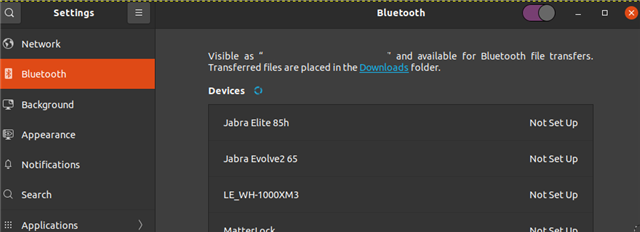
    Then I opened my "Bluetooth Settings" in Ubuntu, it can see Bluetooth devices:

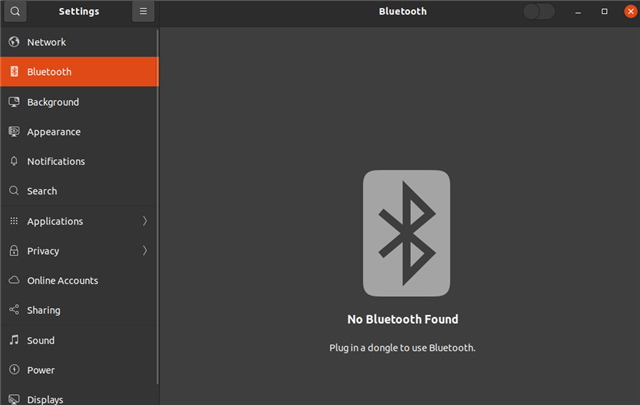
    For reference, this is how my Bluetooth settings look if I have disconnected the Developement Kit:

    Was this what you needed?

    Regards,
    Sigurd Hellesvik

Related