Connection issues from iOS and Android mobile apps.
When our nRF52833 devices are in connectable mode, sometimes iOS app and Android apps face issues in establishing connection.
Sometimes connection happens very fast, sometimes takes up to 30 to 60sec and sometimes fails to connect.
Issue is more prominent when more than 10 devices are powered ON or if App is farther from the devices (but within BLE range).
Even if multiple devices are powered ON, all devices are not sending any connectable or non-conn advertisements at the same time. Mostly all devices will be in scanning state.
Device sends connectable advertisements only when app sends packet (non connectable advertisement with manufacture
specific payload) asking device to come to connectable mode.
In cases where connection fails to establish, the device firmware does not get any intimation of
connection request or connection related errors, tracked in BLE event handler registered in NRF_SDH_BLE_OBSERVER.
Scenario:
1) Multiple devices are powered on and all device sends out connectable advertisements (with custom payload that helps to
identify device) at 200ms rate for 1min.
2) During this time mobile app (iOS, Android), scans for the devices and lists them for the user.
3) The user waits for 1 min to expire so that no devices are advertising connectable packets, then selects all the devices in
the app list and requests to connect to each device one by one.
4) The App sends non connectable advertisements (with custom payload, that helps the devices to understand whom the packet is
intended for) to request 1st device to start connectable advertisements.
5) On receipt of this packet, the device starts connectable advertisements at 20ms for 1 min. Then the app tries to connect to the device.
6) After exchange of relevant data from app to device, commissioning is success (adding the device to network of user).
7) Repeat steps 4,5 and 6 for all the devices (mostly we test with 10 or more devices)
8) Out of 10 devices, usually 1 or 2 devices fails oftenly. If number of devices are greater than 10, say, 20 failure rate is more.
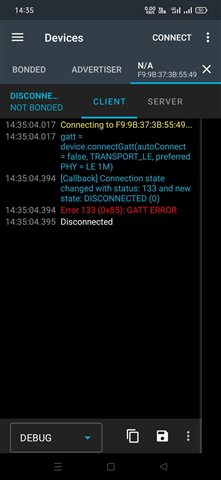
9) When we try to connect the device from nRF connect android app (v4.25.1), app throws GATT ERROR (133) (refer screenshot attached).
Following are the various GAP parameters used
Min Conn interval: 30ms
Max Conn Interval: 70ms
Supervision Timeout: 4 seconds
Slave Latency: 0 (Tried with 10 also)
Connectable Advt rate and duration: At 20ms interval for 1 min
Following are the Hardware & Platform Software details
HW: nRF52833
SDK: nRF5 SDK 17.1.0 (www.nordicsemi.com/.../nRF5_SDK_17.1.0_ddde560.zip)
SD version: s140