How to use uart in mesh, or printf?

When I use 52832 to develop a mesh project and want to use uart to print information, I find that the code always reports an error because of the existence of printf. The sdk used in my development environment is NRF1710sdk and nrf mesh SDK5.0.0, developed in ses,what should I do to make it work normally?

Parents
  • Hello,

    Is it an alternative to use the __LOG() function to log data? Or do you need it to be on a very specific format?

    Without knowing more about your project, and what's failing, it is hard to say what you need to do.

    What do you mean by "normally"? What example did you start with, since it apparently has set up the printf() function over UART?

    Best regards,

    Edvin

  • Thank you, Edvin! My statement is  not clear enough. I want to use uart to display information on a screen. I know that I can use log to view debugging information, but it seems that it cannot be used for regular screen information display. I am using the dimming code and added saadc to it. I want to display the data collected by saadc, but after I add the uart code in ses, the error of ‘printf’ will always be reported, so that the compilation cannot be completed. I don't know the reason.How can I resolve such an error?

Reply
  • Thank you, Edvin! My statement is  not clear enough. I want to use uart to display information on a screen. I know that I can use log to view debugging information, but it seems that it cannot be used for regular screen information display. I am using the dimming code and added saadc to it. I want to display the data collected by saadc, but after I add the uart code in ses, the error of ‘printf’ will always be reported, so that the compilation cannot be completed. I don't know the reason.How can I resolve such an error?

Children
  • So you are using the SDK\examples\dimming\dimming_client example project?

    As far as I can tell, it doesn't use UART by default. So you added the UART to your project, right?

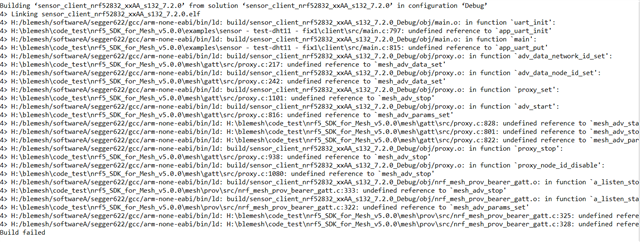
    What does your error look like? I am not sure whether you want to use printf() or if you get an error because printf() is enabled in your project. Perhaps you can show me a screenshot  or log message of what your error looks like?

    In case you want to use printf(): Did you include the files needed for printf() to work? Remember that in the embedded world, printf() doesn't automatically link to UART. Depending on how you added the UART to your application, you need to use an API similar to how you enabled it. If you used the app_uart library, then you can use app_uart_put() to print a character on the UART.

    Best regards,

    Edvin

  • If it is difficult to explain, perhaps you can zip and upload your application folder? Please make sure that it will be able to run (replicate your issue) when unzipped into a new, unmodified SDK. So please keep all modified files inside the zip folder.

  • Thanks for your guidance, Edvin! After seeing your reply, I modified the uart part of my code, but it still throws errors.I used the code in nRF5_SDK_17.1.0_ddde560\examples\ble_peripheral\ble_app_uart:

    static void uart_init(void)
    {
    uint32_t err_code;
    app_uart_comm_params_t const comm_params =
    {
    .rx_pin_no = RX_PIN_NUMBER,
    .tx_pin_no = TX_PIN_NUMBER,
    .rts_pin_no = RTS_PIN_NUMBER,
    .cts_pin_no = CTS_PIN_NUMBER,
    .flow_control = APP_UART_FLOW_CONTROL_DISABLED,
    .use_parity = false,
    #if defined (UART_PRESENT)
    .baud_rate = NRF_UART_BAUDRATE_115200
    #else
    .baud_rate = NRF_UARTE_BAUDRATE_115200
    #endif
    };

    APP_UART_FIFO_INIT(&comm_params,
    UART_RX_BUF_SIZE,
    UART_TX_BUF_SIZE,
    NULL,
    APP_IRQ_PRIORITY_LOWEST,
    err_code);
    APP_ERROR_CHECK(err_code);
    }

    int main(void)
    {
    initialize();
    start();
    for (;;)
    {
    uart_init();
    app_uart_put('p');
    (void)sd_app_evt_wait();
    }
    }

    My idea is to add uart code to the dimming code and try to make it print out a character first and then modify it, I don't know if my idea is correct, but in this case it always gives errors.

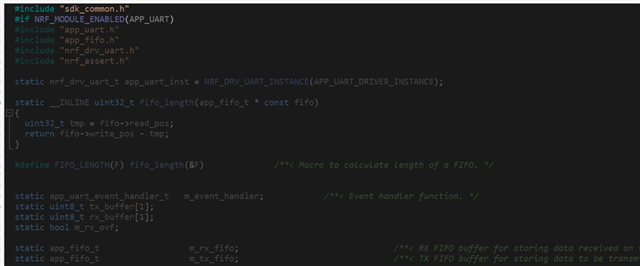
    Although the error message looks a lot, I think the main error is that app_uart_init(); called in APP_UART_FIFO_INIT(); and app_uart_put(); cannot find the corresponding definition. I found the corresponding definition in the original sdk1710 code and added it to the project. They obviously already exist, but it shows that they cannot be found. I don't know why. I have enabled all uart-related drivers, do I need other drivers, or is this function prohibited?

    Best regards,

    unvblestudy

  • Hello,

    If you didn't have undefined references to e.g. mesh_adv_start(), let us assume that fixing the first will help with (most of) the rest.

    Since the compile found the definition of APP_UART_INIT(), I assume you have added:

    #include "app_uart.h"

    near the top of your main.c.

    Did you include app_uart_fifo.c to your project? Is APP_UART_ENABLED defined in your sdk_config.h? Is it defined to 0 or 1? (Try setting it to 1).

    Let us start with that. 

    Best regards,

    Edvin

  • Hi Edwin. I think the APP_UART_ENABLED you mentioned might be something I need to pay attention to, but I don't find anything for APP_UART in the sdkconfig. I have added app_uart_fifo.c before, but it still doesn't work properly. After I re-added it, it is grayed out, indicating that it is not enabled. According to the instructions in the code, I found nordic_common.h, but it doesn't seem to be enabled here. What should I do? do to enable it? The mesh_adv_start() you mentioned did not report a definition problem when removing the uart code. Is it because it conflicts with the UART code?

    Sorry, I accidentally pressed the button to confirm the answer, do I need to ask again?

    Best regards,

    unvblestudy


Related