How to use uart in mesh, or printf?

When I use 52832 to develop a mesh project and want to use uart to print information, I find that the code always reports an error because of the existence of printf. The sdk used in my development environment is NRF1710sdk and nrf mesh SDK5.0.0, developed in ses,what should I do to make it work normally?

Parents
  • Hello,

    Is it an alternative to use the __LOG() function to log data? Or do you need it to be on a very specific format?

    Without knowing more about your project, and what's failing, it is hard to say what you need to do.

    What do you mean by "normally"? What example did you start with, since it apparently has set up the printf() function over UART?

    Best regards,

    Edvin

  • Thank you, Edvin! My statement is  not clear enough. I want to use uart to display information on a screen. I know that I can use log to view debugging information, but it seems that it cannot be used for regular screen information display. I am using the dimming code and added saadc to it. I want to display the data collected by saadc, but after I add the uart code in ses, the error of ‘printf’ will always be reported, so that the compilation cannot be completed. I don't know the reason.How can I resolve such an error?

  • Thanks for your guidance, Edvin! I have now solved the related error and got it running successfully, but when I use app_uart_put('p');, I don't see the output on the serial port software, how can I check if it is working properly? 

    Best regards,

    unvblestudy

  • Hi, Edvin, I have browsed many other posts about uart and found that some people mentioned that rtt and uart cannot be used together, I am wondering if this is the problem I have encountered,because I use rtt in my code  for debugging observations.

    Best regards,

    unvblestudy

  • Hello,

    You can use RTT and UART together. What you cannot do is to use the UART both for logging and for your application. But if you use the RTT backend on the logging, you should be able to use UART in your application (app_uart_put()). 

    What does app_uart_put() return?

    ret_code_t err_code;
    
    err_code = app_uart_put('p');
    
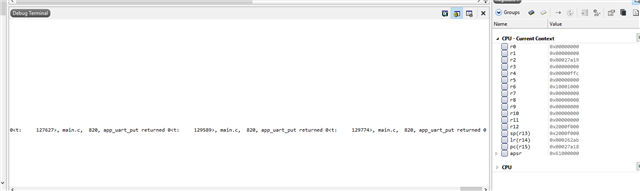
    NRF_LOG_INFO("app_uart_put returned %d", err_code);

    Best regards,

    Edvin

  • Hi,Edvin,sorry to bother you again, but I added this code and it returns 0,  I don't observe any value using putty, I don't know what to do with it now.

    Best regards,

    unvblestudy

  • static void uart_init(void)
    {
        uint32_t                     err_code;
        app_uart_comm_params_t const comm_params =
        {
            .rx_pin_no    = RX_PIN_NUMBER,
            .tx_pin_no    = TX_PIN_NUMBER,
            .rts_pin_no   = RTS_PIN_NUMBER,
            .cts_pin_no   = CTS_PIN_NUMBER,
            .flow_control = APP_UART_FLOW_CONTROL_DISABLED,
            .use_parity   = false,
    #if defined (UART_PRESENT)
            .baud_rate    = NRF_UART_BAUDRATE_115200
    #else
            .baud_rate    = NRF_UARTE_BAUDRATE_115200
    #endif
        };
    
        APP_UART_FIFO_INIT(&comm_params,
                           UART_RX_BUF_SIZE,
                           UART_TX_BUF_SIZE,
                           NULL,
                           APP_IRQ_PRIORITY_LOWEST,
                           err_code);
        APP_ERROR_CHECK(err_code);
    }
    int main(void)
    {
        initialize();
        start();
        uart_init();
        for (;;)
        {
            app_uart_put('p');
            (void)sd_app_evt_wait();
        }
    }

    This is the part I have added to the original code. This is just a test, so I used the loop in main to print the uart directly, it didn't run successfully. The other parts have nothing to do with this, I just tested the uart separately here.

    Best regards,

    unvblestudy

Reply
  • static void uart_init(void)
    {
        uint32_t                     err_code;
        app_uart_comm_params_t const comm_params =
        {
            .rx_pin_no    = RX_PIN_NUMBER,
            .tx_pin_no    = TX_PIN_NUMBER,
            .rts_pin_no   = RTS_PIN_NUMBER,
            .cts_pin_no   = CTS_PIN_NUMBER,
            .flow_control = APP_UART_FLOW_CONTROL_DISABLED,
            .use_parity   = false,
    #if defined (UART_PRESENT)
            .baud_rate    = NRF_UART_BAUDRATE_115200
    #else
            .baud_rate    = NRF_UARTE_BAUDRATE_115200
    #endif
        };
    
        APP_UART_FIFO_INIT(&comm_params,
                           UART_RX_BUF_SIZE,
                           UART_TX_BUF_SIZE,
                           NULL,
                           APP_IRQ_PRIORITY_LOWEST,
                           err_code);
        APP_ERROR_CHECK(err_code);
    }
    int main(void)
    {
        initialize();
        start();
        uart_init();
        for (;;)
        {
            app_uart_put('p');
            (void)sd_app_evt_wait();
        }
    }

    This is the part I have added to the original code. This is just a test, so I used the loop in main to print the uart directly, it didn't run successfully. The other parts have nothing to do with this, I just tested the uart separately here.

    Best regards,

    unvblestudy

Children
Related