Wireshark does not detect BLE messages between peripheral BLE UARTs and central BLE UARTs

Premise: wireshark I had used it about two years ago with another PC with WIN7 and with other versions of SW.

The dongle is the same as two years ago and is the dongle with nRF51.

Now you are using a PC with WIN10 64 bit.

To update all the required SW I refer to this link: https://infocenter.nordicsemi.com/index.jsp?topic=%2Fug_sniffer_ble%2FUG%2Fsniffer_ble%2Finstalling_sniffer.html

I have successfully performed all the required operations.

Once the wireshark program has been started and the sniffer started, the advertising signal from BLE peripheral is displayed (BLE central is OFF).

Once the connection between BLE central and BLE peripheral is started and the data exchange between wireshark no longer detects the advertising signal from BLE peripheral but does not display any BLE communication frame.

If I open a log file saved two years ago with wireshark, I see the information regarding the data exchange correctly displayed.

How can I solve this problem ?

I await your kind reply.

Demetrio Magrin

Parents
  • Hello Demetrio Magrin,

    Please make sure to have selected your specific peripheral device in the 'device dropdown menu' at the top left.
    This will make the sniffer follow this device specifically, and also follow into any connections made with this device.
    If you have 'all advertising devices' selected then the sniffer will only listen on the primary advertising channels, which means that it will no longer see messages from your device as soon as it enters into a connection (and leaves the primary advertising channels).

    Please see the BLE Sniffer Usage documentation for further details and examples of usage.

    Best regards,
    Karl

  • Hello Karl,
    thank you for your support.

    What you suggested I do doesn't work. Any selection made on "Device" does not display the data exchanged via BLE and I continue to see only the advertising data of the other connected BLE devices.
    I added filters to check if data frames arrive without seeing any results.
    What is missing ?
    I thank you.

    BR

    Demetrio

  • Hello Demetrio,

    Demetrio Magrin REEL said:
    thank you for your support.

    No problem at all, I am happy to help! :)

    Demetrio Magrin REEL said:
    What you suggested I do doesn't work. Any selection made on "Device" does not display the data exchanged via BLE and I continue to see only the advertising data of the other connected BLE devices.

    Could you confirm that you selected your device in the device dropdown menu? It looks like this:

    What did your see in your wireshark capture when you had your device selected?
    Did you have a look through the documentation I referenced in my previous reply regarding the different common usage scenarios of the BLE Sniffer and how to achieve them?

    Best regards,
    Karl

  • Hello Karl.

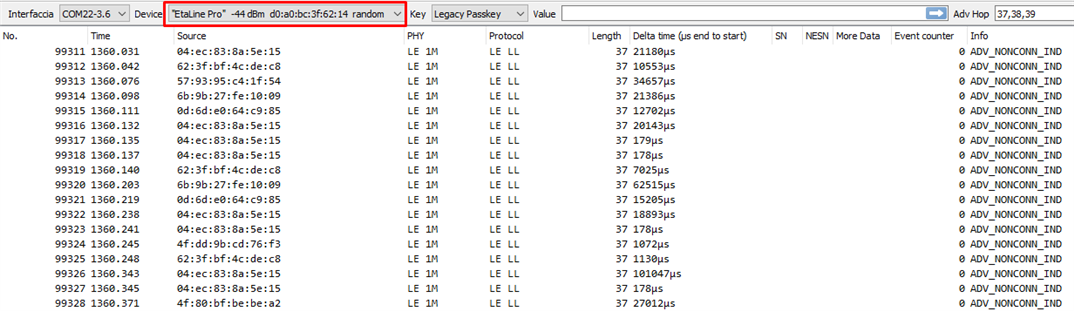
    This is what I see after selecting my snort device (Etaline Pro).
    As you can see below, all devices are displayed (nothing changes from the "All advertising devices" selection).
    If I then connect with a remote BLE central device and initiate a data exchange, nothing changes yet. It seems that selecting the "Device" pull-down menu has no effect.

    I thank you for your support.

    BR

    Demetrio

  • Hello Karl.

    I solved the problem.
    The reason was due to the sniffer version downloaded on the nrF51 dongle (PCA10031).
    With the latest version of "sniffer nrf_sniffer_for_bluetooth_le_4.1.0" it doesn't work.
    If I try to use an eval nRF52dk (PCA0040) as a siniffer it doesn't work the same.
    The sniffer works perfectly ONLY with the version "nrfsniffer200beta312oct20181c2a221" and with the EVAL nRF52dk. With the nRF51 dongle (PCA0031) it still does not work.

    I can conclude that my nrF51 (PCA10031) dongle is obsolete.
    Which nRF dongle do you recommend to buy in order to use the latest version of sniffer
    "sniffer nrf_sniffer_for_bluetooth_le_4.1.0" ?

    Thanks.

    BR

    Demetrio

Reply
  • Hello Karl.

    I solved the problem.
    The reason was due to the sniffer version downloaded on the nrF51 dongle (PCA10031).
    With the latest version of "sniffer nrf_sniffer_for_bluetooth_le_4.1.0" it doesn't work.
    If I try to use an eval nRF52dk (PCA0040) as a siniffer it doesn't work the same.
    The sniffer works perfectly ONLY with the version "nrfsniffer200beta312oct20181c2a221" and with the EVAL nRF52dk. With the nRF51 dongle (PCA0031) it still does not work.

    I can conclude that my nrF51 (PCA10031) dongle is obsolete.
    Which nRF dongle do you recommend to buy in order to use the latest version of sniffer
    "sniffer nrf_sniffer_for_bluetooth_le_4.1.0" ?

    Thanks.

    BR

    Demetrio

Children
  • Hello Demetrio,

    Demetrio Magrin REEL said:
    I solved the problem.

    I am happy to hear that you were able to resolve the issue! :) 

    Demetrio Magrin REEL said:
    I can conclude that my nrF51 (PCA10031) dongle is obsolete.

    This is partly true - the nRF51 dongle can still be used for certain sniffing tasks, as shown in this feature overview, but it unfortunately does not have the capabilities to sniff the BLE features that was introduced after its production. If you are using any of these features in the device you are trying to sniff it will not show up in the sniffer trace made by the nRF51 Dongle, unfortunately.
    From your original post I was under the impression that you were trying to sniff the same peripheral device's connection as you did two years ago - but now that I read it again I see that this necessarily was not the case, my apologies for this inconvenience.

    Demetrio Magrin REEL said:
    Which nRF dongle do you recommend to buy in order to use the latest version of sniffer
    "sniffer nrf_sniffer_for_bluetooth_le_4.1.0" ?

    I would recommend the nRF52840 Dongle to use as a sniffer device with the v4.1 - I personally either use the nRF52840 Dongle or DK as my go-to sniffer device.

    Best regards,
    Karl

Related