nRF9160 crash on assert after going offline then online

Hello, I'm developing firmware for our custom board with a nRF9160.

The problem I'm having is that the modem crashes with error code 0x10 sometimes (read: about every 3rd or 4th time) after its turned off and on again and we try to connect to mqtt.

Because it's supposed to be battery powered we take the modem offline when the application has collected its sensordata and sent to our cloud.
The board is then woken up after a set time or after one of two external interupts are triggered.

We used asset tracker v2 as a base for developing the application and the way we do the sleep is like following:

static void do_sleep(k_tid_t sleep_thread_id)
{
    printk("modem::do_sleep(): disconnecting lte modem\n");
    //lte_lc_power_off(); // dont power off, it should use about the same amp when in flight mode
    lte_lc_offline();
    
    DEFINE_DO_SLEEP(modem, MODEM_EVT_ERROR, sleep_thread_id);
    
    state_set(STATE_DISCONNECTED);
    
    int err = lte_connect();
    if (err) {
        LOG_ERR("Failed connecting to LTE, error: %d", err);
        SEND_ERROR(modem, MODEM_EVT_ERROR, err);
    }
}

#define DEFINE_DO_SLEEP(_mod, _evt, _id) SEND_SLEEP_ACK(self.id); \
    state_set(STATE_SLEEP); \
    printk("%s::do_sleep(): sleeping %s thread\n", STRINGIFY(_mod), STRINGIFY(_mod)); \
    printk("%s::do_sleep(): sleep thread id: %p\n", STRINGIFY(_mod), _id); \
    if (_id == NULL) \
    { \
    printk("Sleep thread was null, something went wrong in the sleep sequence.\n"); \
    SEND_ERROR(_mod, _evt, -1); \
    return; \
    } \
    k_thread_join(_id, K_FOREVER); \
    module_wakeup(&self); \
    printk("%s::do_sleep(): woke up\n", STRINGIFY(_mod));

static int lte_connect(void)
{
    int err;
    
    err = lte_lc_connect_async(lte_evt_handler);
    if (err) {
        LOG_ERR("lte_lc_connect_async, error: %d", err);
        
        return err;
    }
    
    SEND_EVENT(modem, MODEM_EVT_LTE_CONNECTING);
    
    LOG_INF("LTE attempting to connect... waiting %d seconds before timeout", MODEM_LTE_TIMEOUT_SEC);
    k_work_reschedule(&connect_check_work, K_SECONDS(MODEM_LTE_TIMEOUT_SEC));
    
    return 0;
}

The error message we get is the following:
[00:07:03.246,337] <err> modem_module: Modem error: 0x10, PC: 0xda418

Here it is in context:

modem::do_sleep(): woke up
[00:06:59.014,251] <inf> app_event_manager: MODEM_EVT_LTE_CONNECTING
[00:06:59.014,434] <inf> modem_module: LTE attempting to connect... waiting 120 seconds before timeout
[00:06:59.902,587] <inf> app_event_manager: MODEM_EVT_LTE_RSRP_UPDATE
[00:06:59.902,740] <inf> app_event_manager: MODEM_EVT_LTE_DISCONNECTED
[00:07:00.582,489] <inf> app_event_manager: MODEM_EVT_LTE_CONNECTED
[00:07:00.582,733] <wrn> cloud_module: Cloud connection establishment in progress
[00:07:00.582,733] <wrn> cloud_module: New connection attempt in 32 seconds if not successful
[00:07:00.582,824] <inf> app_event_manager: CLOUD_EVT_CONNECTING
[00:07:00.583,435] <inf> pp_cloud: Enabling TLS
[00:07:00.594,451] <inf> app_event_manager: MODEM_EVT_LTE_RSRP_UPDATE
[00:07:03.246,337] <err> modem_module: Modem error: 0x10, PC: 0xda418
[00:07:03.246,459] <err> pp_cloud: mqtt_connect, error: -110
[00:07:03.246,459] <err> pp_cloud: Cloud MQTT broker connect failed -110
[00:07:03.246,520] <inf> app_event_manager: CLOUD_EVT_DISCONNECTED
[00:07:03.246,795] <inf> app_event_manager: CLOUD_EVT_CONNECTION_TIMEOUT
[00:07:03.247,009] <wrn> cloud_module: Cloud connection establishment in progress
[00:07:03.247,039] <wrn> cloud_module: New connection attempt in 32 seconds if not successful
[00:07:03.247,161] <inf> app_event_manager: CLOUD_EVT_CONNECTING
[00:07:03.247,406] <err> pp_cloud: getaddrinfo, error -1
[00:07:03.247,436] <err> pp_cloud: client_broker_init, error: -10
[00:07:03.247,497] <inf> app_event_manager: CLOUD_EVT_DISCONNECTED
[00:07:03.481,109] <inf> modem_module: nRF9160 modem firmware version: mfw_nrf9160_1.2.7
[00:07:03.520,080] <inf> modem_module: LTE attempting to connect... waiting 120 seconds before timeout

When we first got the error it triggered the assert in nrf_to_z_dns_error_code assert because it got -1 from the modem (which is according to modem fault handling documentation).
That leads me to believe that the error happends in the nrf_getaddrinfo function (which is offloaded to the modem).

Can anyone make sense of the error based on the error code and PC? I'm kind of lost on where the debug at the moment :)

EDIT: I forgot to say that I'm experiencing this problem on a nRF9160 revision 0 using modem firmware 1.2.7, this also happends on 1.1.0.

Thanks in advance

Parents
  • Hi Ludwig,

    What is the goal with this approach for entering sleep? Have you considered PSM (Power Saving Mode)? PSM is efficient unless you would like to sleep for a very long time. This post covers important aspects when considering PSM. (The post is three years old, so it might contain some outdated information.)

    Also check out this post commenting on sleep mode in Zephyr.

    Which nRF Connect SDK are you using?

  • We are using v2.0.2 of the nRF Connect SDK.

    The problem with PSM is that not all networks support it and we need to support most networks. We would be offering a very poor service if we have to pick and choose customers based on what networks are near them.

    For example even the network which im testing against is not supporting PSM:

    [00:00:00.802,154] <dbg> modem_module: configure_low_power: PSM requested
    [00:00:00.809,906] <inf> modem_module: nRF9160 modem firmware version: mfw_nrf9160_1.2.7
    [00:00:00.810,485] <inf> app_event_manager: MODEM_EVT_INITIALIZED
    [00:00:00.861,511] <inf> app_event_manager: MODEM_EVT_LTE_CONNECTING
    [00:00:00.861,694] <inf> modem_module: LTE attempting to connect... waiting 120 seconds before timeout
    [00:00:00.861,755] <dbg> modem_module: state_set: State transition STATE_DISCONNECTED --> STATE_CONNECTING
    [00:00:02.867,492] <dbg> modem_module: modem_rsrp_handler: Incoming RSRP status message, RSRP value is -96
    [00:00:02.867,584] <dbg> lte_lc: at_handler_cereg: +CEREG notification: +CEREG: 2,"2724","01ADDA0B",7,0,0,"11100000","11100000"
    
    [00:00:02.867,858] <dbg> lte_lc_helpers: parse_cereg: Network registration status: 2
    [00:00:02.867,889] <dbg> lte_lc_helpers: parse_cereg: LTE mode: 7
    [00:00:02.867,980] <dbg> lte_lc_helpers: event_handler_list_dispatch: Dispatching events:
    [00:00:02.867,980] <dbg> lte_lc_helpers: event_handler_list_dispatch:  - handler=0x000587B9
    [00:00:02.868,377] <dbg> lte_lc_helpers: event_handler_list_dispatch:  - handler=0x0003BF09
    [00:00:02.868,408] <dbg> lte_lc_helpers: event_handler_list_dispatch: Done
    [00:00:02.868,438] <dbg> lte_lc_helpers: event_handler_list_dispatch: Dispatching events:
    [00:00:02.868,438] <dbg> lte_lc_helpers: event_handler_list_dispatch:  - handler=0x000587B9
    [00:00:02.868,469] <dbg> lte_lc_helpers: event_handler_list_dispatch:  - handler=0x0003BF09
    [00:00:02.868,499] <dbg> modem_module: lte_evt_handler: LTE cell changed: Cell ID: 28170763, Tracking area: 10020
    [00:00:02.868,499] <dbg> lte_lc_helpers: event_handler_list_dispatch: Done
    [00:00:02.868,530] <dbg> lte_lc_helpers: event_handler_list_dispatch: Dispatching events:
    [00:00:02.868,530] <dbg> lte_lc_helpers: event_handler_list_dispatch:  - handler=0x000587B9
    [00:00:02.868,560] <dbg> lte_lc_helpers: event_handler_list_dispatch:  - handler=0x0003BF09
    [00:00:02.868,560] <dbg> lte_lc_helpers: event_handler_list_dispatch: Done
    [00:00:02.868,682] <inf> app_event_manager: MODEM_EVT_LTE_RSRP_UPDATE
    [00:00:02.868,835] <inf> app_event_manager: MODEM_EVT_LTE_DISCONNECTED
    [00:00:02.953,704] <dbg> lte_lc: at_handler_cscon: +CSCON notification
    [00:00:02.953,857] <dbg> lte_lc_helpers: event_handler_list_dispatch: Dispatching events:
    [00:00:02.953,857] <dbg> lte_lc_helpers: event_handler_list_dispatch:  - handler=0x000587B9
    [00:00:02.953,887] <dbg> lte_lc_helpers: event_handler_list_dispatch:  - handler=0x0003BF09
    [00:00:02.953,887] <dbg> modem_module: lte_evt_handler: RRC mode: Connected
    [00:00:02.953,918] <dbg> lte_lc_helpers: event_handler_list_dispatch: Done
    [00:00:06.714,813] <dbg> lte_lc: at_handler_cereg: +CEREG notification: +CEREG: 5,"2724","01ADDA0B",7,,,"11100000","11100000"

    Either way, putting the modem in flight mode should be supported, right? And for some reason the modem is crashing because of that.

    I collected a modem trace on the nrf9160dk with firmware 1.2.3. There i get Modem error: 0x10, PC: 0xd90bc

    I've noticed that the modem crash happends during TLS negotiation. Specifically when the modem is supposed to send client key exchange. I've verified traffic logs from our operator.

    Attached is a modem trace from a nrf9160dk running fw1.2.3. The last thing i can see when converting to pcap is the "Certificate" sending to our server and then the ACK back. After that it crashes. Hopefully you can use the modem error and the trace to locate why?

    trace-2022-09-05T16-56-31.872Z.bin

  • The nrf9160dk I have has a B1 nrf9160.

    Using mfw1.3.2 on it I instead get the following error during same circumstances:

    [00:03:11.744,506] <err> modem_module: Modem error: 0x4, PC: 0xe4648

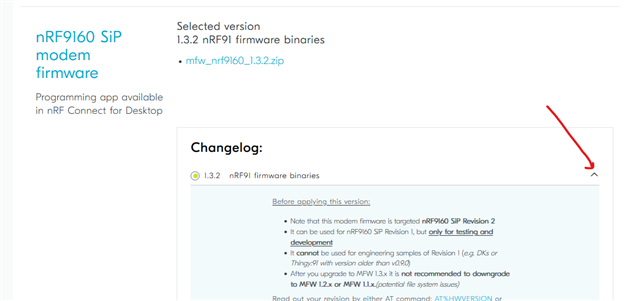
  • Unfortunately, the modem firmware you upgraded to is not compatible with the nRF9160 SiP Revision 1.  You also need to be aware that it is not recommended to downgrade to some of the older modem firmware versions. From the changelog for mfw 1.3.2:

    Before applying this version:

    • Note that this modem firmware is targeted nRF9160 SiP Revision 2 
    • It can be used for nRF9160 SiP Revision 1, but only for testing and development
    • It cannot be used for engineering samples of Revision 1 (e.g. DKs or Thingy:91 with version older than v0.9.0
    • After you upgrade to MFW 1.3.x it is not recommended to downgrade to MFW 1.2.x or MFW 1.1.x.(potential file system issues)

  • My nrf9160dk is revision 2 and that's where I got the latest log from. (using mfw1.3.2)

    The first post I wrote was when I was testing on a revision 1 (also called b0). However, in order to show you that this is a modem error I used my nrf9160dk b1 (also called revision 2) which I wrote in my reply to try with mfw1.3.2.

    And to be clear, this nrf9160dk had version 1.2.3 before I upgraded to mfw1.3.2 and I havent downgraded it at anytime.

  • Hi Ludwig,

    Ludwig Linder said:
    The nrf9160dk I have has a B1 nrf9160.

    Sorry, my mistake. Yes, SiP Revision B2, mfw1.3.2 and nRF Connect SDK v2.0.2 is a valid combination. I am now looking further into what could be causing the modem error.

  • Hi Helsing, thank you. :) Tell me if theres any other info I could provide that might be of help

Reply Children
Related