NRF5340 low-power measurement with PPK2

Hi,

I aw various other posts ( nRF5340-DK Low Power Configuration Issues)

and the post on Optimizing power on nRF53 designs  but I never get results that low.

The Blog post doesn't really help, since it only states the Zephyr settings and not the

real software settings. Using the example from the post mentioned above gets the same

results (650 uA on 1800 mV)

Our setup:

PPK as power supply for NRF5430-DK (version 0.11.0)

SB40 is bridged

SW6 to DEFAULT (if no nRFOnly, more current seems to run)

SW9 to VDD

SW10 to ON

For software:

basic loop, while(1) { WFI(); }

and 100 Hz RTC1 based TICK.

HFCLKSRC = HFINT

Other peripherals idle.

When I measure is still get around 650 uA when setting PPK supply to 1800 mV. (around 1000 uA when 3000 mV).

So 2 questions:

- is the hardware setup ok?

- what can we do in the software?

  • Hi

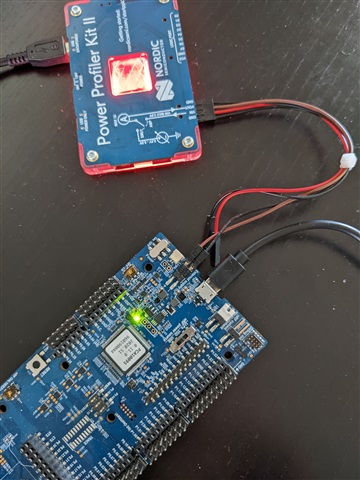
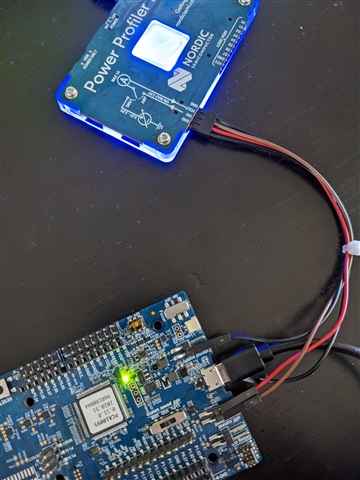
    1. By "SB40 is bridged" do you mean that the SB is not cut? In order for the PPK2 to measure correctly, this SB should be cut when it is connected. And how are the wires from the PPK2 connected to the DK exactly, and do you use the Ampere meter (blue) or Source meter (red) mode? I would recommend Ampere meter, connecting a GND cable to "-" on the external supply header, and the Vin and Vout cables to nRF current measurement header P22. Can you provide a photo (high resolution) of your HW setup?

    2. I think the issue here is HW related, as the example by Wes should be able to get way lower results than ~650µA.

    Best regards,

    Simon

  • SB40 is connected (not cut).

    I use the PPK as Source meter (Red light). The wires are connected as follows:

    ppk.VOUT -- nrf5340.external_supply.+ (brown)

    ppk.GND -- nrf5340.external_supply.- (black)

    Both the PPK and the DK are connected to my PC with the USB cable. No other cables are used.

    If I change sw10 to Off and connect the cables like you said, I can use the Amp meter (blue light) mode. The result is the same, around 640 uA.

    Red setupBlue setup

  • Hi

    Okay, that looks correct. Can you export the current consumption trace from the power Profiler and upload it here so I can take a look? Please note that .ppk files are not okay to upload as is in DevZone so you need to zip the file. 640µA is way too high and points to a peripheral for example being left running for some reason. Please also double check that you followed the "power optimizing guide" correctly.

    Best regards,

    Simon

  • I did follow the guide, although since we're not using Zephyr, only the bottom half was useful. With everything I found the current consumption is around 250 uA (+/- 10 uA). Since I don't have the net-core running for this measurement, I cannot turn the VREGRADIO.VREGH off. I don't know if this runs if the net-core is off...

    Please see the power measurement attached.low_power_250_uamp.zip

  • Is the .ppk file the same for both Source and Ampere meter mode, because the current consumption seems very strange. Does it look like the snippet below on your end as well or did something go wrong during export/import? No current consumption should actually look like this. What is your application supposed to do, and does it work as expected except for the current consumption?

    Best regards,

    Simon

Related