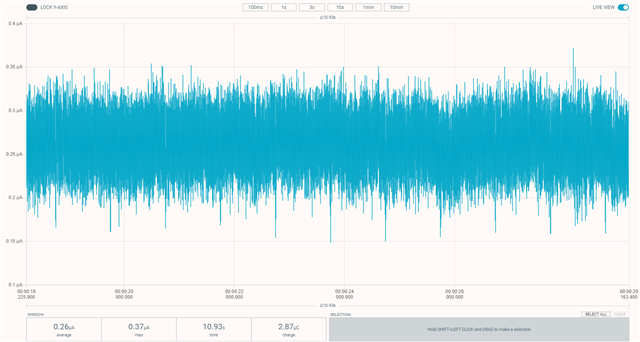
NRF5340 low-power measurement with PPK2

Hi,

I aw various other posts ( nRF5340-DK Low Power Configuration Issues)

and the post on Optimizing power on nRF53 designs  but I never get results that low.

The Blog post doesn't really help, since it only states the Zephyr settings and not the

real software settings. Using the example from the post mentioned above gets the same

results (650 uA on 1800 mV)

Our setup:

PPK as power supply for NRF5430-DK (version 0.11.0)

SB40 is bridged

SW6 to DEFAULT (if no nRFOnly, more current seems to run)

SW9 to VDD

SW10 to ON

For software:

basic loop, while(1) { WFI(); }

and 100 Hz RTC1 based TICK.

HFCLKSRC = HFINT

Other peripherals idle.

When I measure is still get around 650 uA when setting PPK supply to 1800 mV. (around 1000 uA when 3000 mV).

So 2 questions:

- is the hardware setup ok?

- what can we do in the software?

Parents Reply Children
  • The programming of the hex-file in the Programmer (along with erase-all) went fine. But the result is the same. I tried another PPK2 (I have 2), same.

    Do you have your other settings, as they are just as important. How do you supply the board, SW6, SW10 positions, etc

    SW6 - nRF_ONLY / Default

    SW10 - On/Off

    Power source - Li-Po / VDD / USB

    Did you connect the USB cable from the DK to your PC?

  • Hi again

    Sounds very strange that you have two malfunctioning PPKs.

    SW6 is set to default, SW10 is OFF, Power source is set to VDD. The DK is powered with the USB cable to J2.

    Vout on the PPK is connected to the top pin on P22 (nRF current measurement), and Vin on the bottom one. Either GND pin is connected to (-) on P21 (External supply). We even have the same revision of the nRF53 DK, this is very strange. Can you double check that the USB cable is working correctly. Do you have another nRF53 DK you can try with both PPKs as well to check if the consumption looks the same there as well. Also double check that all connections and that the cables from PPK to DK works correctly.

    Best regards,

    Simon

  • Hi Simon,

    I'm a collegue of Bas. Can we schedule a telco to talk about this ?
    This is taking a lot of time doing it this way.

    We have 4 DK boards, they can't be all broken.
    The USB cable is ok of course, because the board is on, and we're able to program it.

    If you look at this video:

    https://www.youtube.com/watch?v=B42lPvkUSoc&t=228s

    we found that here :

    www.nordicsemi.com/.../GetStarted

    The current we're stuck at is the current you see in that video on 3 min 45 sec.
    With our setups it stays on that level, even with your code.

    Could it be that we are having problems with the "retained registers" ?
    Things that might not be initialised on your code, and stuck on a value we have tried in our code ?


Related