NRF5340 low-power measurement with PPK2

Hi,

I aw various other posts ( nRF5340-DK Low Power Configuration Issues)

and the post on Optimizing power on nRF53 designs  but I never get results that low.

The Blog post doesn't really help, since it only states the Zephyr settings and not the

real software settings. Using the example from the post mentioned above gets the same

results (650 uA on 1800 mV)

Our setup:

PPK as power supply for NRF5430-DK (version 0.11.0)

SB40 is bridged

SW6 to DEFAULT (if no nRFOnly, more current seems to run)

SW9 to VDD

SW10 to ON

For software:

basic loop, while(1) { WFI(); }

and 100 Hz RTC1 based TICK.

HFCLKSRC = HFINT

Other peripherals idle.

When I measure is still get around 650 uA when setting PPK supply to 1800 mV. (around 1000 uA when 3000 mV).

So 2 questions:

- is the hardware setup ok?

- what can we do in the software?

Parents
  • Hi

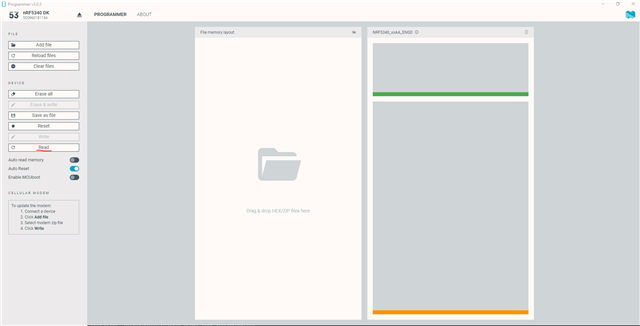
    The current consumption you refer to here is the HF crystal ramp up of an nRF9160 DK I believe, and should definitely not be seen if you only have the empty app core running on an nRF5340 Dk on your end. Can you use the nRF Programmer to check what is on the APP and NET core of your DK? Both have the bare minimum on my end which should result in what I showed below. 

  • I can only Reply to this message (not the last for some reason).

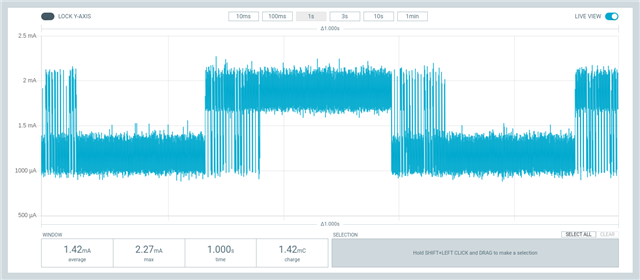
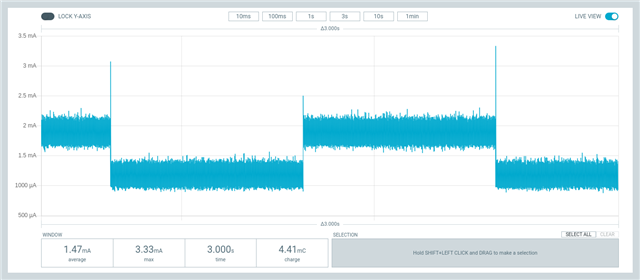
    I have measured board 1 in two setups:

    PPK as power supply.

    Left picture: USB of PPK connected to PC directly

    Right picture: USB of PPK connected to Monitor (=USB hub)

    Otherwise exactly the same. Note that no USB is connected to the DK (only the 3 power wires from the PPK)

    So the conclusion is that the USB connection to the PPK causes this noise somehow...

Reply
  • I can only Reply to this message (not the last for some reason).

    I have measured board 1 in two setups:

    PPK as power supply.

    Left picture: USB of PPK connected to PC directly

    Right picture: USB of PPK connected to Monitor (=USB hub)

    Otherwise exactly the same. Note that no USB is connected to the DK (only the 3 power wires from the PPK)

    So the conclusion is that the USB connection to the PPK causes this noise somehow...

Children
No Data
Related